Generate & publish professional COE blogs with Gemini AI and Google Drive

Workflow preview

Workflow preview
100%
Generate & publish professional COE blogs with Gemini AI and Google Drive preview
Open on n8n.io

Important notice

This workflow is provided as-is. Please review and test before using in production.

1. Workflow Overview

This n8n workflow transforms simple chat requests into professional Center of Excellence (COE) blog posts using AI, then automatically publishes them to Google Drive. What Is This? An intelligent b...

Best for

  • Content Creation automation workflows
  • Multimodal AI automation workflows
  • advanced n8n builders looking for reusable templates

Tools used

@n8n/n8n-nodes-langchain.chattrigger, @n8n/n8n-nodes-langchain.agent, @n8n/n8n-nodes-langchain.lmchatgooglegemini, n8n-nodes-base.code, n8n-nodes-base.googledrive, n8n-nodes-base.set, n8n-nodes-base.stickynote

Source and attribution

This workflow is cataloged by N8N Workflows and links back to its original n8n.io source page by Oneclick AI Squad.

Original n8n.io source

1.1 Workflow description

Title
Generate & publish professional COE blogs with Gemini AI and Google Drive
Workflow name
Generate & publish professional COE blogs with Gemini AI and Google Drive

This n8n workflow transforms simple chat requests into professional Center of Excellence (COE) blog posts using AI, then automatically publishes them to Google Drive.

What Is This?

An intelligent blog creation system that takes a topic from chat and produces executive-level blog posts. Uses three AI stages to ensure high-quality, professional content suitable for business consumption.

Why Use This?

  • Professional Content: Creates sophisticated blogs with business insights
  • Save Time: Topic to published blog in 2-3 minutes
  • No Writing Skills Needed: AI handles all the writing and formatting
  • Auto-Publishing: Creates and shares Google Docs automatically
  • Easy to Use: Just chat your topic, get your blog

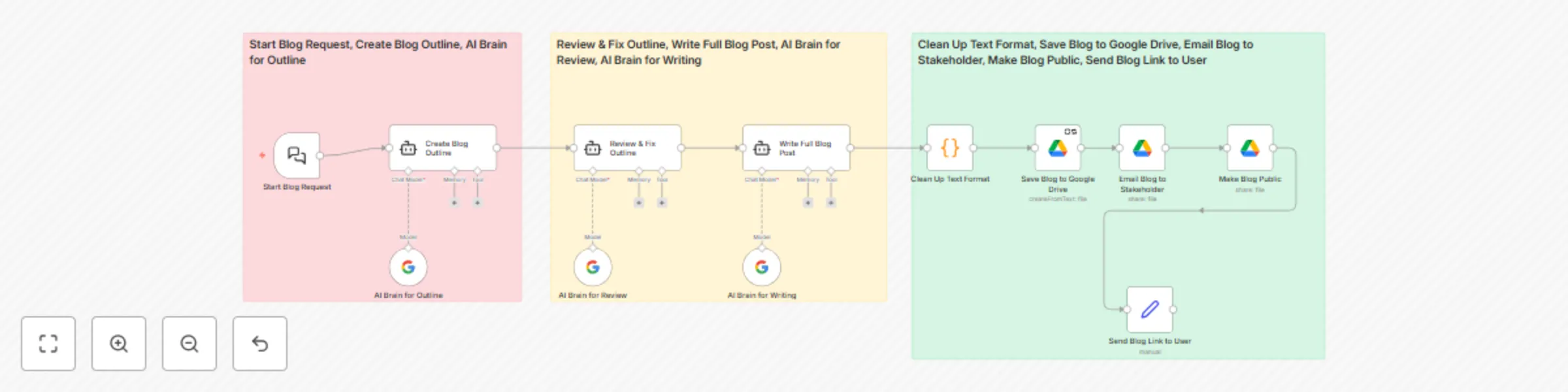
How It Works

1. Blog Request & Planning

  • Start Blog Request: Chat interface receives your blog topic
  • Create Blog Outline: AI generates structured outline with sections
  • AI Brain for Outline: Powers the initial content planning

2. Content Review & Writing

  • Review & Fix Outline: AI improves outline structure and flow
  • Write Full Blog Post: Transforms outline into complete professional blog
  • AI Brain for Review/Writing: Advanced AI models handle content creation

3. Publish & Share Blog

  • Clean Up Text Format: Removes formatting issues for clean presentation
  • Save Blog to Google Drive: Creates properly formatted Google Doc
  • Email Blog to Stakeholder: Shares with specified team members
  • Make Blog Public: Creates shareable public link
  • Send Blog Link to User: Returns document URL via chat

How to Use

  1. Start Chat: Access the chat interface and type your blog topic
  2. Wait: AI automatically processes (2-3 minutes)
  3. Get Your Blog: Receive Google Drive link to your published blog

Good to Know

  • Processing Time: 2-3 minutes per blog
  • Content Quality: Uses advanced Gemini AI models for professional output
  • Auto-Formatting: Creates clean Google Docs ready for sharing
  • Instant Sharing: Stakeholders get email notifications automatically
  • Public Access: Generates shareable links for broader distribution

Customizing This Workflow

Content Style

  • Modify AI prompts to match your company's writing tone
  • Adjust content evaluation criteria for different audiences
  • Change blog structure templates

Publishing & Sharing

  • Update stakeholder email addresses
  • Change Google Drive folder destinations
  • Modify sharing permissions (public/private)
  • Add more distribution channels

AI Enhancement

  • Switch between different AI models for speed vs quality
  • Add more review stages for specialized content
  • Include company-specific knowledge sources

1.2 Logical Blocks

This catalog entry is organized from the workflow JSON. The node-level section below shows the executable blocks available for review before importing the template.

2. Block-by-Block Analysis

Block 1 - Start Blog Request

Type / Role
@n8n/n8n-nodes-langchain.chatTrigger - chatTrigger
Config choices
Version 1.1

Block 2 - Create Blog Outline

Type / Role
@n8n/n8n-nodes-langchain.agent - agent
Config choices
Version 1.7

Block 3 - Review & Fix Outline

Type / Role
@n8n/n8n-nodes-langchain.agent - agent
Config choices
Version 1.7

Block 4 - Write Full Blog Post

Type / Role
@n8n/n8n-nodes-langchain.agent - agent
Config choices
Version 1.7

Block 5 - AI Brain for Outline

Type / Role
@n8n/n8n-nodes-langchain.lmChatGoogleGemini - lmChatGoogleGemini
Config choices
Version 1

Block 6 - AI Brain for Review

Type / Role
@n8n/n8n-nodes-langchain.lmChatGoogleGemini - lmChatGoogleGemini
Config choices
Version 1

Block 7 - AI Brain for Writing

Type / Role
@n8n/n8n-nodes-langchain.lmChatGoogleGemini - lmChatGoogleGemini
Config choices
Version 1

Block 8 - Clean Up Text Format

Type / Role
n8n-nodes-base.code - code
Config choices
Version 2

Block 9 - Save Blog to Google Drive

Type / Role
n8n-nodes-base.googleDrive - googleDrive
Config choices
Version 3

Block 10 - Email Blog to Stakeholder

Type / Role
n8n-nodes-base.googleDrive - googleDrive
Config choices
Version 3

Block 11 - Make Blog Public

Type / Role
n8n-nodes-base.googleDrive - googleDrive
Config choices
Version 3

Block 12 - Send Blog Link to User

Type / Role
n8n-nodes-base.set - set
Config choices
Version 3.4

Block 13 - Sticky Note

Type / Role
n8n-nodes-base.stickyNote - stickyNote
Config choices
Version 1

Block 14 - Sticky Note1

Type / Role
n8n-nodes-base.stickyNote - stickyNote
Config choices
Version 1

Block 15 - Sticky Note2

Type / Role
n8n-nodes-base.stickyNote - stickyNote
Config choices
Version 1

3. Summary Table

Workflow Generate & publish professional COE blogs with Gemini AI and Google Drive
Complexity advanced
Nodes 15
Categories Content Creation, Multimodal AI
Author Oneclick AI Squad
Published 03 Jul 2025

4. Reproducing the Workflow from Scratch

  1. 1. Download the workflow JSON

    Use the JSON export at /data/workflows/5619/5619.json as the source template for this automation.

  2. 2. Import the template into n8n

    Open n8n, import the downloaded JSON, and review each node before activating the workflow.

  3. 3. Configure credentials and variables

    Replace placeholder credentials, API keys, webhook URLs, account IDs, and environment-specific values with your own settings.

  4. 4. Test with sample data

    Run the workflow manually or in a staging workspace, inspect node output, and confirm downstream systems receive the expected data.

  5. 5. Activate and monitor

    Enable the workflow only after testing, then monitor executions, errors, and rate limits during the first production runs.

5. General Notes & Resources

Review imported nodes carefully before activation. This catalog entry is intended to help you inspect the workflow structure, understand required services, and find related templates faster.

Node names, credentials, schedules, webhook paths, and external service limits may need adjustment for your workspace.

Frequently asked questions

What does Generate & publish professional COE blogs with Gemini AI and Google Drive do?

This n8n workflow transforms simple chat requests into professional Center of Excellence (COE) blog posts using AI, then automatically publishes them to Google Drive. What Is This? An intelligent b...

What do I need before importing this workflow?

Review the workflow JSON, configure any required credentials in n8n, and test the automation in a safe workspace before using it in production.

Can I customize this workflow?

Yes. Use the block-by-block analysis and the downloadable JSON to inspect each node, then adjust credentials, prompts, schedules, filters, or destinations for your Content Creation, Multimodal AI use case.