Generate professional product advertisements with Nano Banana Pro via Telegram

Workflow preview

Workflow preview
100%
Generate professional product advertisements with Nano Banana Pro via Telegram preview
Open on n8n.io

Important notice

This workflow is provided as-is. Please review and test before using in production.

1. Workflow Overview

Nano Banana Pro AI Product Advertisement Generator via Telegram Who's It For E commerce businesses needing quick product ads Social media marketers without design resources Small business owners cr...

Best for

  • Content Creation automation workflows
  • Multimodal AI automation workflows
  • advanced n8n builders looking for reusable templates

Tools used

n8n-nodes-base.telegram, n8n-nodes-base.stickynote, n8n-nodes-base.extractfromfile, n8n-nodes-base.telegramtrigger, @n8n/n8n-nodes-langchain.googlegemini, n8n-nodes-base.merge, n8n-nodes-base.code, n8n-nodes-base.httprequest

Source and attribution

This workflow is cataloged by N8N Workflows and links back to its original n8n.io source page by Roshan Ramani.

Original n8n.io source

1.1 Workflow description

Title
Generate professional product advertisements with Nano Banana Pro via Telegram
Workflow name
Generate professional product advertisements with Nano Banana Pro via Telegram

Nano Banana Pro AI Product Advertisement Generator via Telegram

Who's It For

  • E-commerce businesses needing quick product ads
  • Social media marketers without design resources
  • Small business owners creating promotional content
  • Product photographers seeking automated enhancements

What It Does

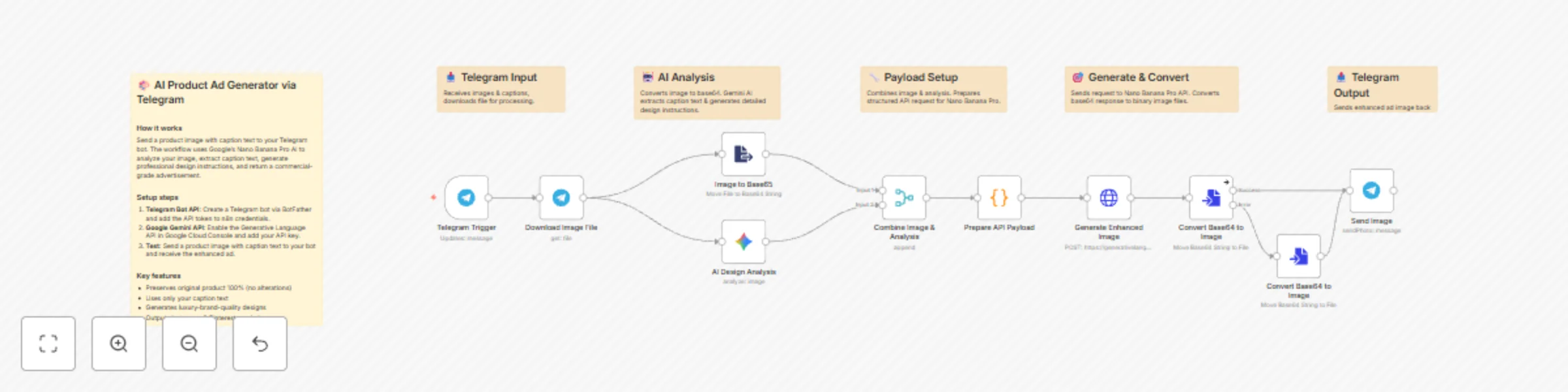
Transforms basic product photos into professional advertisements using AI. Users send a product image with caption text via Telegram, and receive commercial-grade ads with studio lighting, premium backgrounds, and typography overlays.

How It Works

  • User sends product photo with caption to Telegram bot
  • Image converted to base64 for AI processing
  • Google Gemini analyzes image and extracts marketing text from caption
  • AI generates detailed design enhancement instructions (400+ words)
  • Nano Banana Pro creates 1-2 professional advertisement versions
  • Enhanced images automatically sent back to user

Requirements

  • Telegram Bot API credentials (via BotFather)
  • Google Gemini API key with nano-banana-pro-preview access
  • n8n instance (self-hosted or cloud)

Setup Instructions

Create Telegram Bot

  • Message BotFather on Telegram
  • Send /newbot command and follow prompts
  • Copy the API token

Configure n8n Credentials

  • Add Telegram Bot API token
  • Add Google Gemini API key
  • Import workflow JSON
  • Update credential references
  • Activate workflow

Test the Workflow

Send image with caption format: "Product Name | Tagline | Call to Action"

Example: "Premium Sneakers | Mountain Edition | Shop Now"

Key Features

  • Original product remains 100% unchanged
  • Text extracted only from user's caption (no AI-generated taglines)
  • Professional design enhancements applied
  • Studio-quality lighting and color grading
  • Luxury background selection based on product category
  • Typography overlays using caption text
  • 30-60 second processing time
  • Returns 1-2 advertisement variants

Node Breakdown

Telegram Trigger - Listens for messages with images

Download Image File - Retrieves image from Telegram servers

Image to Base64 - Converts image for AI processing

AI Design Analysis - Gemini extracts caption text and generates design blueprint covering composition, lighting, backgrounds, color grading, effects, and typography

Combine Image & Analysis - Merges image data with design instructions

Prepare API Payload - Structures data for Nano Banana Pro API

Generate Enhanced Image - Creates professional ad using AI

Convert Base64 to Image - Converts first generated ad to file

Convert Base64 to Image1 - Converts second ad variant (if available)

Send Image - Returns enhanced ads to user via Telegram

Customization Options

Adjust Design Style

Modify AI Design Analysis prompt to change lighting intensity, background preferences, color grading, or typography styles

Change Caption Parsing

Update extraction rules for different text elements or multi-language support

Add Output Formats

Request different aspect ratios (16:9 social media, 4:5 Instagram, 9:16 Stories)

Error Handling

Add fallback nodes to handle image generation failures

Usage Analytics

Insert database node to track requests and caption data

Caption Examples

"NIKE AIR MAX | Run Beyond Limits | Shop Now"

"Himalayan Coffee Beans - Fresh from the Mountains - Order Today"

"Luxury Smartwatch | Track Your Success | Available Now"

Important Notes

  • Product never altered, only enhanced visually
  • Empty captions result in ads without text overlays
  • Best with clear photos on simple backgrounds
  • Monitor API quotas to avoid rate limits
  • Processing time varies by API response speed

1.2 Logical Blocks

This catalog entry is organized from the workflow JSON. The node-level section below shows the executable blocks available for review before importing the template.

2. Block-by-Block Analysis

Block 1 - Download Image File

Type / Role
n8n-nodes-base.telegram - telegram
Config choices
Version 1.2

Block 2 - Send Image

Type / Role
n8n-nodes-base.telegram - telegram
Config choices
Version 1.2

Block 3 - Main Overview

Type / Role
n8n-nodes-base.stickyNote - stickyNote
Config choices
Version 1

Block 4 - Input Section

Type / Role
n8n-nodes-base.stickyNote - stickyNote
Config choices
Version 1

Block 5 - AI Processing

Type / Role
n8n-nodes-base.stickyNote - stickyNote
Config choices
Version 1

Block 6 - Data Preparation

Type / Role
n8n-nodes-base.stickyNote - stickyNote
Config choices
Version 1

Block 7 - Image Generation

Type / Role
n8n-nodes-base.stickyNote - stickyNote
Config choices
Version 1

Block 8 - Output Section

Type / Role
n8n-nodes-base.stickyNote - stickyNote
Config choices
Version 1

Block 9 - Image to Base65

Type / Role
n8n-nodes-base.extractFromFile - extractFromFile
Config choices
Version 1

Block 10 - Telegram Trigger

Type / Role
n8n-nodes-base.telegramTrigger - telegramTrigger
Config choices
Version 1.2

Block 11 - AI Design Analysis

Type / Role
@n8n/n8n-nodes-langchain.googleGemini - googleGemini
Config choices
Version 1

Block 12 - Combine Image & Analysis

Type / Role
n8n-nodes-base.merge - merge
Config choices
Version 3.2

Block 13 - Prepare API Payload

Type / Role
n8n-nodes-base.code - code
Config choices
Version 2

Block 14 - Generate Enhanced Image

Type / Role
n8n-nodes-base.httpRequest - httpRequest
Config choices
Version 4.2

Block 15 - Convert Base64 to Image

Type / Role
n8n-nodes-base.convertToFile - convertToFile
Config choices
Version 1.1

Block 16 - Convert Base64 to Image

Type / Role
n8n-nodes-base.convertToFile - convertToFile
Config choices
Version 1.1

3. Summary Table

Workflow Generate professional product advertisements with Nano Banana Pro via Telegram
Complexity advanced
Nodes 16
Categories Content Creation, Multimodal AI
Author Roshan Ramani
Published 03 Dec 2025

4. Reproducing the Workflow from Scratch

  1. 1. Download the workflow JSON

    Use the JSON export at /data/workflows/11446/11446.json as the source template for this automation.

  2. 2. Import the template into n8n

    Open n8n, import the downloaded JSON, and review each node before activating the workflow.

  3. 3. Configure credentials and variables

    Replace placeholder credentials, API keys, webhook URLs, account IDs, and environment-specific values with your own settings.

  4. 4. Test with sample data

    Run the workflow manually or in a staging workspace, inspect node output, and confirm downstream systems receive the expected data.

  5. 5. Activate and monitor

    Enable the workflow only after testing, then monitor executions, errors, and rate limits during the first production runs.

5. General Notes & Resources

Review imported nodes carefully before activation. This catalog entry is intended to help you inspect the workflow structure, understand required services, and find related templates faster.

Node names, credentials, schedules, webhook paths, and external service limits may need adjustment for your workspace.

Frequently asked questions

What does Generate professional product advertisements with Nano Banana Pro via Telegram do?

Nano Banana Pro AI Product Advertisement Generator via Telegram Who's It For E commerce businesses needing quick product ads Social media marketers without design resources Small business owners cr...

What do I need before importing this workflow?

Review the workflow JSON, configure any required credentials in n8n, and test the automation in a safe workspace before using it in production.

Can I customize this workflow?

Yes. Use the block-by-block analysis and the downloadable JSON to inspect each node, then adjust credentials, prompts, schedules, filters, or destinations for your Content Creation, Multimodal AI use case.