Generate post-event reports with GPT-4, email delivery & database storage

Workflow preview

Workflow preview
100%
Generate post-event reports with GPT-4, email delivery & database storage preview
Open on n8n.io

Important notice

This workflow is provided as-is. Please review and test before using in production.

1. Workflow Overview

Streamline your post event analysis with this smart n8n workflow. Triggered by a simple webhook, it instantly gathers attendee and engagement data from your event platform, calculates key metrics, ...

Best for

  • Document Extraction automation workflows
  • AI Summarization automation workflows
  • intermediate n8n builders looking for reusable templates

Tools used

n8n-nodes-base.webhook, n8n-nodes-base.httprequest, n8n-nodes-base.code, @n8n/n8n-nodes-langchain.lmchatopenai, n8n-nodes-base.emailsend, n8n-nodes-base.postgres, n8n-nodes-base.respondtowebhook, @n8n/n8n-nodes-langchain.agent

Source and attribution

This workflow is cataloged by N8N Workflows and links back to its original n8n.io source page by Oneclick AI Squad.

Original n8n.io source

1.1 Workflow description

Title
Generate post-event reports with GPT-4, email delivery & database storage
Workflow name
Generate post-event reports with GPT-4, email delivery & database storage

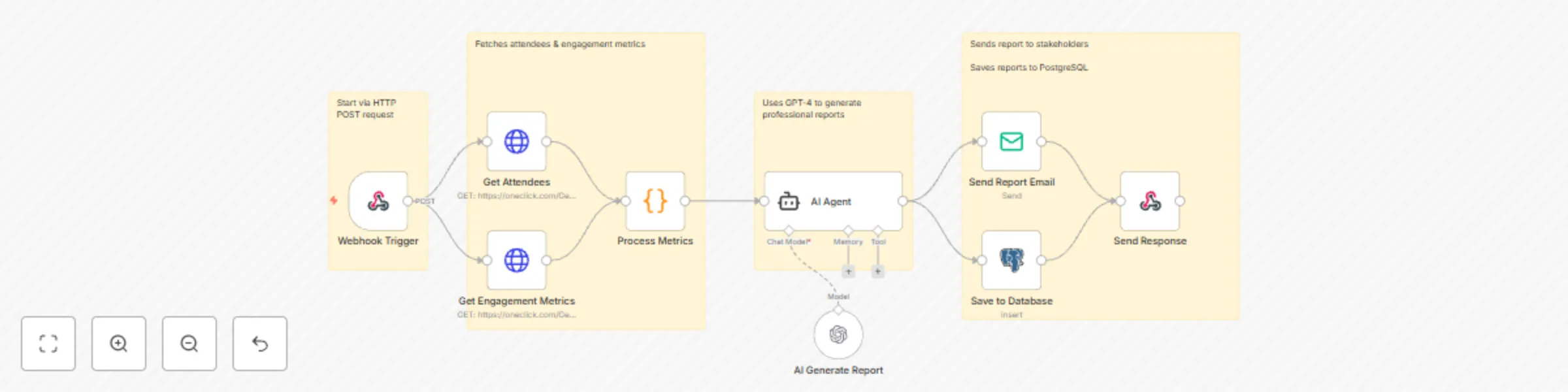
Streamline your post-event analysis with this smart n8n workflow. Triggered by a simple webhook, it instantly gathers attendee and engagement data from your event platform, calculates key metrics, and uses AI to generate a polished, professional report. The final summary is emailed to stakeholders and saved securely in a database β€” all without manual effort. Perfect for conferences, webinars, and corporate events. πŸ“§πŸ“ˆ

Key Features

  • Webhook triggered – Starts instantly via HTTP POST request
  • Multi-source data collection – Fetches attendees & engagement metrics
  • Advanced analytics – Calculates attendance rates, engagement scores, top sessions
  • AI-powered insights – Uses GPT-4 to generate professional reports
  • Auto-email delivery – Sends report to stakeholders
  • Database archiving – Saves reports to PostgreSQL

What it Analyzes

  • Attendance rates & check-ins
  • Average session time
  • Engagement scores (polls, Q&A, networking)
  • Top performing sessions
  • Attendee breakdown (by role & company)
  • AI-generated insights & recommendations

Workflow Process

  • The Webhook Trigger node starts the workflow when an HTTP POST request is received with event details.
  • Get Attendees (GET) pulls the list of registered and checked-in participants from your event system.
  • Get Engagement Metrics (GET) retrieves interaction data like poll responses, Q&A activity, and session views.
  • Process Metrics calculates key stats: attendance rate, average session duration, engagement score, and ranks top sessions.
  • AI Generate Report uses GPT-4 to create a clear, professional summary with insights and recommendations based on the data.
  • AI Agent coordinates data flow and prepares the final report structure using chat model and memory tools.
  • Save to Database (Insert) stores the full report and raw metrics in PostgreSQL for future reference.
  • Send Report Email automatically emails the AI-generated report to the specified recipient.
  • Send Response returns a confirmation back to the triggering system via webhook.

Setup Instructions

  • Import this JSON into n8n
  • Configure credentials:
    • Event API (for GET requests)
    • OpenAI (GPT-4)
    • SMTP (for email delivery)
    • PostgreSQL (for data storage)
  • Trigger via webhook with event data
  • Receive comprehensive report via email within minutes!

Prerequisites

  • Event platform with REST API (for attendee & engagement data)
  • OpenAI API key (GPT-4 access)
  • SMTP server credentials (Gmail, SendGrid, etc.)
  • PostgreSQL database with write access

Example Webhook Payload

{
  "eventId": "evt_123",
  "eventName": "Tech Summit 2025",
  "eventDate": "2025-10-29",
  "email": "[email protected]"
}

Modification Options

  • Add custom metrics in the Process Metrics node (e.g., NPS score, feedback sentiment)
  • Change AI tone in AI Generate Report (formal, executive summary, or creative)
  • Modify email template in Send Report Email with your branding
  • Connect to different data sources by updating GET nodes
  • Add Slack or Teams notification after Send Report Email

Ready to automate your event reporting?
Get in touch with us for custom n8n workflows!

1.2 Logical Blocks

This catalog entry is organized from the workflow JSON. The node-level section below shows the executable blocks available for review before importing the template.

2. Block-by-Block Analysis

Block 1 - Webhook Trigger

Type / Role
n8n-nodes-base.webhook - webhook
Config choices
Version 1

Block 2 - Get Attendees

Type / Role
n8n-nodes-base.httpRequest - httpRequest
Config choices
Version 4.1

Block 3 - Get Engagement Metrics

Type / Role
n8n-nodes-base.httpRequest - httpRequest
Config choices
Version 4.1

Block 4 - Process Metrics

Type / Role
n8n-nodes-base.code - code
Config choices
Version 2

Block 5 - AI Generate Report

Type / Role
@n8n/n8n-nodes-langchain.lmChatOpenAi - lmChatOpenAi
Config choices
Version 1

Block 6 - Send Report Email

Type / Role
n8n-nodes-base.emailSend - emailSend
Config choices
Version 2

Block 7 - Save to Database

Type / Role
n8n-nodes-base.postgres - postgres
Config choices
Version 2.4

Block 8 - Send Response

Type / Role
n8n-nodes-base.respondToWebhook - respondToWebhook
Config choices
Version 1

Block 9 - AI Agent

Type / Role
@n8n/n8n-nodes-langchain.agent - agent
Config choices
Version 2.2

Block 10 - Sticky Note

Type / Role
n8n-nodes-base.stickyNote - stickyNote
Config choices
Version 1

Block 11 - Sticky Note1

Type / Role
n8n-nodes-base.stickyNote - stickyNote
Config choices
Version 1

Block 12 - Sticky Note5

Type / Role
n8n-nodes-base.stickyNote - stickyNote
Config choices
Version 1

Block 13 - Sticky Note7

Type / Role
n8n-nodes-base.stickyNote - stickyNote
Config choices
Version 1

3. Summary Table

Workflow Generate post-event reports with GPT-4, email delivery & database storage
Complexity intermediate
Nodes 13
Categories Document Extraction, AI Summarization
Author Oneclick AI Squad
Published 29 Oct 2025

4. Reproducing the Workflow from Scratch

  1. 1. Download the workflow JSON

    Use the JSON export at /data/workflows/10281/10281.json as the source template for this automation.

  2. 2. Import the template into n8n

    Open n8n, import the downloaded JSON, and review each node before activating the workflow.

  3. 3. Configure credentials and variables

    Replace placeholder credentials, API keys, webhook URLs, account IDs, and environment-specific values with your own settings.

  4. 4. Test with sample data

    Run the workflow manually or in a staging workspace, inspect node output, and confirm downstream systems receive the expected data.

  5. 5. Activate and monitor

    Enable the workflow only after testing, then monitor executions, errors, and rate limits during the first production runs.

5. General Notes & Resources

Review imported nodes carefully before activation. This catalog entry is intended to help you inspect the workflow structure, understand required services, and find related templates faster.

Node names, credentials, schedules, webhook paths, and external service limits may need adjustment for your workspace.

Frequently asked questions

What does Generate post-event reports with GPT-4, email delivery & database storage do?

Streamline your post event analysis with this smart n8n workflow. Triggered by a simple webhook, it instantly gathers attendee and engagement data from your event platform, calculates key metrics, ...

What do I need before importing this workflow?

Review the workflow JSON, configure any required credentials in n8n, and test the automation in a safe workspace before using it in production.

Can I customize this workflow?

Yes. Use the block-by-block analysis and the downloadable JSON to inspect each node, then adjust credentials, prompts, schedules, filters, or destinations for your Document Extraction, AI Summarization use case.