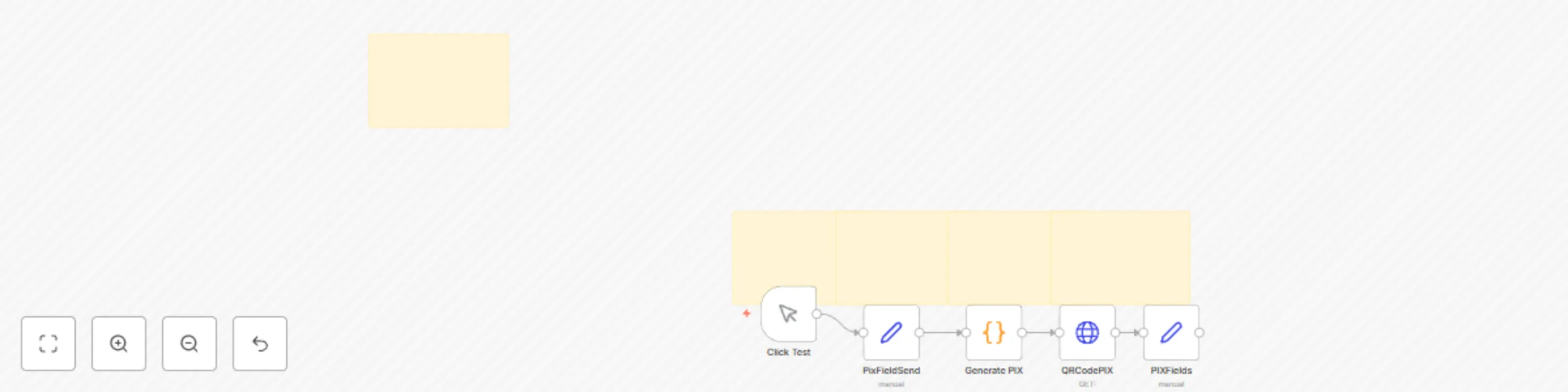
πŸ” Generate PIX payment QR codes for any Brazilian bank key

Workflow preview

Workflow preview
100%
πŸ” Generate PIX payment QR codes for any Brazilian bank key preview
Open on n8n.io

Important notice

This workflow is provided as-is. Please review and test before using in production.

1. Workflow Overview

PIX QR Code Generator for Any Bank and Key – Powered by n8n Easily generate PIX QR Codes with this ready to use n8n workflow, supporting any valid PIX key (CPF, CNPJ, phone, email, or random key...

Best for

  • Miscellaneous automation workflows
  • intermediate n8n builders looking for reusable templates

Tools used

n8n-nodes-base.httprequest, n8n-nodes-base.set, n8n-nodes-base.manualtrigger, n8n-nodes-base.stickynote, n8n-nodes-base.code

Source and attribution

This workflow is cataloged by N8N Workflows and links back to its original n8n.io source page by Bruno Dias.

Original n8n.io source

1.1 Workflow description

Title
πŸ” Generate PIX payment QR codes for any Brazilian bank key
Workflow name
πŸ” Generate PIX payment QR codes for any Brazilian bank key

πŸ” PIX QR Code Generator for Any Bank and Key – Powered by n8n

Easily generate PIX QR Codes with this ready-to-use n8n workflow, supporting any valid PIX key (CPF, CNPJ, phone, email, or random key) and following the official BACEN standard β€” the Central Bank of Brazil's regulation.

Whether you want to automate payments in chatbots, CRM systems, e-commerce checkouts, or custom apps, this solution provides fast, secure, and fully compliant QR Code generation.


πŸ’‘ What is PIX?

PIX is a real-time payment system developed by the Central Bank of Brazil (BACEN).
It allows instant transfers between banks, available 24/7, without fees for individuals.
Businesses widely use PIX for quick, easy, and reliable payments β€” making QR Codes an essential tool for sales, subscriptions, and customer service.


βš™οΈ What this Workflow Does

  • Creates a fully compliant PIX payment code with automatic checksum (CRC)
  • Generates a dynamic QR Code that customers can scan with any banking app
  • Returns:
    • The full PIX EMV payment code (ready for integration)
    • A public URL linking to the QR Code image
    • Clean payment metadata for frontend or messaging bots

All generated dynamically from the user's input: key, amount, receiver name, city, and payment description.


🧠 How it Works

  1. The user provides basic payment information: key, amount, name, city, and description.
  2. The workflow assembles a PIX payload following BACEN's EMV QR standards.
  3. It automatically generates and attaches the CRC (checksum) for validation.
  4. A QR Code is created based on the complete PIX code.
  5. The output returns both the PIX code and a QR Code image URL, ready to use anywhere.

Each component works seamlessly to deliver a ready-to-scan QR Code for instant payments.


πŸ› οΈ How to Set Up

  1. Deploy the workflow on your n8n Cloud or self-hosted instance.
  2. Configure the input variables manually or through an API/Webhook:
    • pixKey: Your PIX key (CPF, CNPJ, email, phone, or random)
    • receiverName: Name of the individual or company receiving the payment
    • city: City name associated with the receiver
    • amount: Payment value (in BRL, ex: 79.90)
    • description: Short description for the transaction (optional)
  3. Trigger the workflow:
    • Manually (for testing)
    • Via webhook/API (ideal for integrations with chatbots, e-commerce, CRM)
  4. Customize the flow (optional):
    • Set default values if user inputs are missing
    • Adjust QR Code size or styling (inside the QR Code generator node)
    • Connect to database/storage if you want to save issued PIX transactions

🎯 Who is This For?

  • E-commerce stores needing instant payment links
  • Chatbots or WhatsApp bots offering product sales or bookings
  • CRM systems wanting to automate billing processes
  • Subscription platforms requiring fast payment confirmation
  • Any business wanting to accept payments faster and smarter

βœ… Requirements

  • Active n8n Cloud or self-hosted instance
  • A valid PIX key (CPF, CNPJ, email, phone, or random key)
  • Basic payment information: amount, city, receiver name, description
  • No external paid APIs needed β€” fully open and server-side

πŸ›’ Ready to Automate Your Payments?

❀️ Buy ready-to-use workflows at: https://iloveflows.com
☁️ Try n8n Cloud with my partner link: https://n8n.partnerlinks.io/amanda

1.2 Logical Blocks

This catalog entry is organized from the workflow JSON. The node-level section below shows the executable blocks available for review before importing the template.

2. Block-by-Block Analysis

Block 1 - QRCodePIX

Type / Role
n8n-nodes-base.httpRequest - httpRequest
Config choices
Version 4.2

Block 2 - PixFieldSend

Type / Role
n8n-nodes-base.set - set
Config choices
Version 3.4

Block 3 - PIXFields

Type / Role
n8n-nodes-base.set - set
Config choices
Version 3.4

Block 4 - Click Test

Type / Role
n8n-nodes-base.manualTrigger - manualTrigger
Config choices
Version 1

Block 5 - Sticky Note

Type / Role
n8n-nodes-base.stickyNote - stickyNote
Config choices
Version 1

Block 6 - Sticky Note1

Type / Role
n8n-nodes-base.stickyNote - stickyNote
Config choices
Version 1

Block 7 - Sticky Note2

Type / Role
n8n-nodes-base.stickyNote - stickyNote
Config choices
Version 1

Block 8 - Sticky Note3

Type / Role
n8n-nodes-base.stickyNote - stickyNote
Config choices
Version 1

Block 9 - Generate PIX

Type / Role
n8n-nodes-base.code - code
Config choices
Version 2

Block 10 - Sticky Note4

Type / Role
n8n-nodes-base.stickyNote - stickyNote
Config choices
Version 1

3. Summary Table

Workflow πŸ” Generate PIX payment QR codes for any Brazilian bank key
Complexity intermediate
Nodes 10
Categories Miscellaneous
Author Bruno Dias
Published 25 Apr 2025

4. Reproducing the Workflow from Scratch

  1. 1. Download the workflow JSON

    Use the JSON export at /data/workflows/3704/3704.json as the source template for this automation.

  2. 2. Import the template into n8n

    Open n8n, import the downloaded JSON, and review each node before activating the workflow.

  3. 3. Configure credentials and variables

    Replace placeholder credentials, API keys, webhook URLs, account IDs, and environment-specific values with your own settings.

  4. 4. Test with sample data

    Run the workflow manually or in a staging workspace, inspect node output, and confirm downstream systems receive the expected data.

  5. 5. Activate and monitor

    Enable the workflow only after testing, then monitor executions, errors, and rate limits during the first production runs.

5. General Notes & Resources

Review imported nodes carefully before activation. This catalog entry is intended to help you inspect the workflow structure, understand required services, and find related templates faster.

Node names, credentials, schedules, webhook paths, and external service limits may need adjustment for your workspace.

Frequently asked questions

What does πŸ” Generate PIX payment QR codes for any Brazilian bank key do?

PIX QR Code Generator for Any Bank and Key – Powered by n8n Easily generate PIX QR Codes with this ready to use n8n workflow, supporting any valid PIX key (CPF, CNPJ, phone, email, or random key...

What do I need before importing this workflow?

Review the workflow JSON, configure any required credentials in n8n, and test the automation in a safe workspace before using it in production.

Can I customize this workflow?

Yes. Use the block-by-block analysis and the downloadable JSON to inspect each node, then adjust credentials, prompts, schedules, filters, or destinations for your Miscellaneous use case.