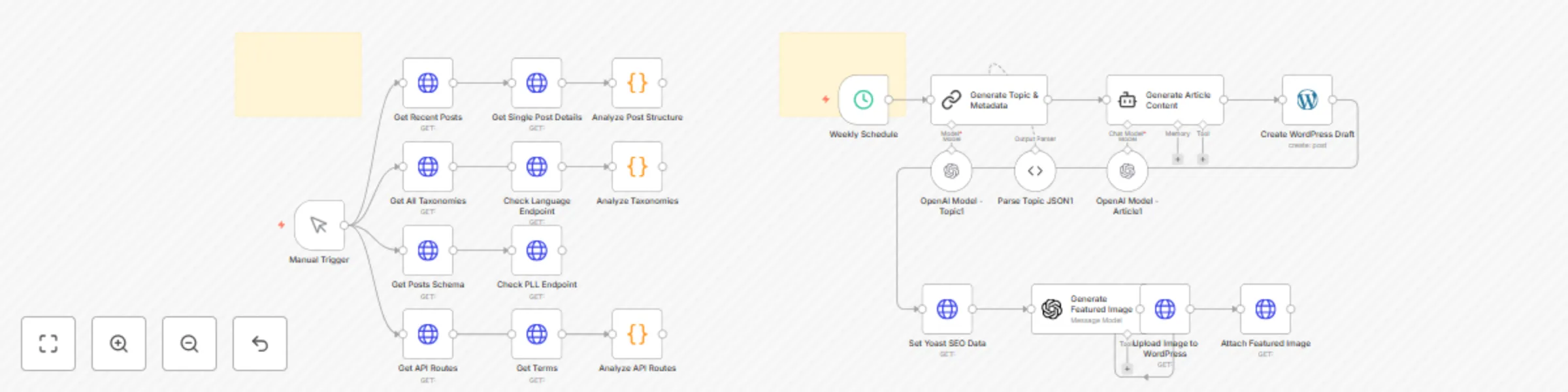
Generate multiple languange blogpost with OpenAI, support Yoast & Polylang

Workflow preview

Workflow preview
100%
Generate multiple languange blogpost with OpenAI, support Yoast & Polylang preview
Open on n8n.io

Important notice

This workflow is provided as-is. Please review and test before using in production.

1. Workflow Overview

The blogblizt: polylang workflow streamlines the creation and publication of high quality blog content using powerful automation with n8n, OpenAI’s GPT and the WordPress API. It enables effortlessl...

Best for

  • Content Creation automation workflows
  • Multimodal AI automation workflows
  • advanced n8n builders looking for reusable templates

Tools used

n8n-nodes-base.manualtrigger, n8n-nodes-base.httprequest, n8n-nodes-base.code, n8n-nodes-base.stickynote, @n8n/n8n-nodes-langchain.lmchatopenai, @n8n/n8n-nodes-langchain.outputparserstructured, n8n-nodes-base.scheduletrigger, @n8n/n8n-nodes-langchain.chainllm

Source and attribution

This workflow is cataloged by N8N Workflows and links back to its original n8n.io source page by Khairul Muhtadin.

Original n8n.io source

1.1 Workflow description

Title
Generate multiple languange blogpost with OpenAI, support Yoast & Polylang
Workflow name
Generate multiple languange blogpost with OpenAI, support Yoast & Polylang

The blogblizt: polylang workflow streamlines the creation and publication of high-quality blog content using powerful automation with n8n, OpenAI’s GPT and the WordPress API. It enables effortlessly generate SEO-friendly articles complete with metadata and optimized featured images, improving content freshness and search engine visibility.

💡 Why Use blogblizt?

  • Automate content creation to keep your blog fresh and engaging
  • Generate SEO-optimized posts with expert-crafted titles, meta descriptions, and focus keyphrases
  • Save hours of manual writing, image sourcing, and SEO configuration
  • Leverage AI for topic ideation and high-quality writing tailored to international student audiences
  • Seamlessly publish and manage drafts directly on your WordPress site via API
  • Produce captivating, relevant featured images without external tools
  • Support multilingual content creation with randomized language selection for diversity

⚡ Who Is This For?

  • Content strategists managing WordPress blogs needing efficient topic generation
  • SEO specialists wanting automated post creation with optimized metadata
  • Website owners aiming to maintain active, multilingual content
  • Marketers who want to leverage AI for high-quality, consistent article production

❓ What Problem Does It Solve?

This workflow automates the entire editorial cycle—from generating engaging topics with AI, drafting full-length articles, producing featured images automatically, to posting drafts configured for SEO on WordPress—dramatically reducing editor workload and improving content output.

🔧 What This Workflow Does

  1. Trigger

    • Runs on manual trigger or a weekly schedule to ensure consistent content flow
  2. 📎 Fetch Site Context

    • Retrieves recent posts, taxonomies, and WordPress API schema to understand site structure
  3. 🔍 Generate Topic

    • Uses OpenAI GPT-4.1-mini to roll a random language and craft a targeted blog post topic + SEO metadata
  4. 🤖 Draft Article

    • Composes a comprehensive, SEO-friendly article tailored to the generated topic
  5. 💌 Create Draft

    • Posts the draft on WordPress with Yoast SEO fields populated
  6. 🖼 Generate Image

    • Creates a high-quality, cinematic featured image via AI
  7. 📤 Upload & Attach

    • Uploads the image to the WordPress media library and sets it as the post’s featured image

🔐 Setup Instructions

  1. Import the workflow file into n8n:

  2. Add credentials:

    • WordPress API (with create-post & media permissions)
    • OpenAI API key (for GPT and image models)
  3. Customize categories, languages, and schedule in the relevant nodes

  4. Adjust the Schedule Trigger timing as desired (e.g. every Monday at 9 AM)

  5. Test end-to-end on a staging WordPress site to verify drafts and images publish correctly

🧩 Pre-Requirements

  • An operational n8n instance (Cloud or self-hosted) (self-hosted or n8n cloud)
  • WordPress site with REST API access & proper authentication
  • OpenAI account with API access for both language and image models
  • (Optional) Yoast SEO plugin installed for metadata recognition

🛠️ Customize It Further

  • Tweak OpenAI prompts for niche topics or additional languages
  • Add social-media nodes to auto-share new posts
  • Insert an editorial review step before publishing
  • Refine image prompts for different visual styles (e.g., “modern infographic” vs. “cinematic portrait”)

🧠 Nodes Used

  • Manual Trigger
  • Schedule Trigger (weekly)
  • HTTP Request (fetch posts, taxonomies, schema; upload media)
  • Code (JavaScript analyzers for API schema & taxonomy parsing)
  • OpenAI Chat (GPT-4.1-mini for topics & articles)
  • OpenAI Image Generation (for featured images)
  • WordPress (create draft post)
  • Sticky Notes (in-flow documentation)

📞 Support

Built by: Khaisa Studio Tags: wordpress, marketing, polylang Category: Content Creation

Need a custom? contact me on LinkedIn or Web

1.2 Logical Blocks

This catalog entry is organized from the workflow JSON. The node-level section below shows the executable blocks available for review before importing the template.

2. Block-by-Block Analysis

Block 1 - Manual Trigger

Type / Role
n8n-nodes-base.manualTrigger - manualTrigger
Config choices
Version 1

Block 2 - Get Recent Posts

Type / Role
n8n-nodes-base.httpRequest - httpRequest
Config choices
Version 4.2

Block 3 - Get All Taxonomies

Type / Role
n8n-nodes-base.httpRequest - httpRequest
Config choices
Version 4.2

Block 4 - Get Posts Schema

Type / Role
n8n-nodes-base.httpRequest - httpRequest
Config choices
Version 4.2

Block 5 - Get API Routes

Type / Role
n8n-nodes-base.httpRequest - httpRequest
Config choices
Version 4.2

Block 6 - Get Single Post Details

Type / Role
n8n-nodes-base.httpRequest - httpRequest
Config choices
Version 4.2

Block 7 - Check Language Endpoint

Type / Role
n8n-nodes-base.httpRequest - httpRequest
Config choices
Version 4.2

Block 8 - Check PLL Endpoint

Type / Role
n8n-nodes-base.httpRequest - httpRequest
Config choices
Version 4.2

Block 9 - Get Terms

Type / Role
n8n-nodes-base.httpRequest - httpRequest
Config choices
Version 4.2

Block 10 - Analyze Post Structure

Type / Role
n8n-nodes-base.code - code
Config choices
Version 2

Block 11 - Analyze Taxonomies

Type / Role
n8n-nodes-base.code - code
Config choices
Version 2

Block 12 - Analyze API Routes

Type / Role
n8n-nodes-base.code - code
Config choices
Version 2

Block 13 - Sticky Note

Type / Role
n8n-nodes-base.stickyNote - stickyNote
Config choices
Version 1

Block 14 - OpenAI Model - Article1

Type / Role
@n8n/n8n-nodes-langchain.lmChatOpenAi - lmChatOpenAi
Config choices
Version 1.2

Block 15 - Parse Topic JSON1

Type / Role
@n8n/n8n-nodes-langchain.outputParserStructured - outputParserStructured
Config choices
Version 1.2

Block 16 - OpenAI Model - Topic1

Type / Role
@n8n/n8n-nodes-langchain.lmChatOpenAi - lmChatOpenAi
Config choices
Version 1.2

Block 17 - Sticky Note1

Type / Role
n8n-nodes-base.stickyNote - stickyNote
Config choices
Version 1

Block 18 - Weekly Schedule

Type / Role
n8n-nodes-base.scheduleTrigger - scheduleTrigger
Config choices
Version 1.1

Block 19 - Generate Topic & Metadata

Type / Role
@n8n/n8n-nodes-langchain.chainLlm - chainLlm
Config choices
Version 1.6

Block 20 - Generate Article Content

Type / Role
@n8n/n8n-nodes-langchain.agent - agent
Config choices
Version 1.9

Block 21 - Create WordPress Draft

Type / Role
n8n-nodes-base.wordpress - wordpress
Config choices
Version 1

Block 22 - Set Yoast SEO Data

Type / Role
n8n-nodes-base.httpRequest - httpRequest
Config choices
Version 4.2

Block 23 - Generate Featured Image

Type / Role
@n8n/n8n-nodes-langchain.openAi - openAi
Config choices
Version 1.8

Block 24 - Upload Image to WordPress

Type / Role
n8n-nodes-base.httpRequest - httpRequest
Config choices
Version 4.2

Showing the first 24 of 25 workflow blocks. Download the JSON for the full node graph.

3. Summary Table

Workflow Generate multiple languange blogpost with OpenAI, support Yoast & Polylang
Complexity advanced
Nodes 25
Categories Content Creation, Multimodal AI
Author Khairul Muhtadin
Published 25 Jun 2025

4. Reproducing the Workflow from Scratch

  1. 1. Download the workflow JSON

    Use the JSON export at /data/workflows/5287/5287.json as the source template for this automation.

  2. 2. Import the template into n8n

    Open n8n, import the downloaded JSON, and review each node before activating the workflow.

  3. 3. Configure credentials and variables

    Replace placeholder credentials, API keys, webhook URLs, account IDs, and environment-specific values with your own settings.

  4. 4. Test with sample data

    Run the workflow manually or in a staging workspace, inspect node output, and confirm downstream systems receive the expected data.

  5. 5. Activate and monitor

    Enable the workflow only after testing, then monitor executions, errors, and rate limits during the first production runs.

5. General Notes & Resources

Review imported nodes carefully before activation. This catalog entry is intended to help you inspect the workflow structure, understand required services, and find related templates faster.

Node names, credentials, schedules, webhook paths, and external service limits may need adjustment for your workspace.

Frequently asked questions

What does Generate multiple languange blogpost with OpenAI, support Yoast & Polylang do?

The blogblizt: polylang workflow streamlines the creation and publication of high quality blog content using powerful automation with n8n, OpenAI’s GPT and the WordPress API. It enables effortlessl...

What do I need before importing this workflow?

Review the workflow JSON, configure any required credentials in n8n, and test the automation in a safe workspace before using it in production.

Can I customize this workflow?

Yes. Use the block-by-block analysis and the downloadable JSON to inspect each node, then adjust credentials, prompts, schedules, filters, or destinations for your Content Creation, Multimodal AI use case.