Block 1 - Sticky Note
- Type / Role
- n8n-nodes-base.stickyNote - stickyNote
- Config choices
- Version 1


 Early Deal
This workflow is provided as-is. Please review and test before using in production.
[Meta] Multi Format Documentation Generator for N8N Creators (+More) One Line Description Transform n8n workflow JSON into five ready to publish documentation formats including technical guides, so...
n8n-nodes-base.stickynote, @n8n/n8n-nodes-langchain.agent, n8n-nodes-base.code, @n8n/n8n-nodes-langchain.lmchatanthropic, n8n-nodes-base.googledocs, n8n-nodes-base.merge, n8n-nodes-base.wait, n8n-nodes-base.formtrigger
This workflow is cataloged by N8N Workflows and links back to its original n8n.io source page by Connor Provines.
Original n8n.io sourceTransform n8n workflow JSON into five ready-to-publish documentation formats including technical guides, social posts, and marketplace submissions.
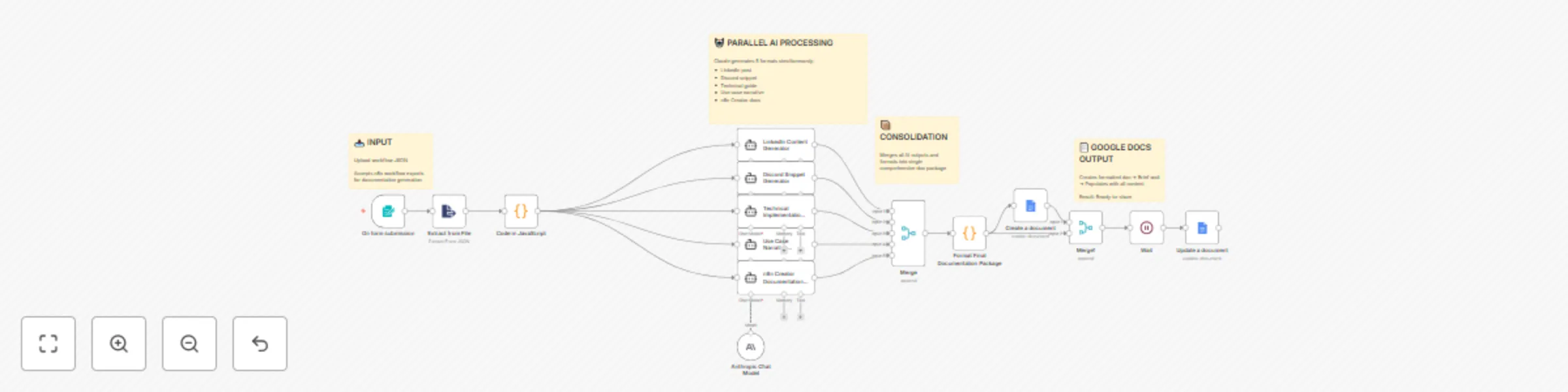
This workflow takes an exported n8n workflow JSON file and automatically generates a complete documentation package with five distinct formats: technical implementation guide, LinkedIn post, Discord community snippet, detailed use case narrative, and n8n Creator Commons submission documentation. All outputs are compiled into a single Google Doc for easy access and distribution.
20-25 minutes (15 minutes for API credentials, 5-10 minutes for testing with sample workflow)
folderId parameter in the "Create a document" node to your target folder—default points to a specific folder that won't exist in your DriveSwappable integrations:
Adjustable parameters:
Extension possibilities:
Development
Marketplace contributors: Generate complete n8n template submission packages in minutes instead of hours of manual documentation writing across multiple format requirements
Agency documentation: Automation consultancies can deliver client workflows with professional documentation suite—technical guides for client IT teams, social posts for client marketing, and narrative case studies for portfolio
Internal knowledge base: Development teams standardize workflow documentation across projects, ensuring every automation has consistent technical details, use case examples, and setup instructions for team onboarding
This catalog entry is organized from the workflow JSON. The node-level section below shows the executable blocks available for review before importing the template.
| Workflow | Generate multi-format documentation with Claude Sonnet & Google Docs |
|---|---|
| Complexity | advanced |
| Nodes | 19 |
| Categories | Document Extraction, Multimodal AI |
| Author | Connor Provines |
| Published | 16 Oct 2025 |
Use the JSON export at /data/workflows/9746/9746.json as the source template for this automation.
Open n8n, import the downloaded JSON, and review each node before activating the workflow.
Replace placeholder credentials, API keys, webhook URLs, account IDs, and environment-specific values with your own settings.
Run the workflow manually or in a staging workspace, inspect node output, and confirm downstream systems receive the expected data.
Enable the workflow only after testing, then monitor executions, errors, and rate limits during the first production runs.
Review imported nodes carefully before activation. This catalog entry is intended to help you inspect the workflow structure, understand required services, and find related templates faster.
Node names, credentials, schedules, webhook paths, and external service limits may need adjustment for your workspace.
[Meta] Multi Format Documentation Generator for N8N Creators (+More) One Line Description Transform n8n workflow JSON into five ready to publish documentation formats including technical guides, so...
Review the workflow JSON, configure any required credentials in n8n, and test the automation in a safe workspace before using it in production.
Yes. Use the block-by-block analysis and the downloadable JSON to inspect each node, then adjust credentials, prompts, schedules, filters, or destinations for your Document Extraction, Multimodal AI use case.