Generate monthly AI financial reports with OpenAI and email/Slack distribution

Workflow preview

Workflow preview
100%
Generate monthly AI financial reports with OpenAI and email/Slack distribution preview
Open on n8n.io

1. Workflow Overview

This n8n workflow automatically fetches monthly financial statements, normalizes the data, performs KPI calculations and trend analysis, detects anomalies, generates AI powered executive insights a...

Best for

  • Document Extraction automation workflows
  • AI Summarization automation workflows
  • advanced n8n builders looking for reusable templates

Tools used

n8n-nodes-base.stickynote, n8n-nodes-base.scheduletrigger, n8n-nodes-base.httprequest, n8n-nodes-base.merge, n8n-nodes-base.code, n8n-nodes-base.postgres, n8n-nodes-base.emailsend

Source and attribution

This workflow is cataloged by N8N Workflows and links back to its original n8n.io source page by Oneclick AI Squad.

Original n8n.io source

1.1 Workflow description

Title
Generate monthly AI financial reports with OpenAI and email/Slack distribution
Workflow name
Generate monthly AI financial reports with OpenAI and email/Slack distribution

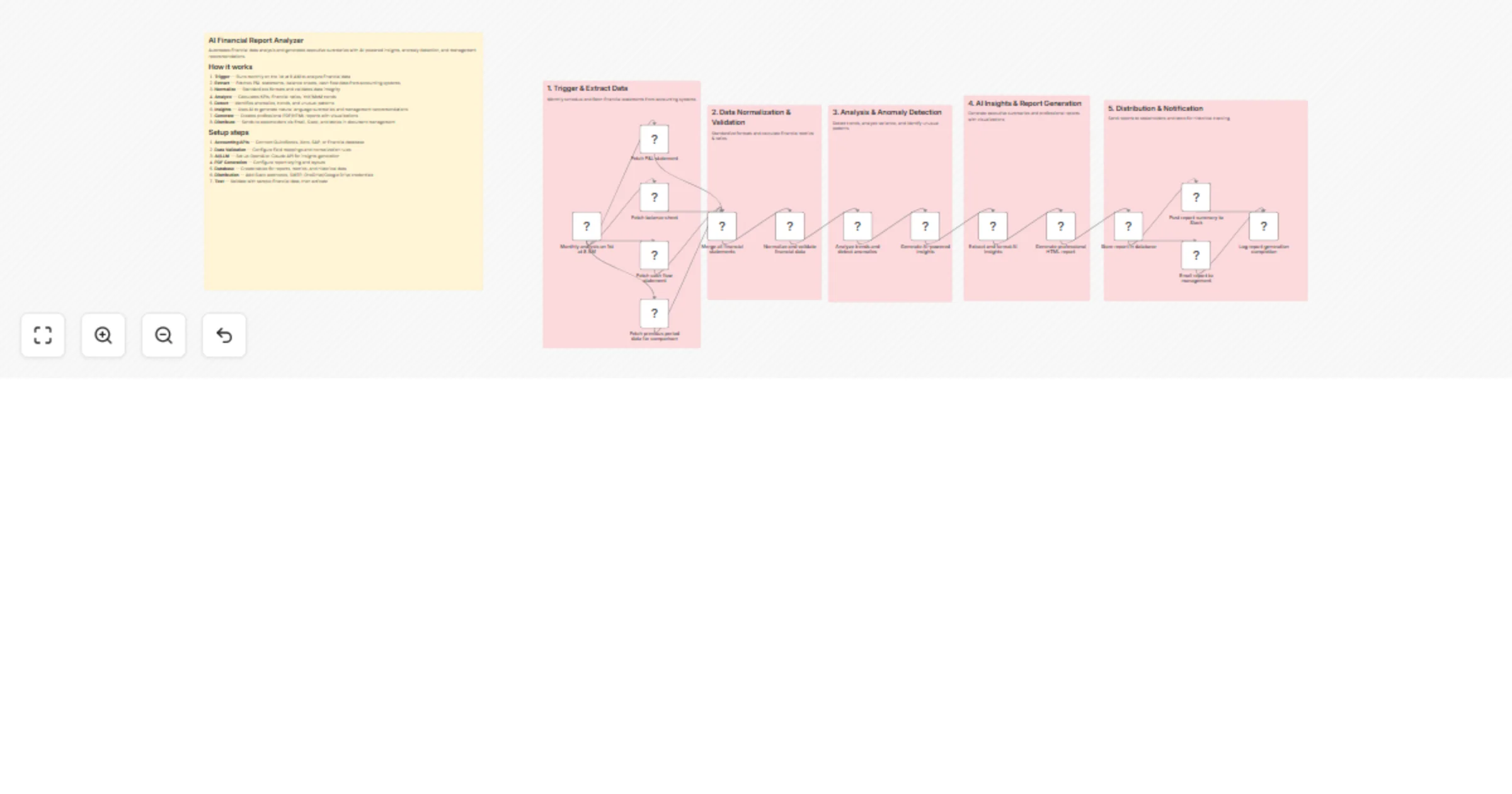
This n8n workflow automatically fetches monthly financial statements, normalizes the data, performs KPI calculations and trend analysis, detects anomalies, generates AI-powered executive insights and recommendations, creates professional reports, and distributes them to stakeholders while maintaining historical records.

Key Insights

  • Consistent data formats from accounting systems (QuickBooks, Xero, etc.) are critical for reliable normalization and analysis.
  • AI-generated insights are only as good as the input data quality — always validate fetched statements and mappings first.
  • Monthly scheduling ensures timely reporting; consider adding manual triggers for ad-hoc runs during testing.

Workflow Process

  1. Initiate the workflow with the Monthly Schedule Trigger node (runs on the 1st of each month at 8 AM).
  2. Fetch current period financial statements (P&L, balance sheet, cash flow) using the accounting API nodes.
  3. Fetch previous period data for accurate YoY/MoM comparisons.
  4. Merge all statements, normalize formats, validate integrity, and calculate standardized KPIs/metrics using data transformation nodes.
  5. Analyze trends, variances, and detect anomalies/unusual patterns.
  6. Send cleaned financial data to an AI model (OpenAI/Claude) to generate natural language executive summaries, key insights, and actionable management recommendations.
  7. Format and generate professional HTML/PDF reports (with charts/visualizations if configured).
  8. Store the report and metrics in a database for historical tracking, post summary to Slack, and email the full report to management/stakeholders.

Usage Guide

  • Import the workflow into n8n and configure credentials for your accounting system(s), AI provider, database, Slack webhook, and email (SMTP).
  • Map fields correctly in the normalization/validation nodes to match your source data structure.
  • Test end-to-end with sample/historical financial data before enabling the schedule.
  • Execute manually first via the Execute workflow button to verify each step (especially API fetches and AI output quality).

Prerequisites

  • API access to accounting system (QuickBooks, Xero, SAP, or direct database connection)
  • OpenAI or Claude API key for insight generation
  • Database (PostgreSQL, MySQL, etc.) with tables ready for reports and metrics storage
  • SMTP server or email service credentials
  • Slack webhook (optional for notifications)
  • PDF/HTML generation tools (if using external services like WeasyPrint via code node or Make.com-style nodes)

Customization Options

  • Adjust the schedule (e.g., quarterly instead of monthly) in the trigger node.
  • Modify the AI prompt in the LLM node to change the style/tone of summaries or add specific focus areas (e.g., cost control, revenue growth).
  • Extend anomaly detection rules or add more KPIs in the analysis section.
  • Change distribution channels (add Teams, Discord, Google Drive upload, etc.) by modifying or adding nodes after report generation.
  • Add conditional branching for high-priority alerts (e.g., if major anomaly detected → immediate notification).

1.2 Logical Blocks

This catalog entry is organized from the workflow JSON. The node-level section below shows the executable blocks available for review before importing the template.

2. Block-by-Block Analysis

Block 1 - Sticky Note

Type / Role
n8n-nodes-base.stickyNote - stickyNote
Config choices
Version 1

Block 2 - Sticky Note1

Type / Role
n8n-nodes-base.stickyNote - stickyNote
Config choices
Version 1

Block 3 - Sticky Note2

Type / Role
n8n-nodes-base.stickyNote - stickyNote
Config choices
Version 1

Block 4 - Sticky Note3

Type / Role
n8n-nodes-base.stickyNote - stickyNote
Config choices
Version 1

Block 5 - Sticky Note4

Type / Role
n8n-nodes-base.stickyNote - stickyNote
Config choices
Version 1

Block 6 - Sticky Note5

Type / Role
n8n-nodes-base.stickyNote - stickyNote
Config choices
Version 1

Block 7 - Monthly analysis on 1st at 8 AM

Type / Role
n8n-nodes-base.scheduleTrigger - scheduleTrigger
Config choices
Version 1.2

Block 8 - Fetch P&L statement

Type / Role
n8n-nodes-base.httpRequest - httpRequest
Config choices
Version 4.2

Block 9 - Fetch balance sheet

Type / Role
n8n-nodes-base.httpRequest - httpRequest
Config choices
Version 4.2

Block 10 - Fetch cash flow statement

Type / Role
n8n-nodes-base.httpRequest - httpRequest
Config choices
Version 4.2

Block 11 - Fetch previous period data for comparison

Type / Role
n8n-nodes-base.httpRequest - httpRequest
Config choices
Version 4.2

Block 12 - Merge all financial statements

Type / Role
n8n-nodes-base.merge - merge
Config choices
Version 3

Block 13 - Normalize and validate financial data

Type / Role
n8n-nodes-base.code - code
Config choices
Version 2

Block 14 - Analyze trends and detect anomalies

Type / Role
n8n-nodes-base.code - code
Config choices
Version 2

Block 15 - Generate AI-powered insights

Type / Role
n8n-nodes-base.httpRequest - httpRequest
Config choices
Version 4.2

Block 16 - Extract and format AI insights

Type / Role
n8n-nodes-base.code - code
Config choices
Version 2

Block 17 - Generate professional HTML report

Type / Role
n8n-nodes-base.code - code
Config choices
Version 2

Block 18 - Store report in database

Type / Role
n8n-nodes-base.postgres - postgres
Config choices
Version 2.5

Block 19 - Post report summary to Slack

Type / Role
n8n-nodes-base.httpRequest - httpRequest
Config choices
Version 4.2

Block 20 - Email report to management

Type / Role
n8n-nodes-base.emailSend - emailSend
Config choices
Version 2.1

Block 21 - Log report generation completion

Type / Role
n8n-nodes-base.code - code
Config choices
Version 2

3. Summary Table

Workflow Generate monthly AI financial reports with OpenAI and email/Slack distribution
Complexity advanced
Nodes 21
Categories Document Extraction, AI Summarization
Author Oneclick AI Squad
Published 26 Feb 2026

4. Reproducing the Workflow from Scratch

  1. 1. Download the workflow JSON

    Use the JSON export at /data/workflows/13725/13725.json as the source template for this automation.

  2. 2. Import the template into n8n

    Open n8n, import the downloaded JSON, and review each node before activating the workflow.

  3. 3. Configure credentials and variables

    Replace placeholder credentials, API keys, webhook URLs, account IDs, and environment-specific values with your own settings.

  4. 4. Test with sample data

    Run the workflow manually or in a staging workspace, inspect node output, and confirm downstream systems receive the expected data.

  5. 5. Activate and monitor

    Enable the workflow only after testing, then monitor executions, errors, and rate limits during the first production runs.

5. General Notes & Resources

Review imported nodes carefully before activation. This catalog entry is intended to help you inspect the workflow structure, understand required services, and find related templates faster.

Node names, credentials, schedules, webhook paths, and external service limits may need adjustment for your workspace.

Frequently asked questions

What does Generate monthly AI financial reports with OpenAI and email/Slack distribution do?

This n8n workflow automatically fetches monthly financial statements, normalizes the data, performs KPI calculations and trend analysis, detects anomalies, generates AI powered executive insights a...

What do I need before importing this workflow?

Review the workflow JSON, configure any required credentials in n8n, and test the automation in a safe workspace before using it in production.

Can I customize this workflow?

Yes. Use the block-by-block analysis and the downloadable JSON to inspect each node, then adjust credentials, prompts, schedules, filters, or destinations for your Document Extraction, AI Summarization use case.