Generate Instagram carousels from Telegram prompts using OpenAI and Kie AI

Workflow preview

Workflow preview
100%
Generate Instagram carousels from Telegram prompts using OpenAI and Kie AI preview
Open on n8n.io

1. Workflow Overview

This workflow acts as an automated Social Media Content Strategist , allowing you to generate a complete, 5 slide Instagram carousel with a corresponding caption directly from a single idea sent vi...

Best for

  • Content Creation automation workflows
  • Multimodal AI automation workflows
  • advanced n8n builders looking for reusable templates

Tools used

@n8n/n8n-nodes-langchain.outputparserstructured, @n8n/n8n-nodes-langchain.lmchatopenai, n8n-nodes-base.telegramtrigger, n8n-nodes-base.set, @n8n/n8n-nodes-langchain.agent, @n8n/n8n-nodes-langchain.openai, n8n-nodes-base.httprequest, n8n-nodes-base.telegram

Source and attribution

This workflow is cataloged by N8N Workflows and links back to its original n8n.io source page by Wildan Adli.

Original n8n.io source

1.1 Workflow description

Title
Generate Instagram carousels from Telegram prompts using OpenAI and Kie AI
Workflow name
Generate Instagram carousels from Telegram prompts using OpenAI and Kie AI

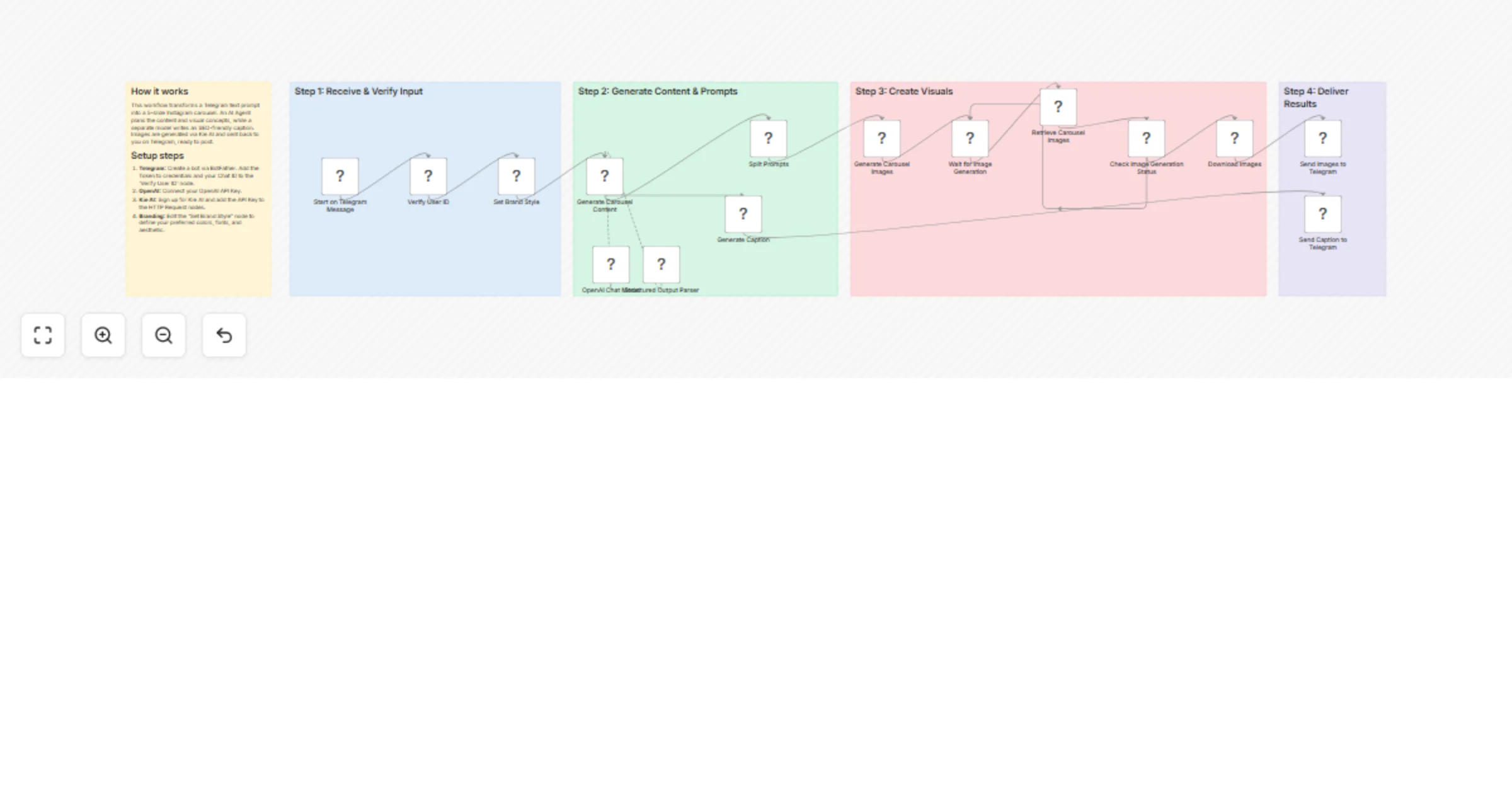
This workflow acts as an automated Social Media Content Strategist, allowing you to generate a complete, 5-slide Instagram carousel with a corresponding caption directly from a single idea sent via Telegram. Instead of writing complex prompts for each slide, the workflow uses a specialized AI Agent to interpret your topic, apply your specific brand guidelines, and generate a full, structured educational carousel automatically.

By integrating a structured output parser, it ensures the AI generates a detailed plan for all 5 slides. These are then sent to an external, high-quality image generation API. A second AI agent simultaneously works on crafting an engaging, SEO-friendly caption for your post.

Use cases are many:

  • Automated Content Creation: Generate a complete, ready-to-post Instagram carousel from a simple topic idea in minutes.
  • Rapid Idea Visualization: Quickly prototype different educational content pillars for your social media strategy.
  • Brand Consistency: Enforce a specific visual style, color palette, and mood across all AI-generated carousels through a central brand guideline node.

Good to know

  • Full Carousel Generation: The workflow doesn't just make one image; it creates a complete 5-slide carousel, including the visual concepts and text overlays for each slide.
  • Dual AI Agents: It leverages two distinct AI personas: a "Senior Content Strategist" to structure the carousel and an "Instagram Copywriter" to write the caption.
  • Polling System: It includes a smart "Wait" and "Check Status" loop to handle the asynchronous nature of the external image generation API, ensuring it retrieves the content without errors once it's ready.
  • Security: It features a Chat ID filter on the trigger to ensure only authorized users can initiate the workflow.

How it works

  1. Trigger: You send a content idea (e.g., "5 tips for better time management") to your configured Telegram bot.
  2. Validation: The workflow first checks if the message comes from an authorized Chat ID.
  3. Content Strategist (AI Agent): An AI agent takes your topic and the predefined "Brand Guideline" to create a detailed 5-slide plan, outputting a JSON object with prompts for both the visuals and text overlay of each slide.
  4. Caption Copywriter (AI Agent): In parallel, a second AI agent writes an engaging, SEO-friendly Instagram caption based on the carousel prompts.
  5. Image Generation: The workflow sends the 5 slide prompts to the external image generation API (Kie AI) to create the visuals.
  6. Status Polling: It waits for a set duration and then repeatedly checks the API with the unique task ID until the images are fully generated and ready for download.
  7. Delivery: The final high-resolution carousel images and the generated caption are sent back to you via Telegram, ready to be posted.

Setup steps

  1. Telegram: Create a bot via @BotFather on Telegram. Get the API Token and add it to the Telegram Trigger node's credentials. Send a message from your account, run the workflow once, and copy your Chat ID from the output into the IF node to authorize yourself.
  2. OpenAI: Connect your OpenAI credentials to the "Generate Carousel Content" and "Generate Caption" nodes.
  3. Image Generation API (Kie AI): This workflow uses api.kie.ai for image generation. You will need to create an account with them to get an API key. Add this key as a new Header Auth Credential in n8n and select it in the "Generate Carousel Images" and "Retrieve Carousel Images" nodes.
  4. Brand Guideline: Open the "Set Brand Style" node and replace the placeholder text in the style variable with your specific brand colors, typography, and overall aesthetic.
  5. Execution: Activate the workflow and send a simple topic to your bot to start the content creation process.

Requirements

  • Telegram Bot API Token
  • OpenAI API Key
  • Kie.ai (or other image generation service) API Key
  • n8n version with LangChain & AI Agent nodes support

1.2 Logical Blocks

This catalog entry is organized from the workflow JSON. The node-level section below shows the executable blocks available for review before importing the template.

2. Block-by-Block Analysis

Block 1 - Structured Output Parser

Type / Role
@n8n/n8n-nodes-langchain.outputParserStructured - outputParserStructured
Config choices
Version 1.3

Block 2 - OpenAI Chat Model

Type / Role
@n8n/n8n-nodes-langchain.lmChatOpenAi - lmChatOpenAi
Config choices
Version 1.3

Block 3 - Start on Telegram Message

Type / Role
n8n-nodes-base.telegramTrigger - telegramTrigger
Config choices
Version 1.2

Block 4 - Set Brand Style

Type / Role
n8n-nodes-base.set - set
Config choices
Version 3.4

Block 5 - Generate Carousel Content

Type / Role
@n8n/n8n-nodes-langchain.agent - agent
Config choices
Version 2.2

Block 6 - Generate Caption

Type / Role
@n8n/n8n-nodes-langchain.openAi - openAi
Config choices
Version 2.1

Block 7 - Generate Carousel Images

Type / Role
n8n-nodes-base.httpRequest - httpRequest
Config choices
Version 4.3

Block 8 - Retrieve Carousel Images

Type / Role
n8n-nodes-base.httpRequest - httpRequest
Config choices
Version 4.3

Block 9 - Send Images to Telegram

Type / Role
n8n-nodes-base.telegram - telegram
Config choices
Version 1.2

Block 10 - Download Images

Type / Role
n8n-nodes-base.httpRequest - httpRequest
Config choices
Version 4.3

Block 11 - Send Caption to Telegram

Type / Role
n8n-nodes-base.telegram - telegram
Config choices
Version 1.2

Block 12 - Sticky Note

Type / Role
n8n-nodes-base.stickyNote - stickyNote
Config choices
Version 1

Block 13 - Check Image Generation Status

Type / Role
n8n-nodes-base.if - if
Config choices
Version 2.3

Block 14 - Wait for Image Generation

Type / Role
n8n-nodes-base.wait - wait
Config choices
Version 1.1

Block 15 - Split Prompts

Type / Role
n8n-nodes-base.splitOut - splitOut
Config choices
Version 1

Block 16 - Verify User ID

Type / Role
n8n-nodes-base.if - if
Config choices
Version 2.3

Block 17 - Sticky Note1

Type / Role
n8n-nodes-base.stickyNote - stickyNote
Config choices
Version 1

Block 18 - Sticky Note2

Type / Role
n8n-nodes-base.stickyNote - stickyNote
Config choices
Version 1

Block 19 - Sticky Note3

Type / Role
n8n-nodes-base.stickyNote - stickyNote
Config choices
Version 1

Block 20 - Sticky Note4

Type / Role
n8n-nodes-base.stickyNote - stickyNote
Config choices
Version 1

3. Summary Table

Workflow Generate Instagram carousels from Telegram prompts using OpenAI and Kie AI
Complexity advanced
Nodes 20
Categories Content Creation, Multimodal AI
Author Wildan Adli
Published 06 Jan 2026

4. Reproducing the Workflow from Scratch

  1. 1. Download the workflow JSON

    Use the JSON export at /data/workflows/12510/12510.json as the source template for this automation.

  2. 2. Import the template into n8n

    Open n8n, import the downloaded JSON, and review each node before activating the workflow.

  3. 3. Configure credentials and variables

    Replace placeholder credentials, API keys, webhook URLs, account IDs, and environment-specific values with your own settings.

  4. 4. Test with sample data

    Run the workflow manually or in a staging workspace, inspect node output, and confirm downstream systems receive the expected data.

  5. 5. Activate and monitor

    Enable the workflow only after testing, then monitor executions, errors, and rate limits during the first production runs.

5. General Notes & Resources

Review imported nodes carefully before activation. This catalog entry is intended to help you inspect the workflow structure, understand required services, and find related templates faster.

Node names, credentials, schedules, webhook paths, and external service limits may need adjustment for your workspace.

Frequently asked questions

What does Generate Instagram carousels from Telegram prompts using OpenAI and Kie AI do?

This workflow acts as an automated Social Media Content Strategist , allowing you to generate a complete, 5 slide Instagram carousel with a corresponding caption directly from a single idea sent vi...

What do I need before importing this workflow?

Review the workflow JSON, configure any required credentials in n8n, and test the automation in a safe workspace before using it in production.

Can I customize this workflow?

Yes. Use the block-by-block analysis and the downloadable JSON to inspect each node, then adjust credentials, prompts, schedules, filters, or destinations for your Content Creation, Multimodal AI use case.