Generate influencer posts with GPT-4, Google Sheets, and Media APIs

Workflow preview

Workflow preview
100%
Generate influencer posts with GPT-4, Google Sheets, and Media APIs preview
Open on n8n.io

Important notice

This workflow is provided as-is. Please review and test before using in production.

1. Workflow Overview

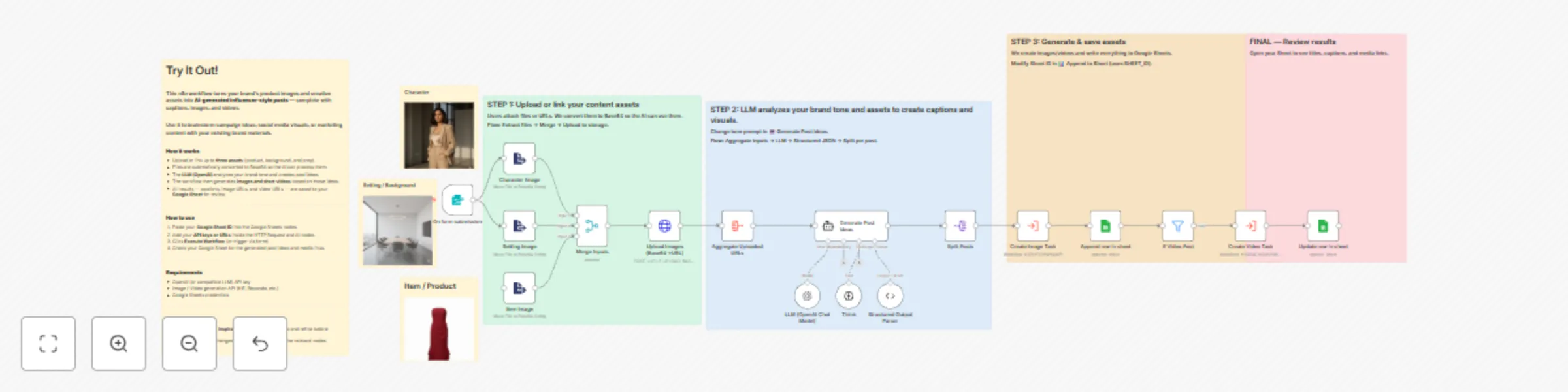
This template transforms uploaded brand assets into AI generated influencer style posts — complete with captions, images, and videos — using n8n, OpenAI, and your preferred image/video generation A...

Best for

  • Content Creation automation workflows
  • Multimodal AI automation workflows
  • advanced n8n builders looking for reusable templates

Tools used

n8n-nodes-base.formtrigger, @n8n/n8n-nodes-langchain.toolthink, @n8n/n8n-nodes-langchain.outputparserstructured, n8n-nodes-base.stickynote, n8n-nodes-base.merge, @n8n/n8n-nodes-langchain.agent, n8n-nodes-base.extractfromfile, n8n-nodes-base.httprequest

Source and attribution

This workflow is cataloged by N8N Workflows and links back to its original n8n.io source page by Palak Rathor.

Original n8n.io source

1.1 Workflow description

Title
Generate influencer posts with GPT-4, Google Sheets, and Media APIs
Workflow name
Generate influencer posts with GPT-4, Google Sheets, and Media APIs

This template transforms uploaded brand assets into AI-generated influencer-style posts — complete with captions, images, and videos — using n8n, OpenAI, and your preferred image/video generation APIs.


🧠 Who it’s for

Marketers, creators, or brand teams who want to speed up content ideation and visual generation.
Perfect for social-media teams looking to turn product photos and brand visuals into ready-to-review creative posts.


⚙️ How it works

  1. Upload your brand assets — A form trigger collects up to three files: product, background, and prop.
  2. AI analysis & content creation — An OpenAI LLM analyzes your brand tone and generates post titles, captions, and visual prompts.
  3. Media generation — Connected image/video generation workflows create corresponding visuals.
  4. Result storage — All captions, image URLs, and video URLs are automatically written to a Google Sheet for review or publishing.

🧩 How to set it up

  1. Replace all placeholders in nodes:
    • <<YOUR_SHEET_ID>>
    • <<FILE_UPLOAD_BASE>>
    • <<YOUR_API_KEY>>
    • <<YOUR_N8N_DOMAIN>>/form/<<FORM_ID>>
  2. Add your own credentials in:
    • Google Sheets
    • HTTP Request
    • AI/LLM nodes
  3. Execute the workflow or trigger via form.
  4. Check your connected Google Sheet for generated posts and media links.

🛠️ Requirements

Tool Purpose
OpenAI / compatible LLM key Caption & idea generation
Image/Video generation API Creating visuals
Google Sheets credentials Storing results
(Optional) n8n Cloud / self-hosted To run the workflow

🧠 Notes

  • The workflow uses modular sub-workflows for image and video creation; you can connect your own generation nodes.
  • All credentials and private URLs have been removed.
  • Works seamlessly with both n8n Cloud and self-hosted setups.
  • Output is meant for creative inspiration — review before posting publicly.

🧩 Why it’s useful

  • Speeds up campaign ideation and content creation.
  • Provides structured, reusable results in Google Sheets.
  • Fully visual, modular, and customizable for any brand or industry.

🧠 Example Use Cases

  • Influencer campaign planning
  • Product launch creatives
  • E-commerce catalog posts
  • Fashion, lifestyle, or tech brand content

✅ Security & best practices

  • No hardcoded keys or credentials included.
  • All private URLs replaced with placeholders.
  • Static data removed from the public JSON.
  • Follows n8n’s template structure, node naming, and sticky-note annotation guidelines.

📦 Template info

Name: AI-Powered Influencer Post Generator with Google Sheets and Image/Video APIs Category: AI / Marketing Automation / Content Generation
Author: Palak Rathor
Version: 1.0 (Public Release — October 2025)

1.2 Logical Blocks

This catalog entry is organized from the workflow JSON. The node-level section below shows the executable blocks available for review before importing the template.

2. Block-by-Block Analysis

Block 1 - On form submission

Type / Role
n8n-nodes-base.formTrigger - formTrigger
Config choices
Version 2.3

Block 2 - Think

Type / Role
@n8n/n8n-nodes-langchain.toolThink - toolThink
Config choices
Version 1.1

Block 3 - Structured Output Parser

Type / Role
@n8n/n8n-nodes-langchain.outputParserStructured - outputParserStructured
Config choices
Version 1.3

Block 4 - Sticky Note

Type / Role
n8n-nodes-base.stickyNote - stickyNote
Config choices
Version 1

Block 5 - Sticky Note1

Type / Role
n8n-nodes-base.stickyNote - stickyNote
Config choices
Version 1

Block 6 - Sticky Note2

Type / Role
n8n-nodes-base.stickyNote - stickyNote
Config choices
Version 1

Block 7 - Merge Inputs

Type / Role
n8n-nodes-base.merge - merge
Config choices
Version 3.2

Block 8 - Generate Post Ideas

Type / Role
@n8n/n8n-nodes-langchain.agent - agent
Config choices
Version 2.2

Block 9 - Sticky Note3

Type / Role
n8n-nodes-base.stickyNote - stickyNote
Config choices
Version 1

Block 10 - Character Image

Type / Role
n8n-nodes-base.extractFromFile - extractFromFile
Config choices
Version 1

Block 11 - Setting Image

Type / Role
n8n-nodes-base.extractFromFile - extractFromFile
Config choices
Version 1

Block 12 - Item Image

Type / Role
n8n-nodes-base.extractFromFile - extractFromFile
Config choices
Version 1

Block 13 - Upload Images (Base64→URL)

Type / Role
n8n-nodes-base.httpRequest - httpRequest
Config choices
Version 4.2

Block 14 - Aggregate Uploaded URLs

Type / Role
n8n-nodes-base.aggregate - aggregate
Config choices
Version 1

Block 15 - LLM (OpenAI Chat Model)

Type / Role
@n8n/n8n-nodes-langchain.lmChatOpenAi - lmChatOpenAi
Config choices
Version 1.2

Block 16 - Split Posts

Type / Role
n8n-nodes-base.splitOut - splitOut
Config choices
Version 1

Block 17 - Create Image Task

Type / Role
n8n-nodes-base.executeWorkflow - executeWorkflow
Config choices
Version 1.2

Block 18 - If Video Post

Type / Role
n8n-nodes-base.filter - filter
Config choices
Version 2.2

Block 19 - Create Video Task

Type / Role
n8n-nodes-base.executeWorkflow - executeWorkflow
Config choices
Version 1.2

Block 20 - Sticky Note4

Type / Role
n8n-nodes-base.stickyNote - stickyNote
Config choices
Version 1

Block 21 - Sticky Note5

Type / Role
n8n-nodes-base.stickyNote - stickyNote
Config choices
Version 1

Block 22 - Sticky Note6

Type / Role
n8n-nodes-base.stickyNote - stickyNote
Config choices
Version 1

Block 23 - Sticky Note7

Type / Role
n8n-nodes-base.stickyNote - stickyNote
Config choices
Version 1

Block 24 - Append row in sheet

Type / Role
n8n-nodes-base.googleSheets - googleSheets
Config choices
Version 4.7

Showing the first 24 of 25 workflow blocks. Download the JSON for the full node graph.

3. Summary Table

Workflow Generate influencer posts with GPT-4, Google Sheets, and Media APIs
Complexity advanced
Nodes 25
Categories Content Creation, Multimodal AI
Author Palak Rathor
Published 30 Oct 2025

4. Reproducing the Workflow from Scratch

  1. 1. Download the workflow JSON

    Use the JSON export at /data/workflows/10364/10364.json as the source template for this automation.

  2. 2. Import the template into n8n

    Open n8n, import the downloaded JSON, and review each node before activating the workflow.

  3. 3. Configure credentials and variables

    Replace placeholder credentials, API keys, webhook URLs, account IDs, and environment-specific values with your own settings.

  4. 4. Test with sample data

    Run the workflow manually or in a staging workspace, inspect node output, and confirm downstream systems receive the expected data.

  5. 5. Activate and monitor

    Enable the workflow only after testing, then monitor executions, errors, and rate limits during the first production runs.

5. General Notes & Resources

Review imported nodes carefully before activation. This catalog entry is intended to help you inspect the workflow structure, understand required services, and find related templates faster.

Node names, credentials, schedules, webhook paths, and external service limits may need adjustment for your workspace.

Frequently asked questions

What does Generate influencer posts with GPT-4, Google Sheets, and Media APIs do?

This template transforms uploaded brand assets into AI generated influencer style posts — complete with captions, images, and videos — using n8n, OpenAI, and your preferred image/video generation A...

What do I need before importing this workflow?

Review the workflow JSON, configure any required credentials in n8n, and test the automation in a safe workspace before using it in production.

Can I customize this workflow?

Yes. Use the block-by-block analysis and the downloadable JSON to inspect each node, then adjust credentials, prompts, schedules, filters, or destinations for your Content Creation, Multimodal AI use case.