Generate Google Forms quizzes from Excel files sent via Telegram

Workflow preview

Workflow preview
100%
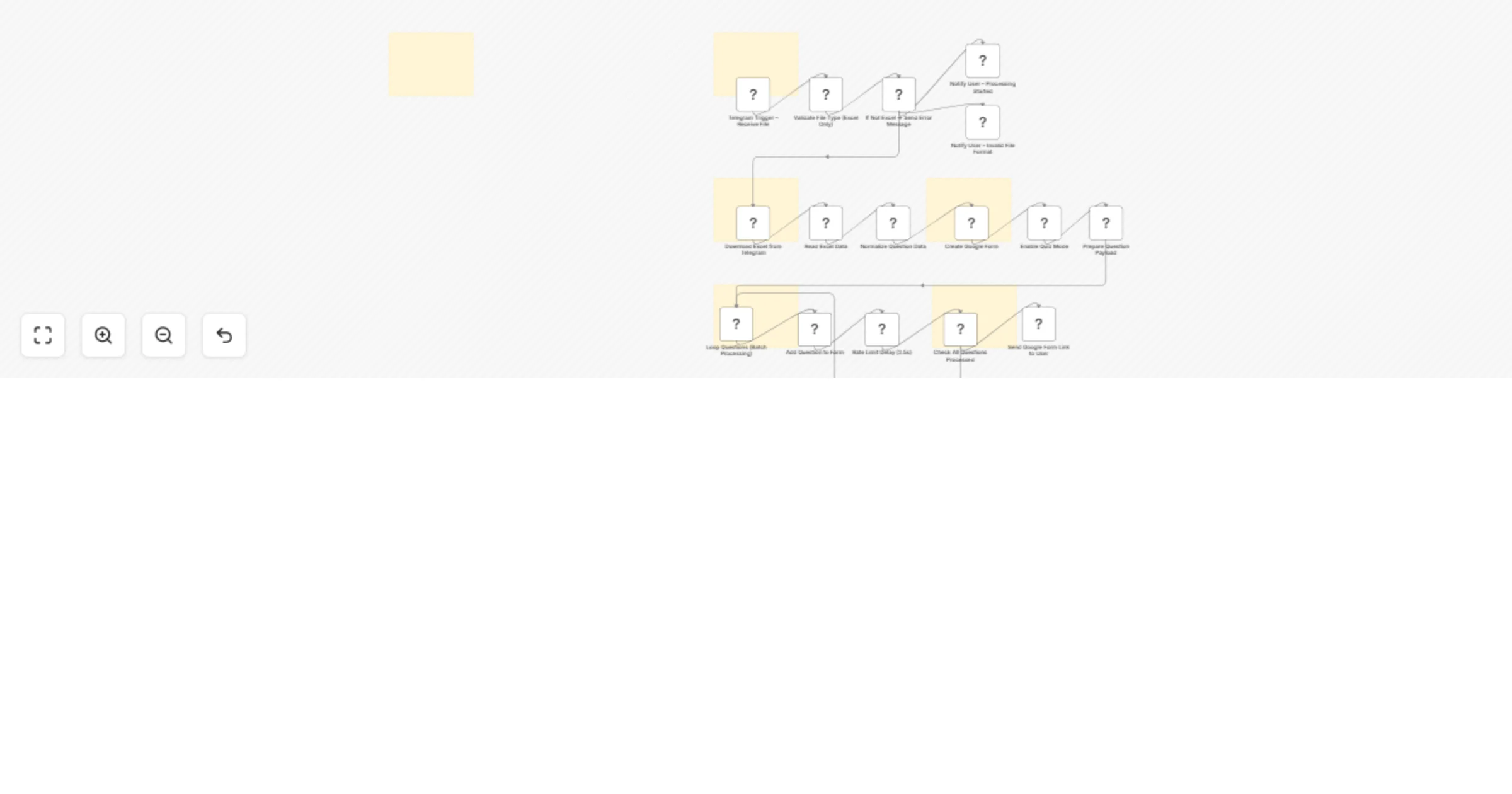
Generate Google Forms quizzes from Excel files sent via Telegram preview
Open on n8n.io

1. Workflow Overview

Generate Google Forms Quiz from Excel via Telegram (n8n Workflow) Turn your Excel question banks into fully functional Google Forms quizzes automatically — just by sending a file via Telegram. �...

Best for

  • Document Extraction automation workflows
  • advanced n8n builders looking for reusable templates

Tools used

n8n-nodes-base.httprequest, n8n-nodes-base.telegramtrigger, n8n-nodes-base.code, n8n-nodes-base.if, n8n-nodes-base.telegram, n8n-nodes-base.extractfromfile, n8n-nodes-base.set, n8n-nodes-base.splitinbatches

Source and attribution

This workflow is cataloged by N8N Workflows and links back to its original n8n.io source page by Ramdoni.

Original n8n.io source

1.1 Workflow description

Title
Generate Google Forms quizzes from Excel files sent via Telegram
Workflow name
Generate Google Forms quizzes from Excel files sent via Telegram

📊 Generate Google Forms Quiz from Excel via Telegram (n8n Workflow)

Turn your Excel question banks into fully functional Google Forms quizzes automatically — just by sending a file via Telegram.


🚀 Overview

This workflow allows users to upload an Excel file containing multiple-choice questions through Telegram. The system processes the file and automatically creates a Google Forms quiz with answer keys.

Perfect for:

  • Teachers
  • Trainers
  • HR teams
  • Online course creators

⚙️ Features

  • 📩 Upload Excel via Telegram
  • 📊 Automatic Excel parsing
  • 🧹 Data normalization
  • 📝 Google Form auto creation
  • ✅ Quiz mode with answer keys
  • 🔁 Batch processing with rate limiting
  • 📤 Instant delivery of form link

🧠 How It Works

  1. User sends Excel file to Telegram bot
  2. Workflow validates file type
  3. Excel data is extracted and normalized
  4. Google Form is created automatically
  5. Questions are inserted with correct answers
  6. Form link is sent back to the user

📂 Excel Format

question option_a option_b option_c option_d answer
What is 2+2? 3 4 5 6 B
  • answer must be: A / B / C / D

🔧 Setup

1. Telegram Bot

  • Create bot via BotFather
  • Add token to n8n

2. Google API

  • Enable:
  • Google Forms API
  • Google Drive API
  • Setup OAuth2 credentials
  • Add scopes:
  • forms.body
  • drive.file

3. n8n Configuration

  • Import workflow
  • Set credentials
  • Activate workflow

⚠️ Notes

  • Excel must follow the correct format
  • Large files may require batching
  • Google API rate limits apply

💡 Use Cases

  • Generate exams in seconds
  • Convert training materials to quizzes
  • Automate assessment workflows

💰 Monetization Idea

You can turn this into a SaaS by:

  • Offering a Telegram bot service
  • Limiting free usage (e.g. 20 questions)
  • Charging for unlimited access

🔥 Future Improvements

  • Multi-language support
  • AI question validation
  • Question randomization
  • Section grouping by topic

👨‍💻 Built with n8n

Automation made simple.

1.2 Logical Blocks

This catalog entry is organized from the workflow JSON. The node-level section below shows the executable blocks available for review before importing the template.

2. Block-by-Block Analysis

Block 1 - Enable Quiz Mode

Type / Role
n8n-nodes-base.httpRequest - httpRequest
Config choices
Version 4.3

Block 2 - Telegram Trigger – Receive File

Type / Role
n8n-nodes-base.telegramTrigger - telegramTrigger
Config choices
Version 1.2

Block 3 - Validate File Type (Excel Only)

Type / Role
n8n-nodes-base.code - code
Config choices
Version 2

Block 4 - If Not Excel → Send Error Message

Type / Role
n8n-nodes-base.if - if
Config choices
Version 2.2

Block 5 - Notify User – Invalid File Format

Type / Role
n8n-nodes-base.telegram - telegram
Config choices
Version 1.2

Block 6 - Notify User – Processing Started

Type / Role
n8n-nodes-base.telegram - telegram
Config choices
Version 1.2

Block 7 - Download Excel from Telegram

Type / Role
n8n-nodes-base.telegram - telegram
Config choices
Version 1.2

Block 8 - Read Excel Data

Type / Role
n8n-nodes-base.extractFromFile - extractFromFile
Config choices
Version 1.1

Block 9 - Normalize Question Data

Type / Role
n8n-nodes-base.code - code
Config choices
Version 2

Block 10 - Create Google Form

Type / Role
n8n-nodes-base.httpRequest - httpRequest
Config choices
Version 4.3

Block 11 - Prepare Question Payload

Type / Role
n8n-nodes-base.set - set
Config choices
Version 3.4

Block 12 - Loop Questions (Batch Processing)

Type / Role
n8n-nodes-base.splitInBatches - splitInBatches
Config choices
Version 3

Block 13 - Add Question to Form

Type / Role
n8n-nodes-base.httpRequest - httpRequest
Config choices
Version 4.3

Block 14 - Rate Limit Delay (2.5s)

Type / Role
n8n-nodes-base.wait - wait
Config choices
Version 1.1

Block 15 - Check All Questions Processed

Type / Role
n8n-nodes-base.if - if
Config choices
Version 2.2

Block 16 - Send Google Form Link to User

Type / Role
n8n-nodes-base.telegram - telegram
Config choices
Version 1.2

Block 17 - Sticky Note

Type / Role
n8n-nodes-base.stickyNote - stickyNote
Config choices
Version 1

Block 18 - Sticky Note1

Type / Role
n8n-nodes-base.stickyNote - stickyNote
Config choices
Version 1

Block 19 - Sticky Note2

Type / Role
n8n-nodes-base.stickyNote - stickyNote
Config choices
Version 1

Block 20 - Sticky Note3

Type / Role
n8n-nodes-base.stickyNote - stickyNote
Config choices
Version 1

Block 21 - Sticky Note4

Type / Role
n8n-nodes-base.stickyNote - stickyNote
Config choices
Version 1

Block 22 - Sticky Note5

Type / Role
n8n-nodes-base.stickyNote - stickyNote
Config choices
Version 1

3. Summary Table

Workflow Generate Google Forms quizzes from Excel files sent via Telegram
Complexity advanced
Nodes 22
Categories Document Extraction
Author Ramdoni
Published 01 Apr 2026

4. Reproducing the Workflow from Scratch

  1. 1. Download the workflow JSON

    Use the JSON export at /data/workflows/14539/14539.json as the source template for this automation.

  2. 2. Import the template into n8n

    Open n8n, import the downloaded JSON, and review each node before activating the workflow.

  3. 3. Configure credentials and variables

    Replace placeholder credentials, API keys, webhook URLs, account IDs, and environment-specific values with your own settings.

  4. 4. Test with sample data

    Run the workflow manually or in a staging workspace, inspect node output, and confirm downstream systems receive the expected data.

  5. 5. Activate and monitor

    Enable the workflow only after testing, then monitor executions, errors, and rate limits during the first production runs.

5. General Notes & Resources

Review imported nodes carefully before activation. This catalog entry is intended to help you inspect the workflow structure, understand required services, and find related templates faster.

Node names, credentials, schedules, webhook paths, and external service limits may need adjustment for your workspace.

Frequently asked questions

What does Generate Google Forms quizzes from Excel files sent via Telegram do?

Generate Google Forms Quiz from Excel via Telegram (n8n Workflow) Turn your Excel question banks into fully functional Google Forms quizzes automatically — just by sending a file via Telegram. �...

What do I need before importing this workflow?

Review the workflow JSON, configure any required credentials in n8n, and test the automation in a safe workspace before using it in production.

Can I customize this workflow?

Yes. Use the block-by-block analysis and the downloadable JSON to inspect each node, then adjust credentials, prompts, schedules, filters, or destinations for your Document Extraction use case.