Block 1 - Webhook
- Type / Role
- n8n-nodes-base.webhook - webhook
- Config choices
- Version 2


 Early Deal
This workflow is provided as-is. Please review and test before using in production.
Description This AI powered n8n workflow helps users generate or explain complex Excel/Google Sheets/R and Math formulas with a simple text prompt. Whether you're a beginner trying to understand VL...
n8n-nodes-base.webhook, n8n-nodes-base.respondtowebhook, @n8n/n8n-nodes-langchain.lmchatopenrouter, n8n-nodes-base.set, n8n-nodes-base.switch, @n8n/n8n-nodes-langchain.agent, n8n-nodes-base.code
This workflow is cataloged by N8N Workflows and links back to its original n8n.io source page by Gerald Denor.
Original n8n.io sourceDescription
This AI-powered n8n workflow helps users generate or explain complex Excel/Google Sheets/R and Math formulas with a simple text prompt. Whether you're a beginner trying to understand VLOOKUP, or an advanced user automating formula creation, this tool handles it with intelligent, clean, and easy-to-read responses.
The workflow acts as your personal formula assistant, powered by AI through OpenRouter (LangChain integration), and responds instantly via webhook when a user asks a question.
Use cases are many 🧑🎓 Students & learners using spreadsheets for assignments.
🧑💼 Finance, sales, HR, and marketing pros who regularly create or audit complex formulas.
💼 Consultants & freelancers offering spreadsheet automation services.
🛠️ No-code builders embedding this into their own AI assistants.
🌱 Micro-SaaS founders building AI bots or chatbot features around Excel/Sheets/R.
🧪 Educators wanting to build interactive formula explainers for courses.
How I used it to build a microSaaS
Check it out here: AI Formula Bot
I connected this n8n workflow to a Fillout form on my micro-site and added Stripe + myCred credits on WordPress. Users submit formula-related queries, and the bot responds in seconds. It’s monetized with credit-based limits, a free tier, and upsells for pro plans.
This setup allowed me to launch a niche AI tool in days, without building a full backend. It’s scalable, automatable, and integrates with email, WhatsApp, or even voice AI for escalations. This workflow was the core engine behind it all.
Good to know
You can deploy this as a microSaaS with a front-end UI (like Fillout, Tally, or custom form) connected to this webhook.
It’s model-agnostic: swap in your preferred OpenRouter-compatible model.
Responses are formatted for readability — with clean breakdowns and examples.
The system intelligently detects whether the user wants to generate or explain a formula using NLP logic inside the workflow.
Designed with modular nodes for easy customization and expansion.
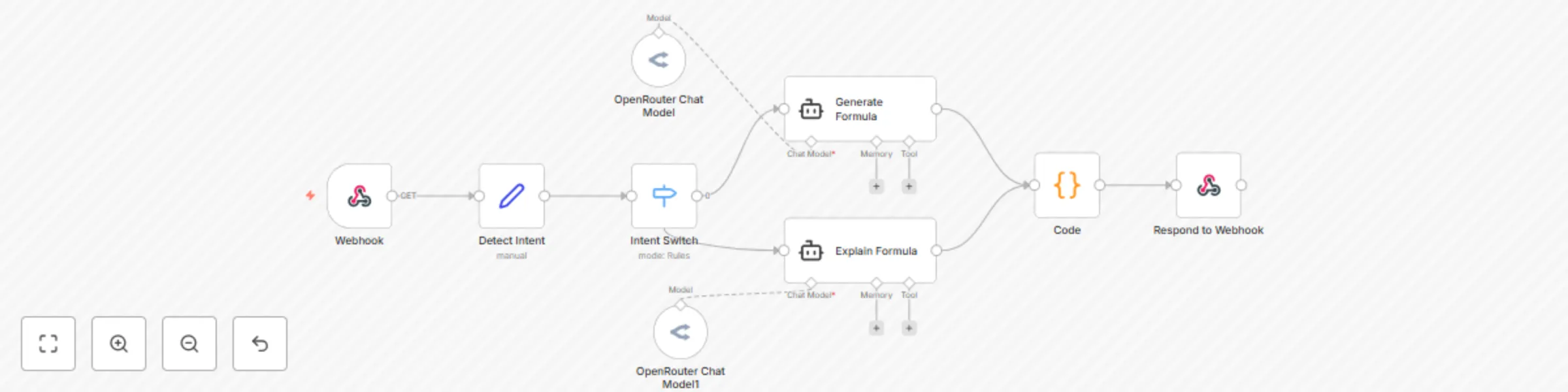
How it works
User input hits the Webhook via POST (e.g., from a form).
A logic node classifies the intent: generate or explain.
Depending on intent, it routes the query to one of two AI agent nodes with tailored system prompts.
The AI returns a natural language explanation or a code block formula.
A custom Code node sanitizes the output.
The formatted result is sent back via webhook response.
How to use
Import the workflow JSON into n8n.
Set up your OpenRouter credentials (create in Credentials tab).
Deploy the webhook URL in a frontend form (e.g., Fillout, Webflow form, etc.).
Prompt the bot by asking:
“Explain how =IF(A1>100,"High","Low") works.”
“Write a formula to calculate compound interest.”
Receive an AI response with either:
✅ A generated formula
✅ An explanation with bullet points and examples
Requirements
🧠 n8n (Self-hosted or Cloud)
🔐 OpenRouter API key (Free or Paid Tier)
🌐 A front-end form tool (optional but recommended: Fillout, Tally, or any frontend that can POST)
Customizing this workflow
Swap the AI model to your preferred one on OpenRouter (e.g., Mixtral, Claude, GPT-3.5).
Edit system prompts inside the agent nodes to control tone or response style.
Extend logic detection to classify more intents like "optimize" or "debug" formulas.
Chain outputs into Google Sheets for logging or CRM tracking.
Add logging and lead capture for SaaS-style metrics.
Use AI content moderation before responses if deploying for public use.
Other use cases
Build an AI spreadsheet tutor bot for your online course.
Offer Formula-as-a-Service for agencies or clients.
Integrate with Slack or WhatsApp via n8n for real-time formula help.
Add to internal knowledge bots for teams in operations, finance, or HR.
This catalog entry is organized from the workflow JSON. The node-level section below shows the executable blocks available for review before importing the template.
| Workflow | Generate & explain Excel/Google Sheets formulas with DeepSeek AI |
|---|---|
| Complexity | intermediate |
| Nodes | 9 |
| Categories | Personal Productivity, AI Chatbot |
| Author | Gerald Denor |
| Published | 24 Jul 2025 |
Use the JSON export at /data/workflows/6396/6396.json as the source template for this automation.
Open n8n, import the downloaded JSON, and review each node before activating the workflow.
Replace placeholder credentials, API keys, webhook URLs, account IDs, and environment-specific values with your own settings.
Run the workflow manually or in a staging workspace, inspect node output, and confirm downstream systems receive the expected data.
Enable the workflow only after testing, then monitor executions, errors, and rate limits during the first production runs.
Review imported nodes carefully before activation. This catalog entry is intended to help you inspect the workflow structure, understand required services, and find related templates faster.
Node names, credentials, schedules, webhook paths, and external service limits may need adjustment for your workspace.
Description This AI powered n8n workflow helps users generate or explain complex Excel/Google Sheets/R and Math formulas with a simple text prompt. Whether you're a beginner trying to understand VL...
Review the workflow JSON, configure any required credentials in n8n, and test the automation in a safe workspace before using it in production.
Yes. Use the block-by-block analysis and the downloadable JSON to inspect each node, then adjust credentials, prompts, schedules, filters, or destinations for your Personal Productivity, AI Chatbot use case.