Generate enhanced AI images via Telegram with DALL-E and GPT

Workflow preview

Workflow preview
100%
Generate enhanced AI images via Telegram with DALL-E and GPT preview
Open on n8n.io

Important notice

This workflow is provided as-is. Please review and test before using in production.

1. Workflow Overview

PromptCraft AI – Telegram Image Generator How It Works PromptCraft AI is an n8n automation that transforms simple image ideas sent through Telegram into stunning AI generated images using OpenAI...

Best for

  • Content Creation automation workflows
  • Multimodal AI automation workflows
  • intermediate n8n builders looking for reusable templates

Tools used

@n8n/n8n-nodes-langchain.agent, n8n-nodes-base.googledrive, n8n-nodes-base.googlesheets, n8n-nodes-base.stickynote, n8n-nodes-base.telegram, n8n-nodes-base.telegramtrigger, n8n-nodes-base.httprequest, @n8n/n8n-nodes-langchain.lmchatopenai

Source and attribution

This workflow is cataloged by N8N Workflows and links back to its original n8n.io source page by David Olusola.

Original n8n.io source

1.1 Workflow description

Title
Generate enhanced AI images via Telegram with DALL-E and GPT
Workflow name
Generate enhanced AI images via Telegram with DALL-E and GPT

PromptCraft AI – Telegram Image Generator

🚀 How It Works

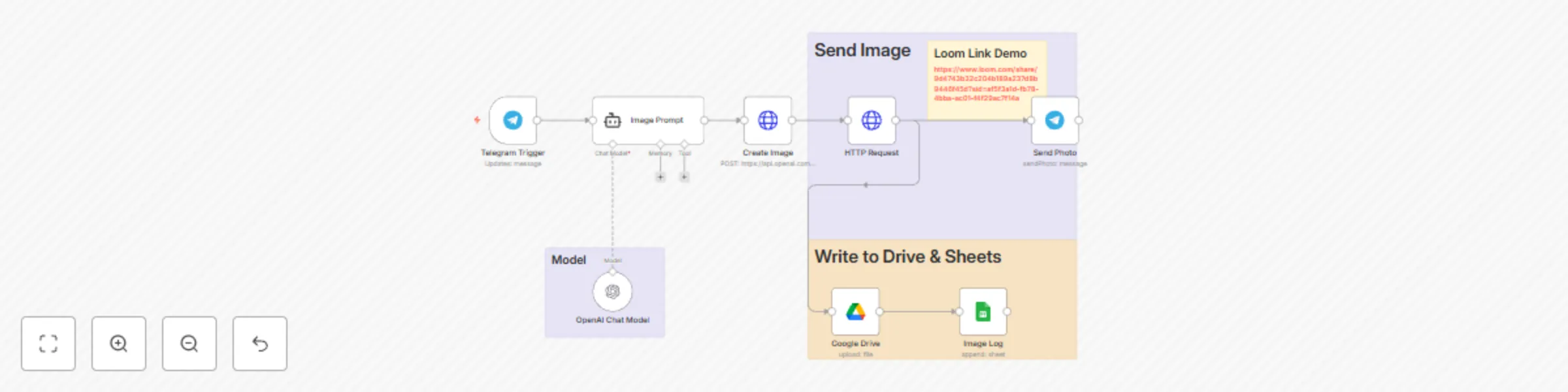
PromptCraft AI is an n8n automation that transforms simple image ideas sent through Telegram into stunning AI-generated images using OpenAI's DALL·E (or other image models).

🔁 Workflow Overview:

  1. Telegram Trigger: Listens for messages from a user on Telegram.
  2. Prompt Expansion: The message is transformed into a rich image description using GPT (OpenAI Chat Model).
  3. Image Generation: The prompt is passed to OpenAI's image API to generate a high-quality image.
  4. Send Image: The final image is sent back to the user on Telegram.
  5. (Optional) Log image titles and links to Google Drive and Google Sheets.

⚙️ Setup Instructions

📋 Prerequisites

  • n8n installed (Self-hosted or via n8n.cloud)
  • Telegram bot token (via @BotFather)
  • OpenAI API key (platform.openai.com)
  • Google Sheets & Drive OAuth2 credentials (optional)

🧠 Step-by-Step Configuration

1. 📥 Import the Workflow
  • Go to n8n → click Import → upload PromptCraft_AI_Template.json
2. 🔐 Set Up Credentials
  • In Credentials, add the following:

    • Telegram API → Paste your bot token
    • OpenAI API → Paste your OpenAI API key
    • (Optional) Google Sheets OAuth2, Google Drive OAuth2
3. 🔄 Replace Placeholders
  • Open each node that requires credentials:

    • Replace REPLACE_OPENAI_API_KEY with your actual OpenAI API key
    • Replace REPLACE_TELEGRAM_API_ID and credential names as needed
    • (Optional) Update Google Drive Folder ID & Sheet ID in respective nodes
4. ✅ Activate the Workflow
  • Turn on the Telegram Trigger node.
  • Deploy and activate the full workflow.
5. ✉️ Test It Out
  • Send your Telegram bot a message like:

    > a knight riding a robotic horse in the future

  • Receive the generated image back in Telegram!


💡 Pro Tips

  • Use detailed or imaginative inputs for better outputs.
  • Fine-tune the GPT prompt for specific visual styles.
  • Extend with Google Vision, image upscaling, or watermarking.

🛟 Support

For setup assistance or custom feature requests, feel free to contact me @[email protected]


Happy Prompting! 🖼✨

1.2 Logical Blocks

This catalog entry is organized from the workflow JSON. The node-level section below shows the executable blocks available for review before importing the template.

2. Block-by-Block Analysis

Block 1 - Image Prompt

Type / Role
@n8n/n8n-nodes-langchain.agent - agent
Config choices
Version 1.9

Block 2 - Google Drive

Type / Role
n8n-nodes-base.googleDrive - googleDrive
Config choices
Version 3

Block 3 - Image Log

Type / Role
n8n-nodes-base.googleSheets - googleSheets
Config choices
Version 4.5

Block 4 - Sticky Note2

Type / Role
n8n-nodes-base.stickyNote - stickyNote
Config choices
Version 1

Block 5 - Sticky Note7

Type / Role
n8n-nodes-base.stickyNote - stickyNote
Config choices
Version 1

Block 6 - Sticky Note6

Type / Role
n8n-nodes-base.stickyNote - stickyNote
Config choices
Version 1

Block 7 - Send Photo

Type / Role
n8n-nodes-base.telegram - telegram
Config choices
Version 1.2

Block 8 - Telegram Trigger

Type / Role
n8n-nodes-base.telegramTrigger - telegramTrigger
Config choices
Version 1.2

Block 9 - Create Image

Type / Role
n8n-nodes-base.httpRequest - httpRequest
Config choices
Version 4.2

Block 10 - OpenAI Chat Model

Type / Role
@n8n/n8n-nodes-langchain.lmChatOpenAi - lmChatOpenAi
Config choices
Version 1.2

Block 11 - HTTP Request

Type / Role
n8n-nodes-base.httpRequest - httpRequest
Config choices
Version 4.2

Block 12 - Sticky Note

Type / Role
n8n-nodes-base.stickyNote - stickyNote
Config choices
Version 1

3. Summary Table

Workflow Generate enhanced AI images via Telegram with DALL-E and GPT
Complexity intermediate
Nodes 12
Categories Content Creation, Multimodal AI
Author David Olusola
Published 28 May 2025

4. Reproducing the Workflow from Scratch

  1. 1. Download the workflow JSON

    Use the JSON export at /data/workflows/4467/4467.json as the source template for this automation.

  2. 2. Import the template into n8n

    Open n8n, import the downloaded JSON, and review each node before activating the workflow.

  3. 3. Configure credentials and variables

    Replace placeholder credentials, API keys, webhook URLs, account IDs, and environment-specific values with your own settings.

  4. 4. Test with sample data

    Run the workflow manually or in a staging workspace, inspect node output, and confirm downstream systems receive the expected data.

  5. 5. Activate and monitor

    Enable the workflow only after testing, then monitor executions, errors, and rate limits during the first production runs.

5. General Notes & Resources

Review imported nodes carefully before activation. This catalog entry is intended to help you inspect the workflow structure, understand required services, and find related templates faster.

Node names, credentials, schedules, webhook paths, and external service limits may need adjustment for your workspace.

Frequently asked questions

What does Generate enhanced AI images via Telegram with DALL-E and GPT do?

PromptCraft AI – Telegram Image Generator How It Works PromptCraft AI is an n8n automation that transforms simple image ideas sent through Telegram into stunning AI generated images using OpenAI...

What do I need before importing this workflow?

Review the workflow JSON, configure any required credentials in n8n, and test the automation in a safe workspace before using it in production.

Can I customize this workflow?

Yes. Use the block-by-block analysis and the downloadable JSON to inspect each node, then adjust credentials, prompts, schedules, filters, or destinations for your Content Creation, Multimodal AI use case.