Block 1 - RSS Read
- Type / Role
- n8n-nodes-base.rssFeedRead - rssFeedRead
- Config choices
- Version 1.2


 Early Deal
This workflow is provided as-is. Please review and test before using in production.
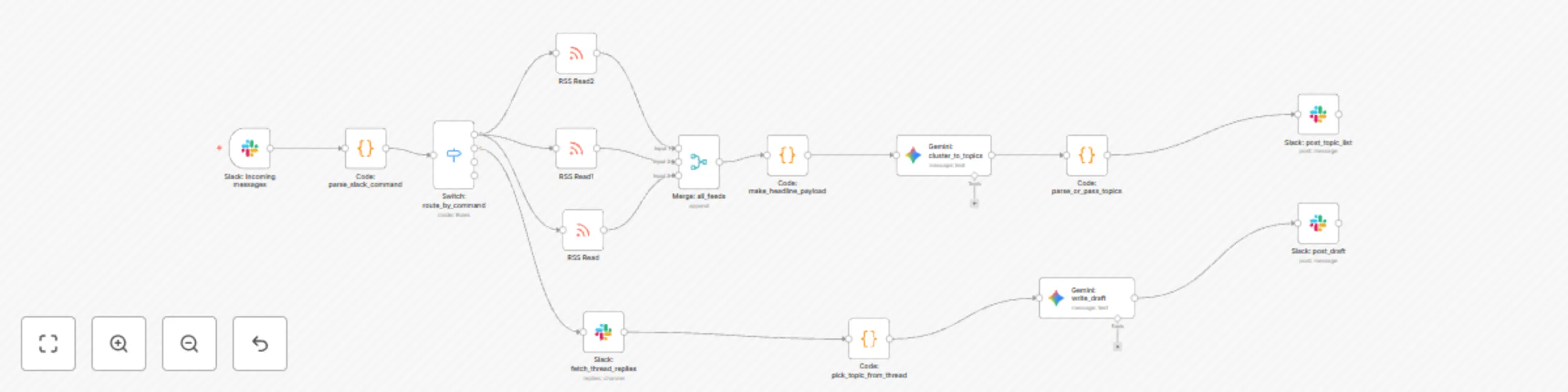
This workflow turns Slack into your content control hub and automates the full blog creation pipeline — from sourcing trending headlines, validating topics, drafting posts, and preparing content fo...
n8n-nodes-base.rssfeedread, n8n-nodes-base.slacktrigger, n8n-nodes-base.code, n8n-nodes-base.switch, n8n-nodes-base.merge, @n8n/n8n-nodes-langchain.googlegemini, n8n-nodes-base.slack
This workflow is cataloged by N8N Workflows and links back to its original n8n.io source page by Nijan.
Original n8n.io sourceThis workflow turns Slack into your content control hub and automates the full blog creation pipeline — from sourcing trending headlines, validating topics, drafting posts, and preparing content for your CMS.
With one command in Slack, you can source news from RSS feeds, refine them with Gemini AI, generate high-quality blog posts, and get publish-ready output — all inside a single n8n workflow.
⸻
**1.Trigger in Slack**

Type start in a Slack channel to fetch trending headlines.
Headlines are pulled from your configured RSS feeds.

**2.Topic Generation (Gemini AI)**

Gemini rewrites RSS headlines into unique, non-duplicate topics.
Slack displays these topics in a numbered list (e.g., reply with 2 to pick topic 2).

**3.Content Validation**
	When you reply with a number, Gemini validates and slightly rewrites the topic to ensure originality.
	Slack confirms the selected topic back to you.

**4.Content Creation**

	Gemini generates a LinkedIn/blog-style draft:
	Strong hook introduction
	3–5 bullet insights
	A closing takeaway and CTA
	Optionally suggests asset ideas (e.g., image, infographic).

**5.CMS-Ready Output**

Final draft is structured for publishing (markdown or plain text).
You can expand this workflow to automatically send the output to your CMS (WordPress, Ghost, Notion, etc.).
⸻
1.	Connect your Slack Bot to n8n.
2.	Configure your RSS Read nodes with feeds relevant to your niche.
3.	Add your Gemini API credentials in the AI node.
4.	Run the workflow:
	Type start in Slack → see trending topics.
	Reply with a number (e.g., gen 3) → get a generated blog draft in the same Slack thread.
⸻
•	Change RSS sources to match your industry.
•	Adjust Gemini prompts for tone (educational, casual, professional).
•	Add moderation filters (skip sensitive or irrelevant topics).
•	Connect the final output step to your CMS, Notion, or Google Docs for publishing.
⸻
•	One-stop flow: Sourcing → Validation → Writing → Publishing.
•	Hands-free control: Everything happens from Slack.
•	Flexible: Easily switch feeds, tone, or target CMS.
•	Scalable: Extend to newsletters, social posts, or knowledge bases.
This catalog entry is organized from the workflow JSON. The node-level section below shows the executable blocks available for review before importing the template.
| Workflow | Generate end-to-end blog content from Slack with Gemini AI and RSS feeds |
|---|---|
| Complexity | advanced |
| Nodes | 15 |
| Categories | Content Creation, Multimodal AI |
| Author | Nijan |
| Published | 28 Aug 2025 |
Use the JSON export at /data/workflows/7974/7974.json as the source template for this automation.
Open n8n, import the downloaded JSON, and review each node before activating the workflow.
Replace placeholder credentials, API keys, webhook URLs, account IDs, and environment-specific values with your own settings.
Run the workflow manually or in a staging workspace, inspect node output, and confirm downstream systems receive the expected data.
Enable the workflow only after testing, then monitor executions, errors, and rate limits during the first production runs.
Review imported nodes carefully before activation. This catalog entry is intended to help you inspect the workflow structure, understand required services, and find related templates faster.
Node names, credentials, schedules, webhook paths, and external service limits may need adjustment for your workspace.
This workflow turns Slack into your content control hub and automates the full blog creation pipeline — from sourcing trending headlines, validating topics, drafting posts, and preparing content fo...
Review the workflow JSON, configure any required credentials in n8n, and test the automation in a safe workspace before using it in production.
Yes. Use the block-by-block analysis and the downloadable JSON to inspect each node, then adjust credentials, prompts, schedules, filters, or destinations for your Content Creation, Multimodal AI use case.