Generate & deploy landing pages with GPT, Gemini and Vercel

Workflow preview

Workflow preview
100%
Generate & deploy landing pages with GPT, Gemini and Vercel preview
Open on n8n.io

Important notice

This workflow is provided as-is. Please review and test before using in production.

1. Workflow Overview

Who’s it for This workflow is for: People who want to quickly launch simple landing pages without paying monthly fees to landing page creators. It’s ideal for rapid prototyping, generation of large...

Best for

  • Content Creation automation workflows
  • Multimodal AI automation workflows
  • advanced n8n builders looking for reusable templates

Tools used

@n8n/n8n-nodes-langchain.googlegemini, n8n-nodes-base.openai, @n8n/n8n-nodes-langchain.chattrigger, @n8n/n8n-nodes-langchain.chat, n8n-nodes-base.httprequest, n8n-nodes-base.code, n8n-nodes-base.stickynote, n8n-nodes-base.datatable

Source and attribution

This workflow is cataloged by N8N Workflows and links back to its original n8n.io source page by Lachlan.

Original n8n.io source

1.1 Workflow description

Title
Generate & deploy landing pages with GPT, Gemini and Vercel
Workflow name
Generate & deploy landing pages with GPT, Gemini and Vercel

Who’s it for

This workflow is for:

  • People who want to quickly launch simple landing pages without paying monthly fees to landing page creators. It’s ideal for rapid prototyping, generation of large amounts of landing pages, testing campaign ideas, or generating quick web mockups with AI.
  • People launching products that compete in some way with the complete landing page solutions, and want to get an understanding of the basic building blocks of landing page creators

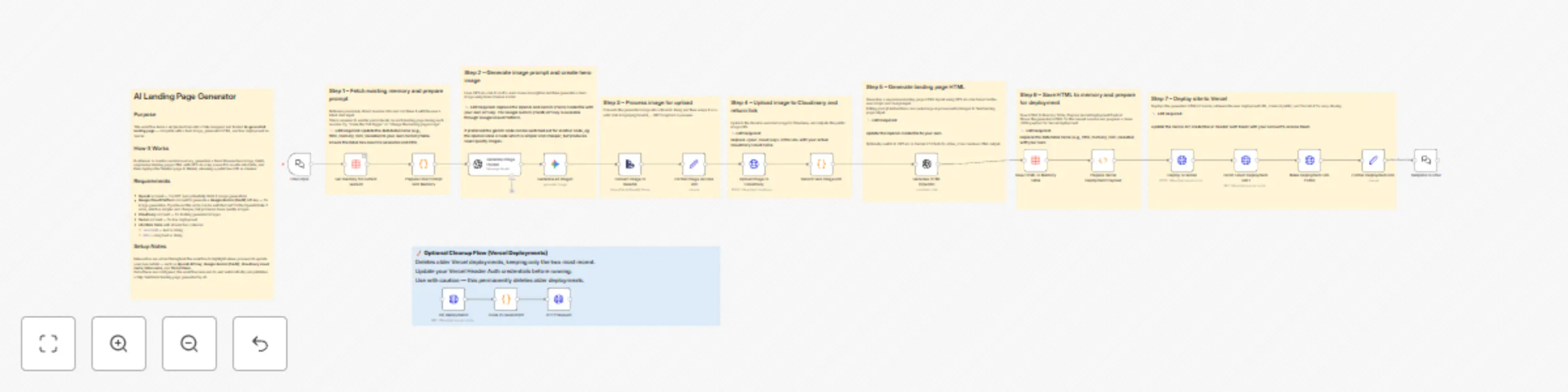
How it works / What it does

  • Retrieves or creates session data from n8n Tables
  • Generates a vivid scene description for the hero image using GPT
  • Creates a custom AI-generated hero image (using Gemini Palm or your preferred model)
  • Builds a responsive landing page layout with GPT-4o-mini
  • Saves the generated HTML to an n8n data table
  • Deploys the landing page to Vercel automatically
  • Returns the public live URL of the generated site

This workflow combines OpenAI, Google Gemini,Cloudinary, Vercel, and n8n Tables to create, store, and publish your webpage seamlessly from a single prompt.

How to set up

  1. Create an n8n Table with the following columns:

    • sessionID (text)
    • html (long text)
  2. Add your credentials:

    • OpenAI (for text and image generation)
    • Geminoogle Gemini (PaLM) - through the Google Cloud Platform (for text and image generation)
    • Cloudinary (for image upload)
    • Vercel (for live deployment)
  3. Update the placeholders as noted inside the workflow:

    • Cloudinary cloud name and upload preset
    • OpenAI model and API key
    • n8n table name and column mapping (sessionID, html)
    • Vercel Header Auth token
  4. Run the workflow. After configuration, it will generate, upload, deploy, and return the live landing page URL automatically.

Inline notes are included throughout the workflow indicating where you must update values such as credentials, table names, or API keys to make the flow work end to end.

Requirements

  • OpenAI API key
  • Google Gemini API key
  • Cloudinary account
  • Vercel account
  • n8n Table with sessionID and html columns

How to customize the workflow

  • Modify the OpenAI model or prompt to change the tone, layout, or visual style of the generated landing page.
  • Replace Vercel deployment with your preferred hosting platform (e.g., Netlify or GitHub Pages) if desired.
  • Add extra input fields (e.g., title, CTA, description) to collect richer context before generating the page.
  • Add ability to integreat with databases to turn into a full loveable/Base44 competitor

Result

After setup, this workflow automatically converts any idea into a fully designed and live landing page within seconds. It generates the hero image, builds the HTML layout, deploys it to Vercel, and provides the final shareable URL instantly.

Optional Cleanup Subflow

An additional utility subflow is included to help keep your Vercel project clean by deleting older deployments.
It preserves the two most recent deployments and deletes the rest.
Use with caution — only run it if you want to remove previous test pages and free up space in your Vercel account.

1.2 Logical Blocks

This catalog entry is organized from the workflow JSON. The node-level section below shows the executable blocks available for review before importing the template.

2. Block-by-Block Analysis

Block 1 - Generate an image1

Type / Role
@n8n/n8n-nodes-langchain.googleGemini - googleGemini
Config choices
Version 1

Block 2 - Generate HTML (OpenAI)

Type / Role
n8n-nodes-base.openAi - openAi
Config choices
Version 1

Block 3 - Chat input

Type / Role
@n8n/n8n-nodes-langchain.chatTrigger - chatTrigger
Config choices
Version 1.3

Block 4 - Respond to Chat

Type / Role
@n8n/n8n-nodes-langchain.chat - chat
Config choices
Version 1

Block 5 - Deploy to Vercel

Type / Role
n8n-nodes-base.httpRequest - httpRequest
Config choices
Version 4.2

Block 6 - list deployments

Type / Role
n8n-nodes-base.httpRequest - httpRequest
Config choices
Version 4.2

Block 7 - Code in JavaScript1

Type / Role
n8n-nodes-base.code - code
Config choices
Version 2

Block 8 - HTTP Request

Type / Role
n8n-nodes-base.httpRequest - httpRequest
Config choices
Version 4.2

Block 9 - Sticky Note

Type / Role
n8n-nodes-base.stickyNote - stickyNote
Config choices
Version 1

Block 10 - Get memory for current session

Type / Role
n8n-nodes-base.dataTable - dataTable
Config choices
Version 1

Block 11 - Sticky Note1

Type / Role
n8n-nodes-base.stickyNote - stickyNote
Config choices
Version 1

Block 12 - Prepare Chat Prompt with Memory

Type / Role
n8n-nodes-base.code - code
Config choices
Version 2

Block 13 - Generate Image Prompt

Type / Role
@n8n/n8n-nodes-langchain.openAi - openAi
Config choices
Version 1.8

Block 14 - Sticky Note3

Type / Role
n8n-nodes-base.stickyNote - stickyNote
Config choices
Version 1

Block 15 - Convert Image to Base64

Type / Role
n8n-nodes-base.extractFromFile - extractFromFile
Config choices
Version 1

Block 16 - Sticky Note5

Type / Role
n8n-nodes-base.stickyNote - stickyNote
Config choices
Version 1

Block 17 - Format Image as Data URI

Type / Role
n8n-nodes-base.set - set
Config choices
Version 3.4

Block 18 - Upload Image to Cloudinary

Type / Role
n8n-nodes-base.httpRequest - httpRequest
Config choices
Version 4.2

Block 19 - Sticky Note7

Type / Role
n8n-nodes-base.stickyNote - stickyNote
Config choices
Version 1

Block 20 - Return Hero Image URL

Type / Role
n8n-nodes-base.code - code
Config choices
Version 2

Block 21 - Sticky Note9

Type / Role
n8n-nodes-base.stickyNote - stickyNote
Config choices
Version 1

Block 22 - Sticky Note10

Type / Role
n8n-nodes-base.stickyNote - stickyNote
Config choices
Version 1

Block 23 - Sticky Note12

Type / Role
n8n-nodes-base.stickyNote - stickyNote
Config choices
Version 1

Block 24 - Save HTML to Memory Table

Type / Role
n8n-nodes-base.dataTable - dataTable
Config choices
Version 1

Showing the first 24 of 29 workflow blocks. Download the JSON for the full node graph.

3. Summary Table

Workflow Generate & deploy landing pages with GPT, Gemini and Vercel
Complexity advanced
Nodes 29
Categories Content Creation, Multimodal AI
Author Lachlan
Published 02 Nov 2025

4. Reproducing the Workflow from Scratch

  1. 1. Download the workflow JSON

    Use the JSON export at /data/workflows/10447/10447.json as the source template for this automation.

  2. 2. Import the template into n8n

    Open n8n, import the downloaded JSON, and review each node before activating the workflow.

  3. 3. Configure credentials and variables

    Replace placeholder credentials, API keys, webhook URLs, account IDs, and environment-specific values with your own settings.

  4. 4. Test with sample data

    Run the workflow manually or in a staging workspace, inspect node output, and confirm downstream systems receive the expected data.

  5. 5. Activate and monitor

    Enable the workflow only after testing, then monitor executions, errors, and rate limits during the first production runs.

5. General Notes & Resources

Review imported nodes carefully before activation. This catalog entry is intended to help you inspect the workflow structure, understand required services, and find related templates faster.

Node names, credentials, schedules, webhook paths, and external service limits may need adjustment for your workspace.

Frequently asked questions

What does Generate & deploy landing pages with GPT, Gemini and Vercel do?

Who’s it for This workflow is for: People who want to quickly launch simple landing pages without paying monthly fees to landing page creators. It’s ideal for rapid prototyping, generation of large...

What do I need before importing this workflow?

Review the workflow JSON, configure any required credentials in n8n, and test the automation in a safe workspace before using it in production.

Can I customize this workflow?

Yes. Use the block-by-block analysis and the downloadable JSON to inspect each node, then adjust credentials, prompts, schedules, filters, or destinations for your Content Creation, Multimodal AI use case.