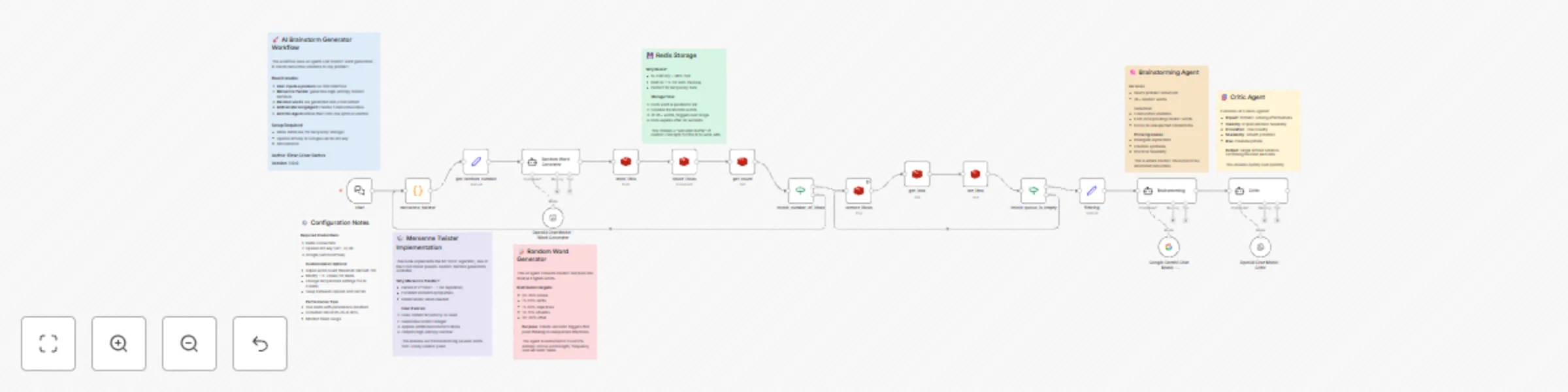
Generate creative solutions with dual AI agents, randomization & Redis

Workflow preview

Workflow preview
100%
Generate creative solutions with dual AI agents, randomization & Redis preview
Open on n8n.io

Important notice

This workflow is provided as-is. Please review and test before using in production.

1. Workflow Overview

AI Brainstorm Generator Break Through Creative Blocks Instantly Transform any problem into innovative solutions using AI powered brainstorming that combines mathematical randomness with intellig...

Best for

  • Content Creation automation workflows
  • AI Chatbot automation workflows
  • advanced n8n builders looking for reusable templates

Tools used

n8n-nodes-base.stickynote, @n8n/n8n-nodes-langchain.agent, n8n-nodes-base.code, n8n-nodes-base.redis, n8n-nodes-base.if, @n8n/n8n-nodes-langchain.chattrigger, @n8n/n8n-nodes-langchain.lmchatopenai, n8n-nodes-base.set

Source and attribution

This workflow is cataloged by N8N Workflows and links back to its original n8n.io source page by Einar César Santos.

Original n8n.io source

1.1 Workflow description

Title
Generate creative solutions with dual AI agents, randomization & Redis
Workflow name
Generate creative solutions with dual AI agents, randomization & Redis

🧠 AI Brainstorm Generator - Break Through Creative Blocks Instantly

Transform any problem into innovative solutions using AI-powered brainstorming that combines mathematical randomness with intelligent synthesis.

What This Workflow Does

This workflow generates creative, actionable solutions to any problem by combining:

  • Mersenne Twister algorithm for high-entropy random seed generation
  • AI-driven random word generation to create unexpected semantic triggers
  • Dual AI agents that brainstorm and refine ideas into polished solutions

Simply input your challenge via the chat interface, and within 2 minutes receive a professionally refined solution that combines the best elements from 5+ innovative ideas.

Key Features

Consistent Creativity - Works regardless of your mental state or time of day
🎲 True Randomness - MT19937 algorithm ensures no pattern repetition
🤖 Multi-Model Support - Works with OpenAI GPT-4 or Google Gemini
Fast Results - Complete solutions in under 2 minutes
🔄 Self-Cleaning - Redis data expires automatically after use

Use Cases

  • Product ideation and feature development
  • Marketing campaign concepts
  • Problem-solving for technical challenges
  • Business strategy innovation
  • Creative writing prompts
  • Workshop facilitation

Requirements

  • Redis database (local or cloud)
  • OpenAI API key (GPT-4) OR Google Gemini API key
  • n8n instance (self-hosted or cloud)

How It Works

  1. User inputs problem via chat trigger
  2. Mersenne Twister generates high-entropy random numbers
  3. AI generates 36+ random words as creative triggers
  4. Brainstorming Agent creates 5 innovative solutions
  5. Critic Agent synthesizes the best elements into one refined solution

Perfect for teams facing innovation challenges, solo entrepreneurs seeking fresh perspectives, or anyone who needs to break through creative blocks reliably.

Setup Time: ~10 minutes
Difficulty: Intermediate
Support: Full documentation included via sticky notes


1.2 Logical Blocks

This catalog entry is organized from the workflow JSON. The node-level section below shows the executable blocks available for review before importing the template.

2. Block-by-Block Analysis

Block 1 - Welcome & Overview

Type / Role
n8n-nodes-base.stickyNote - stickyNote
Config choices
Version 1

Block 2 - Mersenne Twister Explanation

Type / Role
n8n-nodes-base.stickyNote - stickyNote
Config choices
Version 1

Block 3 - Word Generator Note

Type / Role
n8n-nodes-base.stickyNote - stickyNote
Config choices
Version 1

Block 4 - Redis Storage Note

Type / Role
n8n-nodes-base.stickyNote - stickyNote
Config choices
Version 1

Block 5 - Brainstorming Agent Note

Type / Role
n8n-nodes-base.stickyNote - stickyNote
Config choices
Version 1

Block 6 - Critic Agent Note

Type / Role
n8n-nodes-base.stickyNote - stickyNote
Config choices
Version 1

Block 7 - Configuration Notes

Type / Role
n8n-nodes-base.stickyNote - stickyNote
Config choices
Version 1

Block 8 - Random Word Generator

Type / Role
@n8n/n8n-nodes-langchain.agent - agent
Config choices
Version 2.2

Block 9 - mersenne_twister

Type / Role
n8n-nodes-base.code - code
Config choices
Version 2

Block 10 - store_idea

Type / Role
n8n-nodes-base.redis - redis
Config choices
Version 1

Block 11 - count_ideas

Type / Role
n8n-nodes-base.redis - redis
Config choices
Version 1

Block 12 - get_count

Type / Role
n8n-nodes-base.redis - redis
Config choices
Version 1

Block 13 - check_queue_is_empty

Type / Role
n8n-nodes-base.if - if
Config choices
Version 2.2

Block 14 - extract_ideas

Type / Role
n8n-nodes-base.redis - redis
Config choices
Version 1

Block 15 - get_idea

Type / Role
n8n-nodes-base.redis - redis
Config choices
Version 1

Block 16 - set_idea

Type / Role
n8n-nodes-base.redis - redis
Config choices
Version 1

Block 17 - Brainstorming

Type / Role
@n8n/n8n-nodes-langchain.agent - agent
Config choices
Version 2.2

Block 18 - chat

Type / Role
@n8n/n8n-nodes-langchain.chatTrigger - chatTrigger
Config choices
Version 1.3

Block 19 - OpenAI Chat Model - Critic

Type / Role
@n8n/n8n-nodes-langchain.lmChatOpenAi - lmChatOpenAi
Config choices
Version 1.2

Block 20 - check_number_of_ideas

Type / Role
n8n-nodes-base.if - if
Config choices
Version 2.2

Block 21 - filtering

Type / Role
n8n-nodes-base.set - set
Config choices
Version 3.4

Block 22 - get_random_number

Type / Role
n8n-nodes-base.set - set
Config choices
Version 3.4

Block 23 - Critic

Type / Role
@n8n/n8n-nodes-langchain.agent - agent
Config choices
Version 2.2

Block 24 - OpenAI Chat Model - Word Generator

Type / Role
@n8n/n8n-nodes-langchain.lmChatOpenAi - lmChatOpenAi
Config choices
Version 1.2

Showing the first 24 of 25 workflow blocks. Download the JSON for the full node graph.

3. Summary Table

Workflow Generate creative solutions with dual AI agents, randomization & Redis
Complexity advanced
Nodes 25
Categories Content Creation, AI Chatbot
Author Einar César Santos
Published 08 Sept 2025

4. Reproducing the Workflow from Scratch

  1. 1. Download the workflow JSON

    Use the JSON export at /data/workflows/8383/8383.json as the source template for this automation.

  2. 2. Import the template into n8n

    Open n8n, import the downloaded JSON, and review each node before activating the workflow.

  3. 3. Configure credentials and variables

    Replace placeholder credentials, API keys, webhook URLs, account IDs, and environment-specific values with your own settings.

  4. 4. Test with sample data

    Run the workflow manually or in a staging workspace, inspect node output, and confirm downstream systems receive the expected data.

  5. 5. Activate and monitor

    Enable the workflow only after testing, then monitor executions, errors, and rate limits during the first production runs.

5. General Notes & Resources

Review imported nodes carefully before activation. This catalog entry is intended to help you inspect the workflow structure, understand required services, and find related templates faster.

Node names, credentials, schedules, webhook paths, and external service limits may need adjustment for your workspace.

Frequently asked questions

What does Generate creative solutions with dual AI agents, randomization & Redis do?

AI Brainstorm Generator Break Through Creative Blocks Instantly Transform any problem into innovative solutions using AI powered brainstorming that combines mathematical randomness with intellig...

What do I need before importing this workflow?

Review the workflow JSON, configure any required credentials in n8n, and test the automation in a safe workspace before using it in production.

Can I customize this workflow?

Yes. Use the block-by-block analysis and the downloadable JSON to inspect each node, then adjust credentials, prompts, schedules, filters, or destinations for your Content Creation, AI Chatbot use case.