Block 1 - On form submission
- Type / Role
- n8n-nodes-base.formTrigger - formTrigger
- Config choices
- Version 2.3


 Early Deal
This workflow is provided as-is. Please review and test before using in production.
In this tutorial, I’ll walk you through a step by step N8N workflow that combines the power of OpenAI and Claude AI to generate professional, ready to use lead magnet plans for any niche. This work...
n8n-nodes-base.formtrigger, @n8n/n8n-nodes-langchain.openai, n8n-nodes-base.splitout, n8n-nodes-base.aggregate, n8n-nodes-base.googledocs, n8n-nodes-base.markdown, n8n-nodes-base.httprequest, n8n-nodes-base.set
This workflow is cataloged by N8N Workflows and links back to its original n8n.io source page by Santhej Kallada.
Original n8n.io sourceIn this tutorial, I’ll walk you through a step-by-step N8N workflow that combines the power of OpenAI and Claude AI to generate professional, ready-to-use lead magnet plans for any niche.
This workflow helps marketers, agencies, and freelancers create engaging lead magnets — such as guides, blueprints, and checklists — with zero manual writing and complete AI automation.
Marketers and content strategists creating high-converting lead magnets
Agencies looking to scale client content deliverables
Freelancers offering marketing automation services
Anyone who wants to combine AI + automation for efficient content creation
Manually writing lead magnets can be slow and inconsistent. This workflow eliminates that by:
Using OpenAI and Claude AI to co-create detailed content frameworks
Automating research, structure, and formatting of lead magnet documents
Allowing full customization for different industries or audiences
Reducing production time from hours to minutes
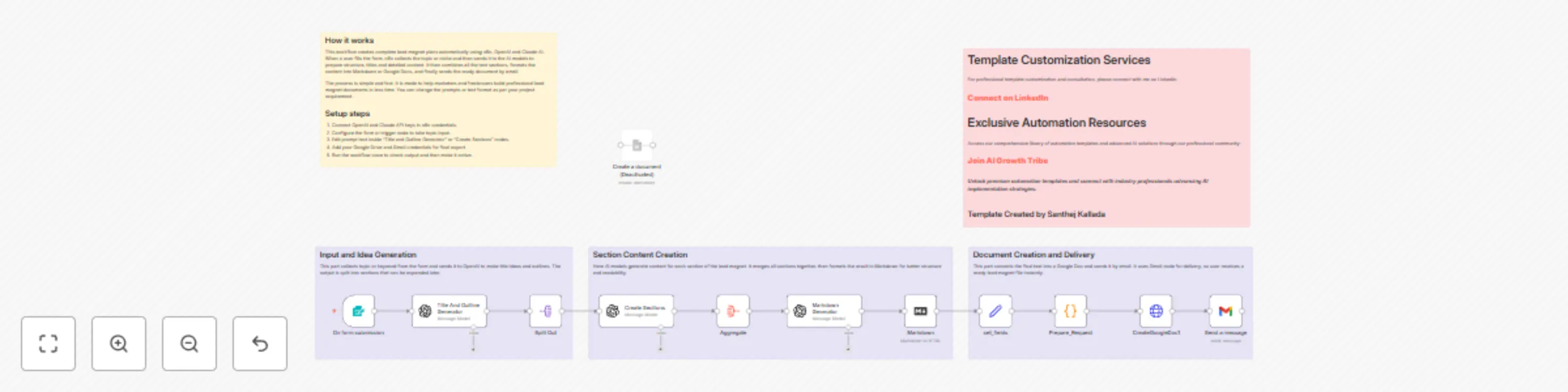
This automation connects OpenAI, Claude AI, and Google Drive (or Docs) inside n8n to produce well-structured lead magnet documents.
The process includes:
Collecting a topic or niche input from a form or webhook.
Generating an outline and content blocks using OpenAI.
Refining, expanding, and organizing the text using Claude AI.
Formatting the content and converting it to clean HTML or Google Docs format.
Saving or uploading the final version to Google Drive or Notion.
By the end of the tutorial, you’ll have a fully automated content agent that builds lead magnet plans from scratch — ready to deliver to clients or publish instantly.
Sign up for n8n.io.
Obtain API access for OpenAI, Claude (via OpenRouter), and Google Drive API.
Use a Form Trigger or Webhook Node to capture topic input.
Add OpenAI Node to generate structure and section ideas.
Add HTTP Request Node for Claude API (OpenRouter) to expand sections into polished paragraphs.
Use a Function Node to merge sections and format them into Markdown or HTML.
Add Google Drive Node to upload or store the final file.
Input a test topic (e.g., “Dental Marketing Blueprint”).
Wait for the AI to generate, merge, and store your lead magnet content automatically.
Modify prompt templates to fit your target audience or writing style.
Integrate Notion, Airtable, or Slack for automatic delivery.
Add a scheduling trigger (e.g., weekly lead magnet generation).
Incorporate branding or styling logic using Markdown → HTML conversion.
Expand prompts for multilingual or niche-specific lead magnets.
This workflow requires API keys for both OpenAI and Claude (via OpenRouter).
Ensure proper handling of text formatting nodes to avoid Markdown errors.
Google Drive integration requires OAuth setup in n8n credentials.
Works on both n8n Cloud and self-hosted environments.
This catalog entry is organized from the workflow JSON. The node-level section below shows the executable blocks available for review before importing the template.
| Workflow | Generate complete lead magnets with OpenAI, Claude, and Google Docs automation |
|---|---|
| Complexity | advanced |
| Nodes | 17 |
| Categories | Content Creation, Multimodal AI |
| Author | Santhej Kallada |
| Published | 04 Nov 2025 |
Use the JSON export at /data/workflows/10489/10489.json as the source template for this automation.
Open n8n, import the downloaded JSON, and review each node before activating the workflow.
Replace placeholder credentials, API keys, webhook URLs, account IDs, and environment-specific values with your own settings.
Run the workflow manually or in a staging workspace, inspect node output, and confirm downstream systems receive the expected data.
Enable the workflow only after testing, then monitor executions, errors, and rate limits during the first production runs.
Review imported nodes carefully before activation. This catalog entry is intended to help you inspect the workflow structure, understand required services, and find related templates faster.
Node names, credentials, schedules, webhook paths, and external service limits may need adjustment for your workspace.
In this tutorial, I’ll walk you through a step by step N8N workflow that combines the power of OpenAI and Claude AI to generate professional, ready to use lead magnet plans for any niche. This work...
Review the workflow JSON, configure any required credentials in n8n, and test the automation in a safe workspace before using it in production.
Yes. Use the block-by-block analysis and the downloadable JSON to inspect each node, then adjust credentials, prompts, schedules, filters, or destinations for your Content Creation, Multimodal AI use case.