Generate competitor-style image ads from your product photos with Gemini

Workflow preview

Workflow preview
100%
Generate competitor-style image ads from your product photos with Gemini preview
Open on n8n.io

1. Workflow Overview

Image Ad Cloner AI Agent This n8n workflow automates “cloning” a competitor ad style and re generating it using your product image. A user uploads your product image and provides a competitor ad UR...

Best for

  • Content Creation automation workflows
  • Multimodal AI automation workflows
  • intermediate n8n builders looking for reusable templates

Tools used

n8n-nodes-base.formtrigger, n8n-nodes-base.httprequest, n8n-nodes-base.extractfromfile, n8n-nodes-base.converttofile, n8n-nodes-base.set, n8n-nodes-base.stickynote, n8n-nodes-base.wait

Source and attribution

This workflow is cataloged by N8N Workflows and links back to its original n8n.io source page by Pratyush Kumar Jha.

Original n8n.io source

1.1 Workflow description

Title
Generate competitor-style image ads from your product photos with Gemini
Workflow name
Generate competitor-style image ads from your product photos with Gemini

Image Ad Cloner AI Agent

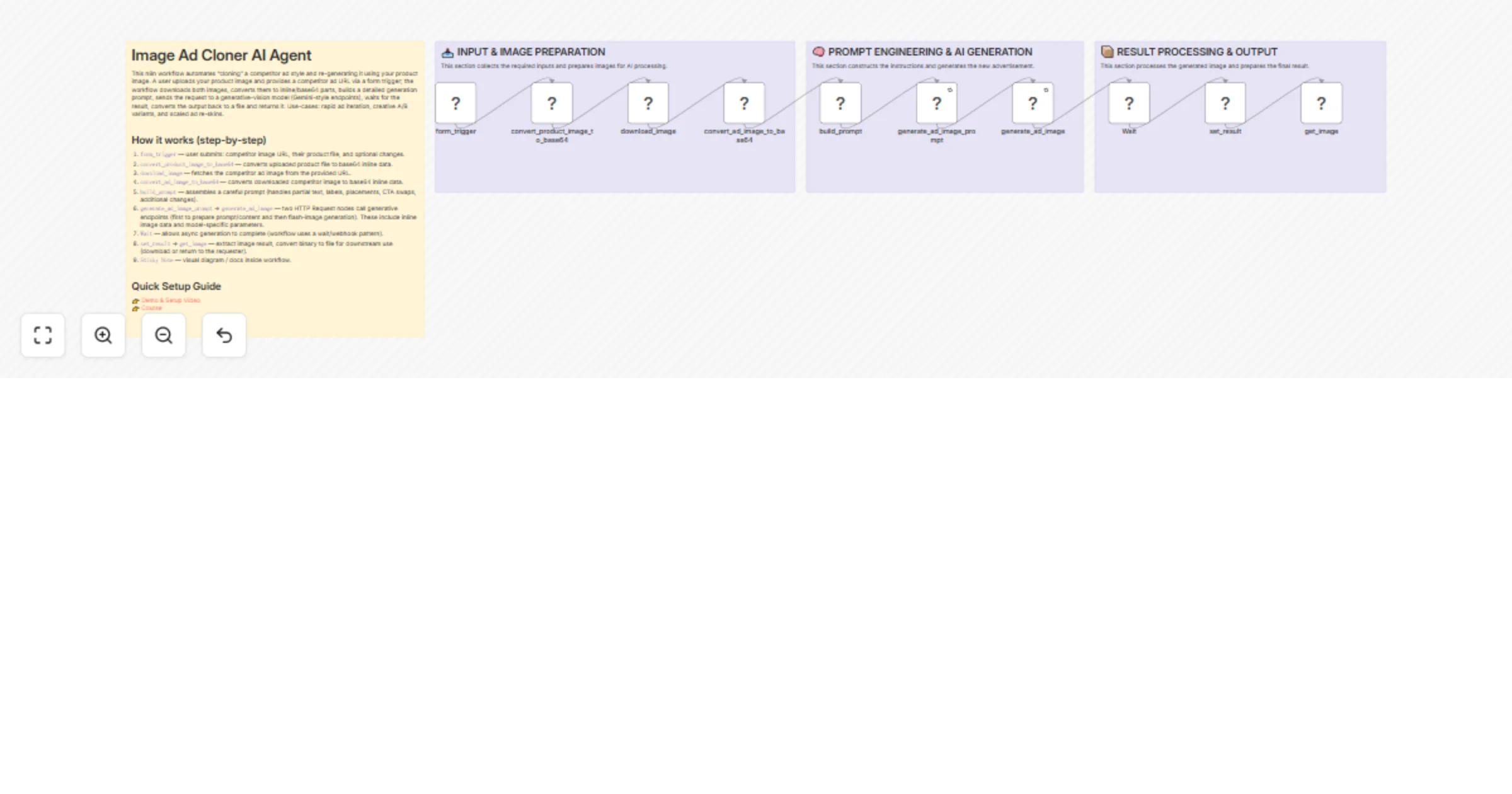
This n8n workflow automates “cloning” a competitor ad style and re-generating it using your product image. A user uploads your product image and provides a competitor ad URL via a form trigger; the workflow downloads both images, converts them to inline/base64 parts, builds a detailed generation prompt, sends the request to a generative-vision model (Gemini-style endpoints), waits for the result, converts the output back to a file and returns it. Use-cases: rapid ad iteration, creative A/B variants, and scaled ad re-skins.


How it works (step-by-step)

  1. form_trigger — user submits: competitor image URL, their product file, and optional changes.
  2. convert_product_image_to_base64 — converts uploaded product file to base64 inline data.
  3. download_image — fetches the competitor ad image from the provided URL.
  4. convert_ad_image_to_base64 — converts downloaded competitor image to base64 inline data.
  5. build_prompt — assembles a careful prompt (handles partial text, labels, placements, CTA swaps, additional changes).
  6. generate_ad_image_promptgenerate_ad_image — two HTTP Request nodes call generative endpoints (first to prepare prompt/content and then flash-image generation). These include inline image data and model-specific parameters.
  7. Wait — allows async generation to complete (workflow uses a wait/webhook pattern).
  8. set_resultget_image — extract image result, convert binary to file for downstream use (download or return to the requester).
  9. Sticky Note — visual diagram / docs inside workflow.

Quick Setup Guide

👉 Demo & Setup Video 👉 Course


Nodes of interest

  • form_trigger (n8n-nodes-base.formTrigger) — entry point; validates inputs.
  • convert_product_image_to_base64 & convert_ad_image_to_base64 (extractFromFile) — convert uploaded/downloaded binaries to inline/base64 data for the model.
  • download_image (httpRequest) — fetches competitor image URL. Add robust URL validation.
  • build_prompt (set) — builds the natural-language prompt that instructs the model how to replace branding, packaging, and CTAs.
  • generate_ad_image_prompt & generate_ad_image (httpRequest) — POST to generative APIs (examples use Gemini endpoints). Have retry/backoff settings.
  • Wait — used to allow model generation to complete before extracting results.
  • set_result / get_image / convertToFile — assemble the final binary file to deliver to the user.

What you’ll need (credentials & permissions)

  • n8n account with Workflow active toggle & webhook exposure (or self-hosted endpoint).
  • HTTP credential(s) for your generative model provider:
  • Header auth credential for any required custom headers (httpHeaderAuth).
  • Bearer token credential for the model API (httpBearerAuth).
  • (Optional) Generic HTTP auth if using proxies or intermediate APIs.
  • Storage (optional): S3 or other if you want to persist generated images.
  • (Recommended) An OCR or moderation service API key if you plan to detect/remove copyrighted logos or PII.
  • Ensure your hosting domain allows outbound HTTPS to the model endpoints and that webhook URLs are reachable.

Recommended settings & best practices

  • Input validation: enforce allowed mime types (jpg, png, webp), max file size (e.g., 5–10 MB), and sanitize competitor URL domain whitelist.
  • Retries & backoff: use retryOnFail and waitBetweenTries for httpRequest nodes (example uses retryOnFail: true and waitBetweenTries: 5000). Limit retries to avoid abuse.
  • Rate limits & quotas: guard calls to the model API with rate-limiting / queueing to avoid hitting provider quotas.
  • Ethics & copyright check: run OCR/logo-detect and flag requests that attempt to reproduce trademarked content; require human approval before creating ads that replicate competitor branding.
  • Partial-text handling: include logic in the prompt (and optionally OCR pre-check) to identify fragment text on packaging and replace it correctly with your brand text.
  • Binary handling: always set and preserve correct mime_type in inline data (png/jpeg) to avoid corrupt outputs.
  • Webhooks & timeouts: set a sensible Wait time and webhook timeout; provide progress/error messages back to the requester.
  • Logging & monitoring: capture model responses and node errors to troubleshoot prompt issues and image artifacts. Obfuscate tokens in logs.
  • Security: store API keys in n8n credentials (never as plain text in Set nodes). Use least privilege.

Customization ideas

  • Add an OCR node (e.g., Tesseract or cloud OCR) prior to build_prompt to detect and list text to replace automatically.
  • Add a logo mask step to blur or remove competitor logos before feeding to the generator.
  • Generate multiple variants per request (different CTAs, color palettes) and save them for A/B testing.
  • Add human-in-the-loop: store generated images in a review queue and send approval emails/webhooks before final download.
  • Integrate analytics: tag generated ads and push metadata (prompt, model used, timestamp) to a database for later analysis.
  • Replace Gemini endpoints with other providers or allow a model selector UI option.
  • Add automatic compliance moderation filters and a “safe mode” toggle that refuses disallowed transformations.

Tags

image-ad-cloner, n8n, gemini, generative-ai, image-editing, ad-cloning, automation, form-trigger, viral

1.2 Logical Blocks

This catalog entry is organized from the workflow JSON. The node-level section below shows the executable blocks available for review before importing the template.

2. Block-by-Block Analysis

Block 1 - form_trigger

Type / Role
n8n-nodes-base.formTrigger - formTrigger
Config choices
Version 2.2

Block 2 - download_image

Type / Role
n8n-nodes-base.httpRequest - httpRequest
Config choices
Version 4.2

Block 3 - convert_ad_image_to_base64

Type / Role
n8n-nodes-base.extractFromFile - extractFromFile
Config choices
Version 1

Block 4 - get_image

Type / Role
n8n-nodes-base.convertToFile - convertToFile
Config choices
Version 1.1

Block 5 - set_result

Type / Role
n8n-nodes-base.set - set
Config choices
Version 3.4

Block 6 - convert_product_image_to_base64

Type / Role
n8n-nodes-base.extractFromFile - extractFromFile
Config choices
Version 1

Block 7 - generate_ad_image_prompt

Type / Role
n8n-nodes-base.httpRequest - httpRequest
Config choices
Version 4.2

Block 8 - generate_ad_image

Type / Role
n8n-nodes-base.httpRequest - httpRequest
Config choices
Version 4.2

Block 9 - build_prompt

Type / Role
n8n-nodes-base.set - set
Config choices
Version 3.4

Block 10 - Sticky Note

Type / Role
n8n-nodes-base.stickyNote - stickyNote
Config choices
Version 1

Block 11 - Wait

Type / Role
n8n-nodes-base.wait - wait
Config choices
Version 1.1

Block 12 - Sticky Note1

Type / Role
n8n-nodes-base.stickyNote - stickyNote
Config choices
Version 1

Block 13 - Sticky Note2

Type / Role
n8n-nodes-base.stickyNote - stickyNote
Config choices
Version 1

Block 14 - Sticky Note3

Type / Role
n8n-nodes-base.stickyNote - stickyNote
Config choices
Version 1

3. Summary Table

Workflow Generate competitor-style image ads from your product photos with Gemini
Complexity intermediate
Nodes 14
Categories Content Creation, Multimodal AI
Author Pratyush Kumar Jha
Published 04 Feb 2026

4. Reproducing the Workflow from Scratch

  1. 1. Download the workflow JSON

    Use the JSON export at /data/workflows/13209/13209.json as the source template for this automation.

  2. 2. Import the template into n8n

    Open n8n, import the downloaded JSON, and review each node before activating the workflow.

  3. 3. Configure credentials and variables

    Replace placeholder credentials, API keys, webhook URLs, account IDs, and environment-specific values with your own settings.

  4. 4. Test with sample data

    Run the workflow manually or in a staging workspace, inspect node output, and confirm downstream systems receive the expected data.

  5. 5. Activate and monitor

    Enable the workflow only after testing, then monitor executions, errors, and rate limits during the first production runs.

5. General Notes & Resources

Review imported nodes carefully before activation. This catalog entry is intended to help you inspect the workflow structure, understand required services, and find related templates faster.

Node names, credentials, schedules, webhook paths, and external service limits may need adjustment for your workspace.

Frequently asked questions

What does Generate competitor-style image ads from your product photos with Gemini do?

Image Ad Cloner AI Agent This n8n workflow automates “cloning” a competitor ad style and re generating it using your product image. A user uploads your product image and provides a competitor ad UR...

What do I need before importing this workflow?

Review the workflow JSON, configure any required credentials in n8n, and test the automation in a safe workspace before using it in production.

Can I customize this workflow?

Yes. Use the block-by-block analysis and the downloadable JSON to inspect each node, then adjust credentials, prompts, schedules, filters, or destinations for your Content Creation, Multimodal AI use case.