Block 1 - When clicking ‘Test workflow’
- Type / Role
- n8n-nodes-base.manualTrigger - manualTrigger
- Config choices
- Version 1


 Early Deal
This workflow is provided as-is. Please review and test before using in production.
Who this is for? The LinkedIn Company Story Generator is an automated workflow that extracts company profile data from LinkedIn using Bright Data's web scraping infrastructure, then transforms that...
n8n-nodes-base.manualtrigger, @n8n/n8n-nodes-langchain.lmchatgooglegemini, @n8n/n8n-nodes-langchain.documentdefaultdataloader, @n8n/n8n-nodes-langchain.textsplitterrecursivecharactertextsplitter, n8n-nodes-base.if, n8n-nodes-base.set, n8n-nodes-base.httprequest, n8n-nodes-base.stickynote
This workflow is cataloged by N8N Workflows and links back to its original n8n.io source page by Ranjan Dailata.
Original n8n.io sourceThe LinkedIn Company Story Generator is an automated workflow that extracts company profile data from LinkedIn using Bright Data's web scraping infrastructure, then transforms that data into a professionally written narrative or story using a language model (e.g., OpenAI, Gemini). The final output is sent via webhook notification, making it easy to publish, review, or further automate.
This workflow is tailored for:
Marketing Professionals: Seeking to generate compelling company narratives for campaigns.
Sales Teams: Aiming to understand potential clients through summarized company insights.
Content Creators: Looking to craft stories or articles based on company data.
Recruiters: Interested in obtaining concise overviews of companies for talent acquisition strategies.
Manually gathering and summarizing company information from LinkedIn can be time-consuming and inconsistent. This workflow automates the process, ensuring:
Efficiency: Quick extraction and summarization of company data.
Consistency: Standardized summaries for uniformity across use cases.
Scalability: Ability to process multiple companies without additional manual effort.
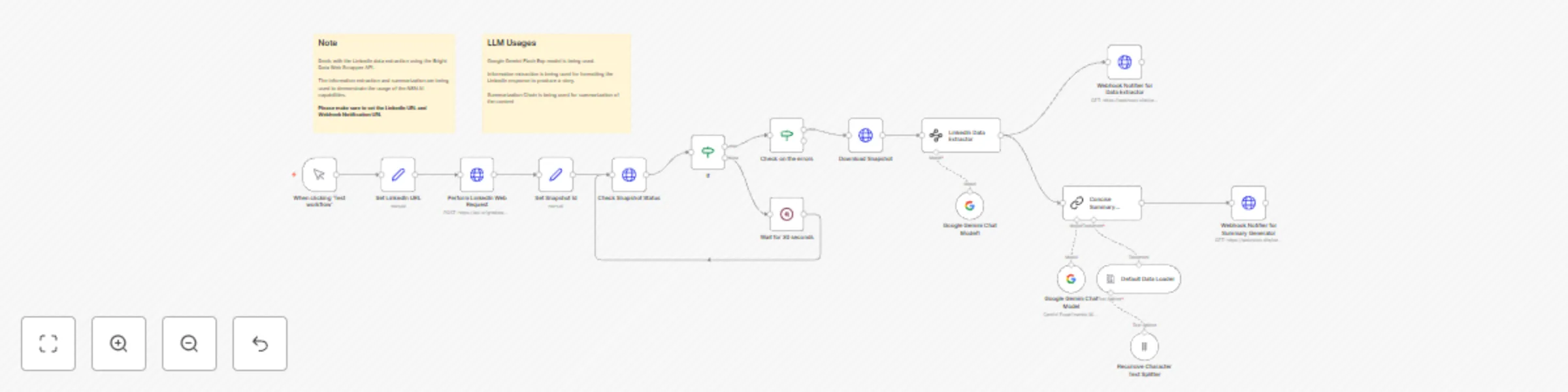
The workflow performs the following steps:
Input Acquisition: Receives a company's name or LinkedIn URL as input.
Data Extraction: Utilizes Bright Data to scrape the company's LinkedIn profile.
Information Parsing: Processes the extracted HTML content to retrieve relevant company details.
Summarization: Employs AI Google Gemini to generate a concise company story.
Output Delivery: Sends the summarized content to a specified webhook or email address.
Input Variations: Modify the Set LinkedIn URL node to accept a different company LinkedIn URL.
Data Points: Adjust the HTML Data Extractor Node to retrieve additional details like employee count, industry, or headquarters location.
Summarization Style: Customize the AI prompt to generate summaries in different tones or formats (e.g., formal, casual, bullet points).
Output Destinations: Configure the output node to send summaries to various platforms, such as Slack, CRM systems, or databases.
This catalog entry is organized from the workflow JSON. The node-level section below shows the executable blocks available for review before importing the template.
| Workflow | Generate company stories from LinkedIn with Bright Data & Google Gemini |
|---|---|
| Complexity | advanced |
| Nodes | 19 |
| Categories | Content Creation, Multimodal AI |
| Author | Ranjan Dailata |
| Published | 13 Apr 2025 |
Use the JSON export at /data/workflows/3540/3540.json as the source template for this automation.
Open n8n, import the downloaded JSON, and review each node before activating the workflow.
Replace placeholder credentials, API keys, webhook URLs, account IDs, and environment-specific values with your own settings.
Run the workflow manually or in a staging workspace, inspect node output, and confirm downstream systems receive the expected data.
Enable the workflow only after testing, then monitor executions, errors, and rate limits during the first production runs.
Review imported nodes carefully before activation. This catalog entry is intended to help you inspect the workflow structure, understand required services, and find related templates faster.
Node names, credentials, schedules, webhook paths, and external service limits may need adjustment for your workspace.
Who this is for? The LinkedIn Company Story Generator is an automated workflow that extracts company profile data from LinkedIn using Bright Data's web scraping infrastructure, then transforms that...
Review the workflow JSON, configure any required credentials in n8n, and test the automation in a safe workspace before using it in production.
Yes. Use the block-by-block analysis and the downloadable JSON to inspect each node, then adjust credentials, prompts, schedules, filters, or destinations for your Content Creation, Multimodal AI use case.