Block 1 - Extract from File2
- Type / Role
- n8n-nodes-base.extractFromFile - extractFromFile
- Config choices
- Version 1.1


 Early Deal
Overview This n8n workflow automatically generates professional API documentation from C header ( ) files using AI. It scans a Google Drive folder for header files, extracts the source code, sen...
n8n-nodes-base.extractfromfile, n8n-nodes-base.manualtrigger, n8n-nodes-base.stickynote, n8n-nodes-base.googledrive, n8n-nodes-base.code, n8n-nodes-base.splitinbatches, n8n-nodes-base.gmail, @n8n/n8n-nodes-langchain.openai
This workflow is cataloged by N8N Workflows and links back to its original n8n.io source page by Tejasv Makkar.
Original n8n.io sourceThis n8n workflow automatically generates professional API documentation from C header (.h) files using AI.
It scans a Google Drive folder for header files, extracts the source code, sends it to GPT-4o for structured analysis, and generates a beautiful HTML documentation page. The final documentation is uploaded back to Google Drive and a completion email is sent.
This workflow is ideal for embedded systems teams, firmware engineers, and SDK developers who want an automated documentation pipeline.
⚡ Fully automated documentation generation
📁 Reads .h files directly from Google Drive
🤖 Uses AI to analyze C APIs and extract documentation
📑 Generates clean HTML documentation
📊 Documents functions, types, enums, and constants
🔁 Processes files one-by-one for reliability
☁️ Saves generated documentation back to Google Drive
📧 Sends a completion email notification
The workflow automatically identifies and documents:
The output is a clean developer-friendly HTML documentation page including:
Perfect for:
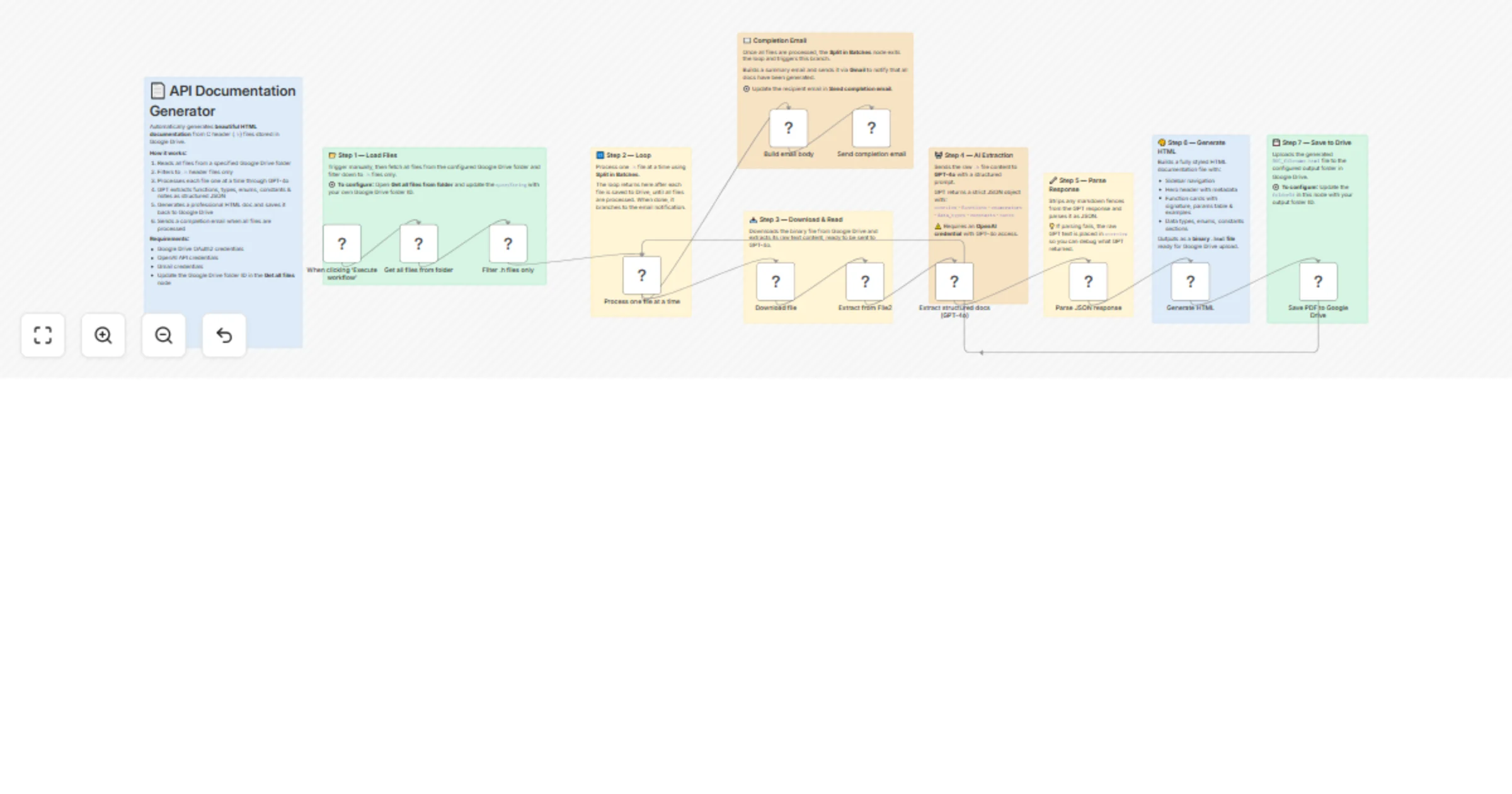
| Step | Node | Purpose |
|---|---|---|
| 1 | ▶️ Manual Trigger | Starts the workflow |
| 2 | 📂 Get all files | Reads files from Google Drive |
| 3 | 🔎 Filter .h files |
Keeps only header files |
| 4 | 🔁 Split in Batches | Processes files sequentially |
| 5 | ⬇️ Download file | Downloads the header file |
| 6 | 📖 Extract text | Extracts code content |
| 7 | 🤖 AI Extraction | AI extracts API structure |
| 8 | 🧹 Parse JSON | Cleans AI output |
| 9 | 🎨 Generate HTML | Builds documentation page |
| 10 | ☁️ Upload to Drive | Saves documentation |
| 11 | 📧 Email notification | Sends completion email |
To run this workflow you need:
🔹 Google Drive OAuth2 credentials 🔹 OpenAI API credentials 🔹 Gmail credentials
Create two folders.
Source folder
Output folder
Update the folder IDs in the nodes:
Get all files from folderSave documentation to Google DriveAdd an OpenAI credential in n8n.
Model used:
The model analyzes C header files and returns structured API documentation.
Add a Gmail OAuth credential.
Update the recipient address inside:
Click Execute Workflow.
The workflow will:
1️⃣ Scan the Google Drive folder
2️⃣ Process each .h file
3️⃣ Generate HTML documentation
4️⃣ Upload documentation to Drive
5️⃣ Send a completion email
🔧 Embedded firmware documentation 📦 SDK documentation generation 🧑💻 Developer portal automation 📚 C library documentation ⚙️ Continuous documentation pipelines
This workflow can be extended with several enhancements:
Add a step to convert the generated HTML documentation into PDF files using tools such as:
This allows teams to distribute documentation as downloadable reports.
Instead of using the OpenAI node, the workflow can be modified to run fully locally using AI models such as:
These models can run on your own server, which provides:
🔒 Better data privacy 🏢 No external API calls ⚡ Faster responses on local infrastructure 🛡 Increased security for proprietary source code
This can be implemented in n8n using:
The workflow could also support additional languages such as: .c .cpp .hpp .rs .go
This catalog entry is organized from the workflow JSON. The node-level section below shows the executable blocks available for review before importing the template.
| Workflow | Generate C API HTML docs from Google Drive headers with GPT-4o and Gmail |
|---|---|
| Complexity | advanced |
| Nodes | 21 |
| Categories | Document Extraction, AI Summarization |
| Author | Tejasv Makkar |
| Published | 16 Mar 2026 |
Use the JSON export at /data/workflows/14093/14093.json as the source template for this automation.
Open n8n, import the downloaded JSON, and review each node before activating the workflow.
Replace placeholder credentials, API keys, webhook URLs, account IDs, and environment-specific values with your own settings.
Run the workflow manually or in a staging workspace, inspect node output, and confirm downstream systems receive the expected data.
Enable the workflow only after testing, then monitor executions, errors, and rate limits during the first production runs.
Review imported nodes carefully before activation. This catalog entry is intended to help you inspect the workflow structure, understand required services, and find related templates faster.
Node names, credentials, schedules, webhook paths, and external service limits may need adjustment for your workspace.
Overview This n8n workflow automatically generates professional API documentation from C header ( ) files using AI. It scans a Google Drive folder for header files, extracts the source code, sen...
Review the workflow JSON, configure any required credentials in n8n, and test the automation in a safe workspace before using it in production.
Yes. Use the block-by-block analysis and the downloadable JSON to inspect each node, then adjust credentials, prompts, schedules, filters, or destinations for your Document Extraction, AI Summarization use case.