Block 1 - Wait
- Type / Role
- n8n-nodes-base.wait - wait
- Config choices
- Version 1.1


 Early Deal
This workflow is provided as-is. Please review and test before using in production.
What this workflow does This workflow automatically turns a topic and a reference image URL into a finished, branded article image. It uses GPT 4o to generate a short, detailed image prompt, sen...
n8n-nodes-base.wait, n8n-nodes-base.merge, n8n-nodes-base.editimage, n8n-nodes-base.code, n8n-nodes-base.if, n8n-nodes-base.manualtrigger, n8n-nodes-base.set, @n8n/n8n-nodes-langchain.openai
This workflow is cataloged by N8N Workflows and links back to its original n8n.io source page by Cong Nguyen.
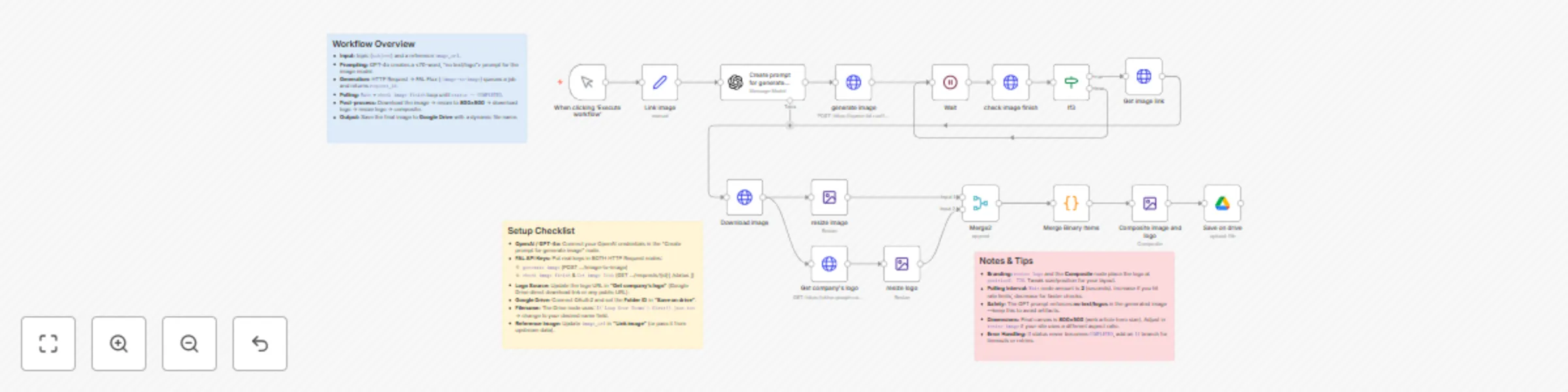
Original n8n.io sourceThis workflow automatically turns a topic and a reference image URL into a finished, branded article image. It uses GPT-4o to generate a short, detailed image prompt, sends it to FAL Flux image-to-image for rendering, polls until the job is completed, downloads and resizes the image, overlays your company logo, and finally saves the branded result into a specified Google Drive folder.
Content teams who need consistent, on-brand article images. Marketing teams looking to scale blog and landing page visuals. Designers who want to automate repetitive resizing and branding tasks. Anyone who needs a pipeline from topic → AI illustration → Google Drive asset.
OpenAI (GPT-4o) API credentials (for image prompt generation). FAL API key for Flux image-to-image generation. Google Drive OAuth2 connection + target folder ID for saving images. A company logo file/URL (direct download link from Google Drive or any public URL).
Connect OpenAI GPT-4o in the “Create prompt” node. Add your FAL API key to all HTTP Request nodes (generate image, check image finish, Get image link). Replace the logo link in “Get company’s logo” with your own logo URL. Configure the Google Drive node with your OAuth2 credentials and set the correct Folder ID. Update the image_url in “Link image” (or pass from upstream data). Test the workflow end-to-end with a sample subject and image.
Form/Manual Trigger → Input subject + reference image URL. GPT-4o → Generates a <70-word sharp/detailed prompt (no text/logos). FAL Flux (HTTP Request) → Submits job for image-to-image generation. Polling Loop → Wait + check status until COMPLETED. Download Image → Retrieves generated image link. Resize Image → Standardize to 800×500 pixels. Get & Resize Logo → Fetch company logo, resize for branding. Composite → Overlay logo onto article image. Save to Google Drive → Final branded image saved in target folder.
Margin AI is your AI Service Companion. We help organizations design intelligent, human-centric automation — from content pipelines and branding workflows to customer insights and sales enablement. Our tailored AI solutions scale marketing, operations, and creative processes with ease.
This catalog entry is organized from the workflow JSON. The node-level section below shows the executable blocks available for review before importing the template.
| Workflow | Generate branded article images with GPT-4o, FAL Flux and Google Drive |
|---|---|
| Complexity | advanced |
| Nodes | 19 |
| Categories | Content Creation, Multimodal AI |
| Author | Cong Nguyen |
| Published | 30 Aug 2025 |
Use the JSON export at /data/workflows/8064/8064.json as the source template for this automation.
Open n8n, import the downloaded JSON, and review each node before activating the workflow.
Replace placeholder credentials, API keys, webhook URLs, account IDs, and environment-specific values with your own settings.
Run the workflow manually or in a staging workspace, inspect node output, and confirm downstream systems receive the expected data.
Enable the workflow only after testing, then monitor executions, errors, and rate limits during the first production runs.
Review imported nodes carefully before activation. This catalog entry is intended to help you inspect the workflow structure, understand required services, and find related templates faster.
Node names, credentials, schedules, webhook paths, and external service limits may need adjustment for your workspace.
What this workflow does This workflow automatically turns a topic and a reference image URL into a finished, branded article image. It uses GPT 4o to generate a short, detailed image prompt, sen...
Review the workflow JSON, configure any required credentials in n8n, and test the automation in a safe workspace before using it in production.
Yes. Use the block-by-block analysis and the downloadable JSON to inspect each node, then adjust credentials, prompts, schedules, filters, or destinations for your Content Creation, Multimodal AI use case.