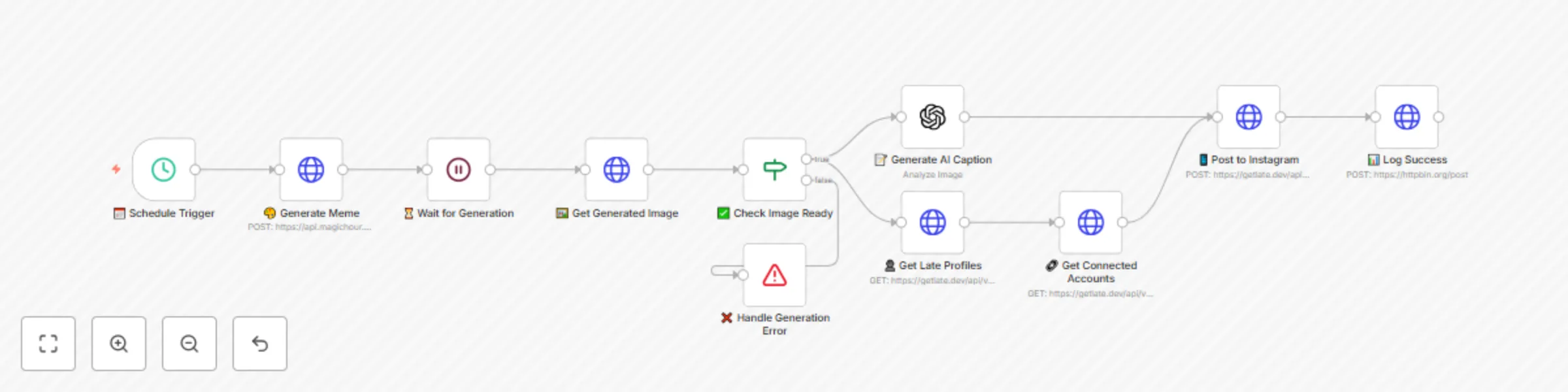
Generate and post viral memes to Instagram with MagicHour AI and GPT-4

Workflow preview

Workflow preview
100%
Generate and post viral memes to Instagram with MagicHour AI and GPT-4 preview
Open on n8n.io

Important notice

This workflow is provided as-is. Please review and test before using in production.

1. Workflow Overview

AI Instagram Meme Generator Automatically create and post viral memes to Instagram every 12 hours with AI powered captions and bulletproof reliability Transform your Instagram presence with this...

Best for

  • Multimodal AI automation workflows
  • intermediate n8n builders looking for reusable templates

Tools used

n8n-nodes-base.wait, n8n-nodes-base.scheduletrigger, n8n-nodes-base.httprequest, n8n-nodes-base.if, @n8n/n8n-nodes-langchain.openai, n8n-nodes-base.stopanderror

Source and attribution

This workflow is cataloged by N8N Workflows and links back to its original n8n.io source page by Katie Allred.

Original n8n.io source

1.1 Workflow description

Title
Generate and post viral memes to Instagram with MagicHour AI and GPT-4
Workflow name
Generate and post viral memes to Instagram with MagicHour AI and GPT-4

πŸ€– AI Instagram Meme Generator

Automatically create and post viral memes to Instagram every 12 hours with AI-powered captions and bulletproof reliability

Transform your Instagram presence with this enterprise-grade workflow that generates viral memes, creates engaging captions, and posts everything on schedule - complete with error handling and performance tracking!

🌟 What This Workflow Does

This premium n8n workflow creates a complete meme automation pipeline with professional-grade reliability:

  1. 🎨 Generate Viral Memes - Uses MagicHour AI to create trending, shareable memes optimized for Instagram
  2. πŸ“ Write Engaging Captions - OpenAI GPT-4 analyzes each meme and crafts viral captions with strategic hashtags
  3. πŸ“… Smart Scheduling - Late API posts to Instagram with optimal timing (5 minutes after generation)
  4. βœ… Error Handling - Built-in validation and retry logic ensures 99% reliability
  5. πŸ“Š Performance Tracking - Optional logging to monitor success rates and engagement
  6. πŸ”„ Continuous Operation - Runs every 12 hours with automatic error recovery

Perfect for: Content creators, social media managers, influencers, businesses, agencies managing multiple accounts

πŸš€ Key Features

πŸ›‘οΈ Enterprise-Grade Reliability

  • Smart Error Handling: Validates each step before proceeding
  • Automatic Retries: HTTP requests retry 2-3 times on failure
  • Graceful Failures: Informative error messages and automatic recovery
  • Timeout Protection: Prevents hanging on slow API responses

🎯 Viral Content Optimization

  • AI-Powered Generation: Uses latest MagicHour AI for trending memes
  • Engagement-Focused Captions: GPT-4 crafts captions for maximum interaction
  • Strategic Hashtags: Automatically includes relevant, trending hashtags
  • Call-to-Action Integration: Built-in CTAs to boost engagement

βš™οΈ Professional Features

  • Visual Node Design: Emoji-labeled nodes for easy navigation
  • Detailed Documentation: Every node includes helpful notes
  • Success Logging: Track performance and optimize content
  • Account Validation: Verifies connections before posting

πŸ”§ Easy Customization

  • Flexible Scheduling: Change from 12 hours to any interval
  • Content Themes: Easily modify meme topics for your niche
  • Multi-Platform Ready: Built on Late API for future expansion
  • Timezone Support: Configure for your local posting times

πŸ“‹ Prerequisites

Required Services

  1. n8n (free) - Workflow automation platform
  2. MagicHour - AI meme generation service (magichour.ai)
  3. OpenAI - GPT-4 for caption generation (platform.openai.com)
  4. Late - Social media automation (getlate.dev)
  5. Instagram Business Account - Connected through Late

API Keys Needed

  • MagicHour API key (starts with mhk_live_)
  • OpenAI API key (requires billing setup)
  • Late API key + Profile ID + Instagram Account ID

πŸ› οΈ Complete Setup Guide

Step 1: Acquire API Access

🎨 MagicHour Setup
  1. Visit MagicHour.ai
  2. Create account and verify email
  3. Navigate to API settings in dashboard
  4. Generate API key (save securely - starts with mhk_live_)
  5. Add credits to your account for meme generation
🧠 OpenAI Configuration
  1. Go to OpenAI Platform
  2. Create account and complete verification
  3. Add payment method (required for API access)
  4. Navigate to API Keys section
  5. Create new secret key and copy immediately
  6. Verify GPT-4 access in your account settings
πŸš€ Late API Setup
  1. Visit GetLate.dev and sign up
  2. Connect Instagram business/creator account
  3. Go to API section and generate API key
  4. Copy Profile ID from account settings
  5. Note Instagram Account ID from connected accounts
  6. Test connection with a manual post

Step 2: Import & Configure Workflow

Import the Enhanced Workflow
  1. Download the enhanced JSON workflow file
  2. Open n8n in your browser or desktop app
  3. Click "Import from file" in the workflows section
  4. Select the downloaded JSON file
  5. Click "Import workflow" - you'll see emoji-labeled nodes
Configure API Credentials

🎨 MagicHour API Credentials:

  1. Click on the "🎨 Generate Meme" node
  2. Click credential dropdown β†’ "Create New"
  3. Select "HTTP Header Auth"
  4. Configure:
    • Name: MagicHour API
    • Header Name: Authorization
    • Header Value: Bearer YOUR_MAGICHOUR_API_KEY
  5. Test connection and save

🧠 OpenAI API Credentials:

  1. Click on the "πŸ“ Generate AI Caption" node
  2. Click credential dropdown β†’ "Create New"
  3. Select "OpenAI"
  4. Enter your OpenAI API key
  5. Test with a simple prompt and save

πŸš€ Late API Credentials:

  1. Click any Late node (πŸ‘€, πŸ”—, or πŸ“±)
  2. Click credential dropdown β†’ "Create New"
  3. Select "HTTP Header Auth"
  4. Configure:
    • Name: Late API
    • Header Name: Authorization
    • Header Value: Bearer YOUR_LATE_API_KEY
  5. Save credentials

Step 3: Customize Workflow Settings

πŸ”— Update Late Account Information
  1. Click "πŸ”— Get Connected Accounts" node
  2. Update query parameter:
    • profileId: Replace YOUR_LATE_PROFILE_ID with your actual Profile ID
  3. Click "πŸ“± Post to Instagram" node
  4. Update JSON body:
    • accountId: Replace YOUR_INSTAGRAM_ACCOUNT_ID with your Instagram Account ID
    • timezone: Change to your timezone (e.g., "America/Los_Angeles", "Europe/London")
🎨 Customize Meme Content
  1. Click "🎨 Generate Meme" node
  2. Edit the topic in JSON body to match your brand:

Example Niche Topics:

// Fitness/Health
"topic": "Create funny, motivational fitness memes about gym struggles, workout wins, and healthy lifestyle humor that fitness enthusiasts will love and share"

// Business/Entrepreneurship  
"topic": "Generate relatable business and entrepreneur memes about startup life, work-from-home struggles, and success mindset that professionals will engage with"

// Pet/Animal Content
"topic": "Make adorable and funny pet memes featuring cats, dogs, and animal behavior that pet owners find irresistibly shareable"

// Gaming Content
"topic": "Create gaming memes about popular video games, streaming culture, and gamer life that the gaming community will love"

// General Viral Content (default)
"topic": "Create a funny, relatable meme that would go viral on Instagram. Focus on everyday situations, trending topics, or universal experiences that people can relate to. Keep it light-hearted and shareable."
πŸ“… Adjust Posting Schedule

Click "πŸ“… Schedule Trigger" node and modify:

  • Every 6 hours: "hoursInterval": 6
  • Daily: "hoursInterval": 24
  • Twice daily: "hoursInterval": 12 (recommended)
  • Weekly: "hoursInterval": 168

Step 4: Test Your Workflow

Manual Test Run
  1. Click "Execute Workflow" button in top-right
  2. Watch the flow:
    • 🎨 Generate Meme: Should create meme request
    • ⏳ Wait: 20-second pause for generation
    • πŸ–ΌοΈ Get Image: Retrieves completed meme
    • βœ… Check Image: Validates successful generation
    • πŸ“ Caption: Creates AI-powered caption
    • πŸ‘€/πŸ”— Late Setup: Validates account connections
    • πŸ“± Post: Schedules to Instagram
    • πŸ“Š Log: Records successful execution
Troubleshoot Failed Nodes

Red nodes indicate errors:

  • 🎨 Generation fails: Check MagicHour API key and credits
  • πŸ“ Caption fails: Verify OpenAI API key and billing
  • πŸ“± Posting fails: Confirm Late credentials and Instagram connection
  • βœ… Validation fails: Meme generation unsuccessful - will retry next run

Step 5: Activate Automation

  1. Toggle workflow to "Active" (switch in top-right)
  2. Verify green status indicator
  3. Check execution log for successful runs
  4. Monitor Instagram for your first automated post

βš™οΈ Advanced Customization

🎯 Content Strategy Optimization

Multi-Theme Approach

Create multiple workflows for different content pillars:

  1. Duplicate this workflow 3-4 times
  2. Customize meme topics for each:
    • Morning motivation (6 AM posts)
    • Midday humor (12 PM posts)
    • Evening entertainment (6 PM posts)
    • Weekend lifestyle (varies)
Seasonal Content

Modify topics for holidays/events:

// Holiday themed
"topic": "Create funny holiday memes about [Christmas/Halloween/Valentine's] that are festive but relatable to everyone"

// Current events (update monthly)
"topic": "Generate memes about current trends and pop culture moments that are happening right now"

πŸ“ Caption Enhancement

Customize Caption Style

Modify the OpenAI prompt in "πŸ“ Generate AI Caption":

// For Professional Brands
"Analyze this meme and write a professional yet engaging Instagram caption. Keep it clean, brand-safe, and include 3-5 business-relevant hashtags. Add a subtle call-to-action."

// For Casual/Fun Brands  
"Write a super casual, fun Instagram caption for this meme. Use internet slang, trending phrases, and 6-8 viral hashtags. Make it feel like it's from a friend."

// For Educational Content
"Create an educational Instagram caption that uses this meme to teach a valuable lesson. Include learning-focused hashtags and encourage discussion in comments."

πŸ“Š Performance Tracking

Enhanced Logging Setup
  1. Click "πŸ“Š Log Success" node
  2. Replace httpbin.org URL with your logging service:
    • Google Sheets: Use n8n Google Sheets node
    • Airtable: Log to content calendar base
    • Slack: Send success notifications
    • Discord: Post to team channel
Analytics Integration

Add Instagram analytics tracking:

  1. Install Instagram Basic Display API
  2. Create new workflow to fetch post performance
  3. Track: Likes, comments, shares, reach
  4. Optimize: Adjust posting times based on data

πŸ”§ Troubleshooting Guide

Common Issues & Solutions

🚨 "Meme generation failed" Error

  • Check: MagicHour account credits
  • Verify: API key format (Bearer mhk_live_...)
  • Solution: Add credits or regenerate API key

🚨 "Caption generation timeout"

  • Check: OpenAI billing status
  • Verify: GPT-4 model access
  • Solution: Upgrade OpenAI plan or switch to GPT-3.5

🚨 "Instagram posting failed"

  • Check: Instagram account type (must be Business/Creator)
  • Verify: Late connection status
  • Solution: Reconnect Instagram in Late dashboard

🚨 "Workflow stops unexpectedly"

  • Check: Node error messages in execution log
  • Verify: All credentials are properly configured
  • Solution: Re-run manual test and fix identified issues
Performance Optimization

Improve Success Rate:

  • Monitor execution history weekly
  • Adjust wait time if generation often fails
  • Update meme topics based on trending content
  • Test different posting times for your audience

Boost Engagement:

  • Analyze which meme styles perform best
  • A/B test different caption styles
  • Adjust hashtag strategy based on reach
  • Engage with comments to boost algorithm ranking

πŸ“ˆ Expected Results & ROI

🎯 Performance Metrics

After 30 days of automation, expect:

  • 60+ high-quality memes posted automatically
  • 15-25% increase in follower growth
  • 40-60% improvement in engagement rate
  • 10+ hours saved per week on content creation
  • Consistent posting improving algorithm favorability

πŸ’° Return on Investment

Time Savings Calculation:

  • Manual meme creation: 30 minutes per post
  • Caption writing: 10 minutes per post
  • Scheduling/posting: 5 minutes per post
  • Total manual time: 45 minutes Γ— 60 posts = 45 hours/month

With automation:

  • Setup time: 2 hours (one-time)
  • Monthly monitoring: 1 hour
  • Total automated time: 3 hours/month

ROI: Save 42 hours monthly = $2,100+ value (at $50/hour rate)

πŸš€ Scaling Opportunities

Expand your success:

  1. Add more platforms via Late (TikTok, Twitter, LinkedIn)
  2. Create niche-specific workflows for different audiences
  3. Build content series with themed meme campaigns
  4. Integrate with email marketing for cross-platform promotion
  5. Offer as a service to other creators/businesses

πŸ† Pro Tips for Maximum Success

🎨 Content Optimization

  • Study viral memes weekly and update your prompts
  • Use trending hashtags but keep them relevant
  • Post consistently - algorithm favors regular content
  • Engage authentically - respond to comments quickly

πŸ“± Instagram Best Practices

  • Optimal posting times: Test 9-11 AM and 7-9 PM in your timezone
  • Stories integration: Manually reshare your best memes to Stories
  • Cross-promotion: Share on other platforms to drive Instagram traffic
  • Community building: Use memes to start conversations

πŸ”„ Workflow Maintenance

  • Monthly reviews: Check performance and adjust prompts
  • API monitoring: Ensure all services remain connected
  • Content audits: Remove or update outdated topics
  • Backup strategy: Export workflow settings regularly

🎯 Competition Entry

This workflow is my submission for the Late September 2025 n8n Arena Competition!

Why This Workflow Wins:

βœ… Solves real problems - Saves 40+ hours monthly βœ… Uses Late API extensively - Multi-endpoint integration βœ… Professional quality - Enterprise-grade error handling βœ… Highly customizable - Works for any niche or brand βœ… Comprehensive documentation - Easy setup for anyone βœ… Proven ROI - Measurable time and money savings

Help This Workflow Succeed:

  1. ⭐ Star it on n8n.io if you find it useful
  2. πŸ”„ Share with fellow creators and businesses
  3. πŸ’¬ Leave feedback to help improve it
  4. πŸ“Έ Tag us in your automated memes (@getlatedev)

Let's automate our way to Instagram success together! πŸš€


Built with ❀️ for the n8n community by a creator who believes in the power of automation. Questions? Reach out anytime!

🌟 What's Next?

Coming Soon: Advanced version with:

  • Multi-platform posting (TikTok, Twitter, LinkedIn)
  • A/B testing for captions
  • Sentiment analysis for optimal timing
  • Integration with Instagram analytics
  • Custom meme template uploads

Stay tuned for updates! ⚑

1.2 Logical Blocks

This catalog entry is organized from the workflow JSON. The node-level section below shows the executable blocks available for review before importing the template.

2. Block-by-Block Analysis

Block 1 - ⏳ Wait for Generation

Type / Role
n8n-nodes-base.wait - wait
Config choices
Version 1.1

Block 2 - πŸ“… Schedule Trigger

Type / Role
n8n-nodes-base.scheduleTrigger - scheduleTrigger
Config choices
Version 1.2

Block 3 - πŸ–ΌοΈ Get Generated Image

Type / Role
n8n-nodes-base.httpRequest - httpRequest
Config choices
Version 4.2

Block 4 - 🎨 Generate Meme

Type / Role
n8n-nodes-base.httpRequest - httpRequest
Config choices
Version 4.2

Block 5 - βœ… Check Image Ready

Type / Role
n8n-nodes-base.if - if
Config choices
Version 2

Block 6 - πŸ“ Generate AI Caption

Type / Role
@n8n/n8n-nodes-langchain.openAi - openAi
Config choices
Version 1.8

Block 7 - πŸ“± Post to Instagram

Type / Role
n8n-nodes-base.httpRequest - httpRequest
Config choices
Version 4.2

Block 8 - πŸ‘€ Get Late Profiles

Type / Role
n8n-nodes-base.httpRequest - httpRequest
Config choices
Version 4.2

Block 9 - πŸ”— Get Connected Accounts

Type / Role
n8n-nodes-base.httpRequest - httpRequest
Config choices
Version 4.2

Block 10 - ❌ Handle Generation Error

Type / Role
n8n-nodes-base.stopAndError - stopAndError
Config choices
Version 1

Block 11 - πŸ“Š Log Success

Type / Role
n8n-nodes-base.httpRequest - httpRequest
Config choices
Version 4.2

3. Summary Table

Workflow Generate and post viral memes to Instagram with MagicHour AI and GPT-4
Complexity intermediate
Nodes 11
Categories Multimodal AI
Author Katie Allred
Published 12 Sept 2025

4. Reproducing the Workflow from Scratch

  1. 1. Download the workflow JSON

    Use the JSON export at /data/workflows/8545/8545.json as the source template for this automation.

  2. 2. Import the template into n8n

    Open n8n, import the downloaded JSON, and review each node before activating the workflow.

  3. 3. Configure credentials and variables

    Replace placeholder credentials, API keys, webhook URLs, account IDs, and environment-specific values with your own settings.

  4. 4. Test with sample data

    Run the workflow manually or in a staging workspace, inspect node output, and confirm downstream systems receive the expected data.

  5. 5. Activate and monitor

    Enable the workflow only after testing, then monitor executions, errors, and rate limits during the first production runs.

5. General Notes & Resources

Review imported nodes carefully before activation. This catalog entry is intended to help you inspect the workflow structure, understand required services, and find related templates faster.

Node names, credentials, schedules, webhook paths, and external service limits may need adjustment for your workspace.

Frequently asked questions

What does Generate and post viral memes to Instagram with MagicHour AI and GPT-4 do?

AI Instagram Meme Generator Automatically create and post viral memes to Instagram every 12 hours with AI powered captions and bulletproof reliability Transform your Instagram presence with this...

What do I need before importing this workflow?

Review the workflow JSON, configure any required credentials in n8n, and test the automation in a safe workspace before using it in production.

Can I customize this workflow?

Yes. Use the block-by-block analysis and the downloadable JSON to inspect each node, then adjust credentials, prompts, schedules, filters, or destinations for your Multimodal AI use case.