Block 1 - Webhook
- Type / Role
- n8n-nodes-base.webhook - webhook
- Config choices
- Version 2.1


 Early Deal
This workflow is provided as-is. Please review and test before using in production.
Automated Legal & Accessibility Website Compliance Checker Description Automate website compliance checks in minutes using AI powered analysis. This workflow scans any website for essential legal a...
n8n-nodes-base.webhook, n8n-nodes-base.httprequest, n8n-nodes-base.code, @n8n/n8n-nodes-langchain.openai, n8n-nodes-htmlcsstopdf.htmlcsstopdf, n8n-nodes-base.gmail, n8n-nodes-base.googledrive, n8n-nodes-base.stickynote
This workflow is cataloged by N8N Workflows and links back to its original n8n.io source page by Jitesh Dugar.
Original n8n.io sourceAutomate website compliance checks in minutes using AI-powered analysis. This workflow scans any website for essential legal and accessibility requirements, generates a professional compliance report, delivers it as a PDF, and stores it securely — helping teams identify risks early and stay audit-ready with zero manual effort.
Transforms manual website compliance reviews into a single automated flow:
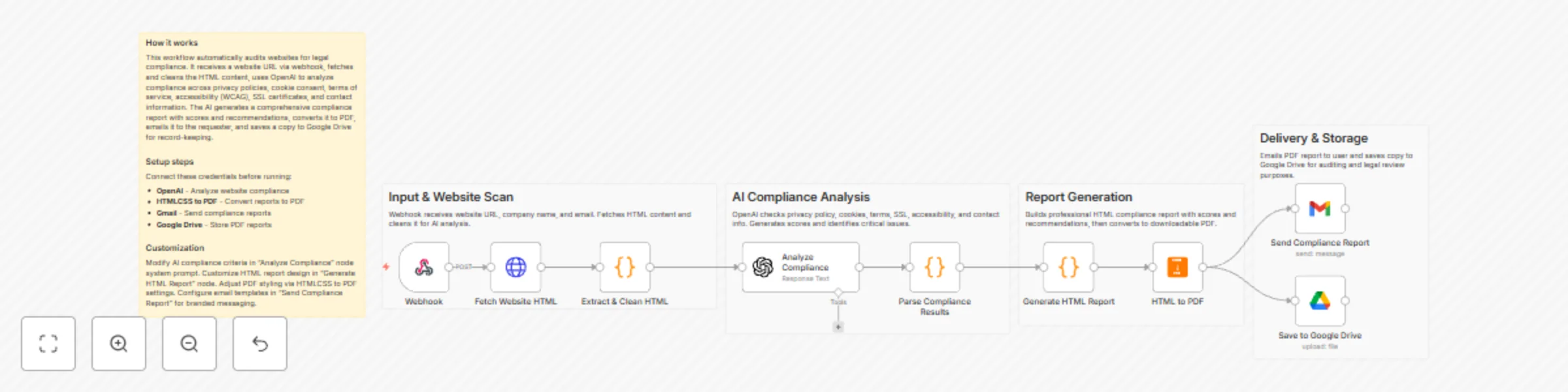
🌐 Capture Website Details – Accepts website URL, company name, and email via webhook.
📥 Fetch Website Content – Securely downloads and cleans website HTML for analysis.
🧠 AI Compliance Analysis – Uses AI to audit the site against key compliance standards.
📊 Scoring & Insights – Calculates an overall compliance score and highlights gaps.
📄 Generate Visual Report – Builds a detailed, easy-to-read HTML compliance report.
🖨️ Convert to PDF – Converts the report into a downloadable, shareable PDF.
📧 Email Delivery – Sends the compliance report directly to the provided email.
☁️ Secure Storage – Saves the PDF report to Google Drive for records and audits.
🤖 AI-Powered Compliance Audits – Automatically checks privacy, cookies, accessibility, SSL, and more.
📊 Compliance Scoring – Clear numerical scores and status indicators for each section.
📄 Professional PDF Reports – Branded, structured reports suitable for clients or audits.
⚙️ End-to-End Automation – From URL submission to email delivery without manual steps.
📧 Instant Email Notifications – Reports delivered automatically to stakeholders.
☁️ Google Drive Backup – Centralized storage for compliance history and documentation.
✔️ Privacy Policy presence & indicators ✔️ Cookie consent mechanisms ✔️ Terms of Service availability ✔️ Accessibility (WCAG-related indicators) ✔️ Contact information visibility ✔️ SSL / HTTPS verification ✔️ Critical issues & improvement recommendations
🏢 Startups & SaaS Companies – Quickly assess website compliance before launch.
🧾 Agencies & Consultants – Deliver automated compliance audits to clients.
⚖️ Legal & Compliance Teams – Speed up preliminary compliance checks.
💻 Freelancers & Web Developers – Validate client websites post-deployment.
📈 Operations Teams – Maintain ongoing compliance documentation effortlessly.
🌐 Webhook – Receive website URL and user details.
🤖 OpenAI – Analyze website HTML for compliance indicators.
📄 HTMLCSS to PDF – Convert compliance report into a PDF.
📧 Gmail – Send compliance report via email.
☁️ Google Drive – Store generated compliance reports.
🌍 HTTP Request – Fetch website HTML content (no authentication required).
📊 Compliance Dashboard – Connect Google Drive or logs to Looker Studio.
🌍 Multi-Website Scans – Extend webhook to accept bulk URLs.
🕒 Scheduled Scans – Run periodic compliance checks automatically.
📨 Slack Alerts – Send compliance summaries to internal channels.
📝 Custom Branding – Adjust HTML styling, logos, and colors.
1️⃣ Import the workflow JSON into your n8n workspace. 2️⃣ Activate the webhook and copy the endpoint URL. 3️⃣ Connect OpenAI, Gmail, Google Drive, and HTMLCSS to PDF credentials. 4️⃣ Send a POST request with website URL, company name, and email. 5️⃣ Review the emailed PDF compliance report. 6️⃣ Check Google Drive for stored audit copies. 7️⃣ Activate the workflow for production use.
⚡ Minutes Instead of Hours – Instant compliance assessments.
🤖 AI Accuracy – Consistent, structured compliance analysis.
📈 Risk Visibility – Early detection of legal and accessibility gaps.
📄 Audit-Ready Reports – Clean, shareable documentation.
☁️ Centralized Storage – Every scan archived automatically.
🌐 Webhook Trigger ↓ 📥 Fetch Website HTML ↓ 🧹 Clean & Prepare Content ↓ 🧠 AI Compliance Analysis ↓ 📊 Parse Results ↓ 📄 Generate HTML Report ↓ 🖨️ Convert to PDF ↓ 📧 Email Report ↓ ☁️ Save to Google Drive
Import this template and turn any website URL into a complete compliance report — automatically, consistently, and professionally. Perfect for audits, clients, and peace of mind. ✅
This catalog entry is organized from the workflow JSON. The node-level section below shows the executable blocks available for review before importing the template.
| Workflow | Generate AI website legal and accessibility compliance reports with OpenAI, Gmail and Google Drive |
|---|---|
| Complexity | intermediate |
| Nodes | 14 |
| Categories | Document Extraction |
| Author | Jitesh Dugar |
| Published | 12 Dec 2025 |
Use the JSON export at /data/workflows/11747/11747.json as the source template for this automation.
Open n8n, import the downloaded JSON, and review each node before activating the workflow.
Replace placeholder credentials, API keys, webhook URLs, account IDs, and environment-specific values with your own settings.
Run the workflow manually or in a staging workspace, inspect node output, and confirm downstream systems receive the expected data.
Enable the workflow only after testing, then monitor executions, errors, and rate limits during the first production runs.
Review imported nodes carefully before activation. This catalog entry is intended to help you inspect the workflow structure, understand required services, and find related templates faster.
Node names, credentials, schedules, webhook paths, and external service limits may need adjustment for your workspace.
Automated Legal & Accessibility Website Compliance Checker Description Automate website compliance checks in minutes using AI powered analysis. This workflow scans any website for essential legal a...
Review the workflow JSON, configure any required credentials in n8n, and test the automation in a safe workspace before using it in production.
Yes. Use the block-by-block analysis and the downloadable JSON to inspect each node, then adjust credentials, prompts, schedules, filters, or destinations for your Document Extraction use case.