Block 1 - Wait
- Type / Role
- n8n-nodes-base.wait - wait
- Config choices
- Version 1.1


 Early Deal
This workflow is provided as-is. Please review and test before using in production.
Who's it for This template is designed for filmmakers, content creators, social media managers, and AI developers who want to harness OpenAI's Sora 2 for creating physically accurate, cinematic vid...
n8n-nodes-base.wait, n8n-nodes-base.switch, n8n-nodes-base.httprequest, n8n-nodes-base.stickynote, n8n-nodes-base.set, n8n-nodes-base.formtrigger, n8n-nodes-base.form, n8n-nodes-base.merge
This workflow is cataloged by N8N Workflows and links back to its original n8n.io source page by Juan Cristóbal Andrews.
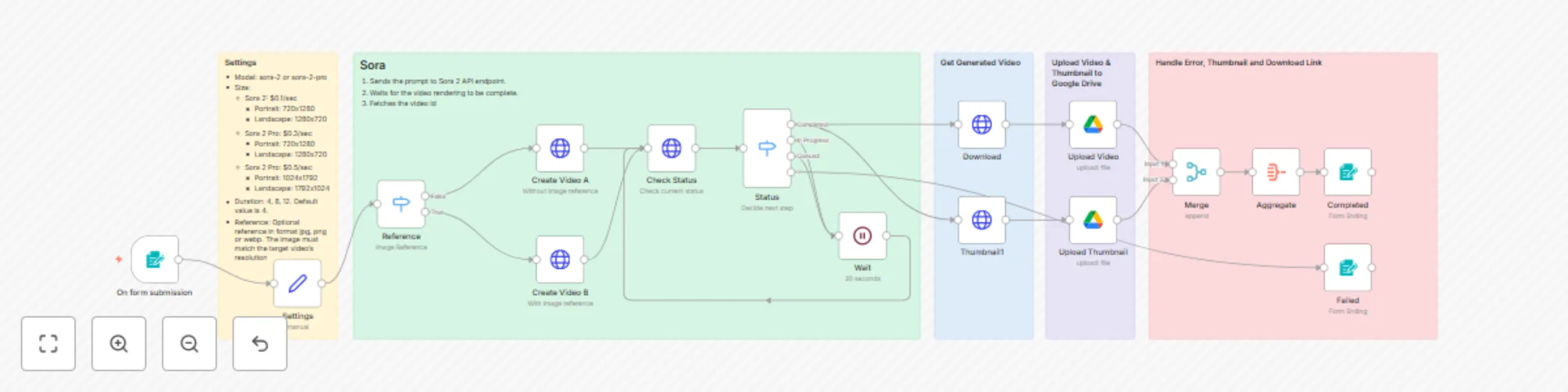
Original n8n.io sourceThis template is designed for filmmakers, content creators, social media managers, and AI developers who want to harness OpenAI's Sora 2 for creating physically accurate, cinematic videos with synchronized audio. Whether you're generating realistic scenes from text prompts or reference images with proper physics simulation, creating multi-shot sequences with persistent world state, or producing content with integrated dialogue and sound effects, this workflow streamlines the entire video generation process from prompt to preview and Google Drive upload.
This workflow:
You'll need an OpenAI API key to use this workflow. Here's the general process:
⚠️ Important: Your API key will start with sk- and should be kept secure. If you lose it, you'll need to generate a new one.
All generation settings are configured through the form, including:
sora-2 or sora-2-proThe workflow supports two Sora models which have the following API pricing:
Sora 2 - $0.10/sec
Sora 2 Pro - $0.30/sec (720p) or $0.50/sec (1080p)
Duration options: 4, 8, 12 seconds (default: 4)
Example costs:
sk-)It's recommended to visit the official documentation on prompting for a detailed Sora 2 guide.
Step-by-step flow:
If you have any questions, just contact me on Linkedin
Ready to create cinematic AI videos with physics-accurate motion, synchronized audio, and optional image references? Import this workflow and start generating! 🎬✨
This catalog entry is organized from the workflow JSON. The node-level section below shows the executable blocks available for review before importing the template.
| Workflow | Generate AI videos with OpenAI Sora 2 & upload to Google Drive |
|---|---|
| Complexity | advanced |
| Nodes | 21 |
| Categories | Content Creation, Multimodal AI |
| Author | Juan Cristóbal Andrews |
| Published | 07 Oct 2025 |
Use the JSON export at /data/workflows/9360/9360.json as the source template for this automation.
Open n8n, import the downloaded JSON, and review each node before activating the workflow.
Replace placeholder credentials, API keys, webhook URLs, account IDs, and environment-specific values with your own settings.
Run the workflow manually or in a staging workspace, inspect node output, and confirm downstream systems receive the expected data.
Enable the workflow only after testing, then monitor executions, errors, and rate limits during the first production runs.
Review imported nodes carefully before activation. This catalog entry is intended to help you inspect the workflow structure, understand required services, and find related templates faster.
Node names, credentials, schedules, webhook paths, and external service limits may need adjustment for your workspace.
Who's it for This template is designed for filmmakers, content creators, social media managers, and AI developers who want to harness OpenAI's Sora 2 for creating physically accurate, cinematic vid...
Review the workflow JSON, configure any required credentials in n8n, and test the automation in a safe workspace before using it in production.
Yes. Use the block-by-block analysis and the downloadable JSON to inspect each node, then adjust credentials, prompts, schedules, filters, or destinations for your Content Creation, Multimodal AI use case.