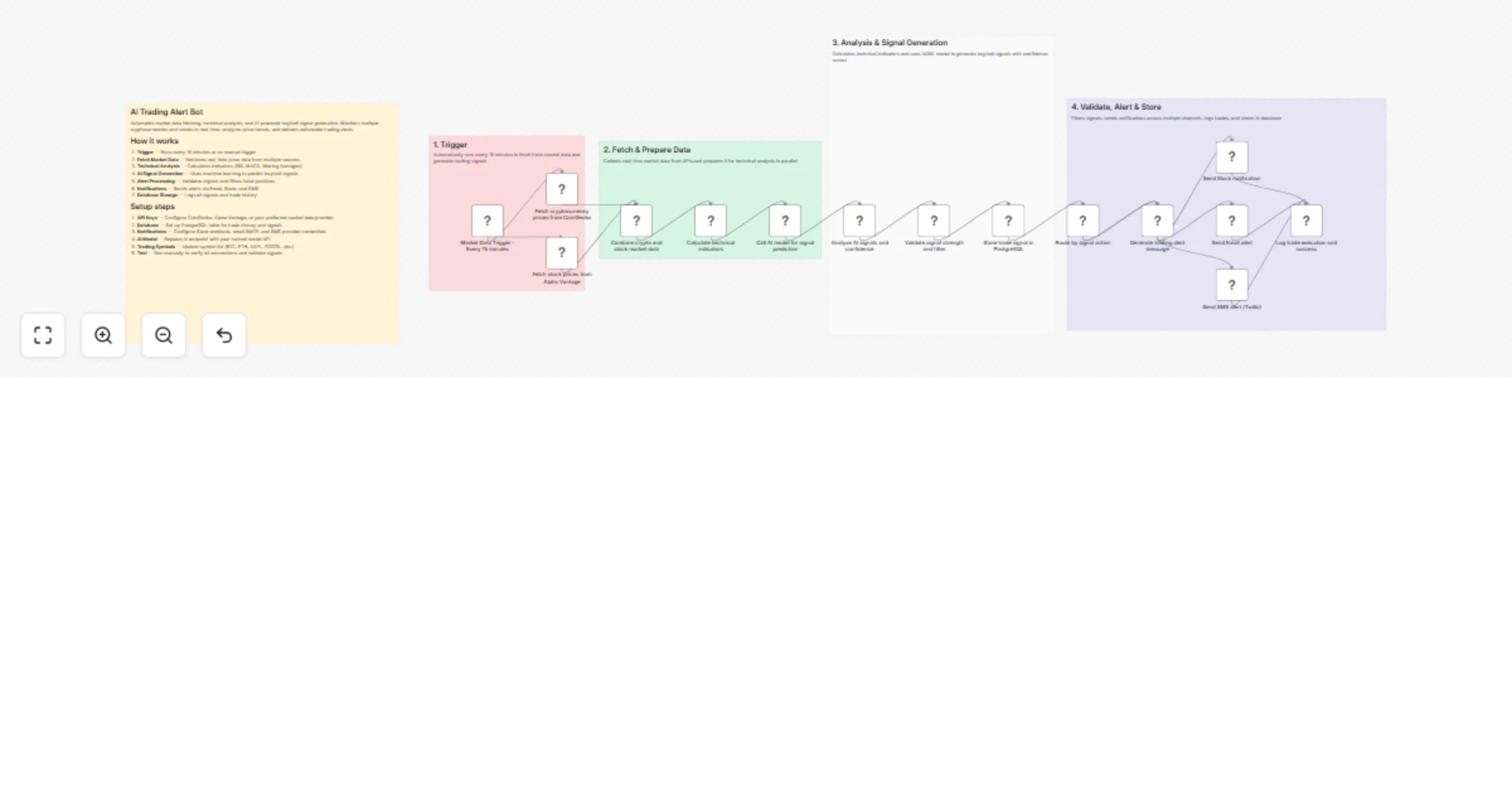
Generate AI trading alerts from CoinGecko and Alpha Vantage via Slack, email and SMS

Workflow preview

Workflow preview
100%
Generate AI trading alerts from CoinGecko and Alpha Vantage via Slack, email and SMS preview
Open on n8n.io

1. Workflow Overview

Automates real time market monitoring, technical analysis, AI powered signal generation for cryptocurrencies (and stocks), filters high confidence trades, and delivers actionable alerts via multipl...

Best for

  • Crypto Trading automation workflows
  • AI Summarization automation workflows
  • advanced n8n builders looking for reusable templates

Tools used

n8n-nodes-base.stickynote, n8n-nodes-base.scheduletrigger, n8n-nodes-base.httprequest, n8n-nodes-base.merge, n8n-nodes-base.code, n8n-nodes-base.filter, n8n-nodes-base.postgres, n8n-nodes-base.switch

Source and attribution

This workflow is cataloged by N8N Workflows and links back to its original n8n.io source page by Oneclick AI Squad.

Original n8n.io source

1.1 Workflow description

Title
Generate AI trading alerts from CoinGecko and Alpha Vantage via Slack, email and SMS
Workflow name
Generate AI trading alerts from CoinGecko and Alpha Vantage via Slack, email and SMS

Automates real-time market monitoring, technical analysis, AI-powered signal generation for cryptocurrencies (and stocks), filters high-confidence trades, and delivers actionable alerts via multiple channels.

Good to Know

  • Runs every 5–30 minutes (configurable trigger) to catch fresh market opportunities
  • Pulls real-time price data from multiple crypto/stock sources in parallel
  • Calculates popular technical indicators (RSI, MACD, Moving Averages, etc.)
  • Uses an AI model (likely Grok/xAI, OpenAI, or similar) to interpret indicators and generate buy/sell signals with confidence scores
  • Applies multi-layer filtering to reduce noise (thresholds, validation rules)
  • Stores signals in a database, logs execution history, and sends notifications
  • Supports email, Telegram, Discord, SMS (via Twilio), or trading execution webhooks
  • Saves significant time compared to manual chart watching

How It Works

1. Trigger

  • Schedule Trigger or Manual Trigger (every 5–30 minutes)
  • Optional: Market Hours / Kill-zone filter (e.g. avoid low-volume periods)
  • Can be webhook-based for on-demand runs

2. Fetch & Prepare Data

  • Fetches real-time / recent OHLCV data for a watchlist of cryptocurrencies (and possibly stocks)
  • Sources: CoinGecko, Binance, Alpha Vantage, CoinMarketCap, Bybit, Kraken, etc. (multiple in parallel)
  • Combines data from different APIs
  • Prepares structured dataset (candles, volume, current price)
  • Calculates technical indicators in parallel or via Code node / community nodes (e.g. RSI(14), MACD, EMA/SMA crossovers, Bollinger Bands, etc.)

3. Analysis & Signal Generation

  • Sends prepared market data + calculated indicators to an AI model
  • Prompt instructs the model to:
  • Analyze current market structure
  • Evaluate indicator confluence
  • Generate Buy / Sell / Hold signal
  • Assign confidence score (e.g. 0–100%)
  • Provide short reasoning
  • Optional: Rule-based pre-filter (e.g. only proceed if RSI < 30 or MACD crossover)

4. Validate, Alert & Store

  • Filters signals: minimum confidence threshold, no-duplicate check, max signals per run, etc.
  • Validates against additional rules (e.g. volume spike, no recent opposite signal)
  • Stores signal in database (PostgreSQL, Supabase, Airtable, Google Sheets, etc.)
  • Includes: timestamp, symbol, signal type, confidence, price, indicators snapshot, AI reasoning
  • Logs full execution trace
  • Sends alerts:
  • Email notification
  • Telegram / Discord message (with formatting)
  • SMS (Twilio)
  • Webhook to trading bot / execution system
  • Optional: Push to tradingview alert or auto-execute (paper/live)

Data Sources

  • Market Data APIs — CoinGecko, Binance, Alpha Vantage, CoinMarketCap, etc.
  • Technical Indicators — Calculated via Code node, community nodes (e.g. phoenix indicators), or external libraries
  • AI Model — Grok (xAI), OpenAI (GPT-4o), Claude, Gemini, or local LLM
  • Notification Channels — Email (Gmail/SMTP), Telegram, Discord, Twilio, webhook
  • Storage — Google Sheets, PostgreSQL, Supabase, Notion, Airtable

How to Use

  1. Import the workflow JSON into your n8n instance
  2. Configure credentials:
  • API keys for market data providers (Alpha Vantage, CoinGecko Pro, Binance, etc.)
  • AI provider (Grok API key, OpenAI key, etc.)
  • Notification services (Telegram bot token, email SMTP, Twilio, etc.)
  • Database connection if used
  1. Set your watchlist — edit the symbols in the fetch node(s)
  2. Tune the schedule — change interval in the trigger node
  3. Customize AI prompt — adjust in the AI node for more aggressive/conservative signals
  4. Set filters — confidence threshold, max alerts per cycle, etc.
  5. Test manually — use Execute Workflow button with sample data
  6. Activate & monitor — check Executions tab for logs

Requirements

  • n8n (self-hosted or cloud)
  • API keys for at least one market data provider
  • AI API access (Grok, OpenAI, etc.)
  • Notification credentials (Telegram bot, email account, etc.)
  • Optional: Database for persistent signal history

Customizing This Workflow

  • Add more exchanges/sources for better data redundancy
  • Include on-chain metrics (whale alerts, funding rates) via additional APIs
  • Switch AI model or fine-tune prompt for your trading style
  • Add risk management rules (position sizing, stop-loss levels)
  • Integrate auto-trading via exchange API (Binance, Bybit, Alpaca, etc.)
  • Create dashboard output (Google Sheets + Looker Studio / Grafana)
  • Add backtesting mode using historical data
  • Implement blackout periods or news filter to avoid high-impact events

1.2 Logical Blocks

This catalog entry is organized from the workflow JSON. The node-level section below shows the executable blocks available for review before importing the template.

2. Block-by-Block Analysis

Block 1 - Sticky Note - Main Overview

Type / Role
n8n-nodes-base.stickyNote - stickyNote
Config choices
Version 1

Block 2 - Sticky Note - Group 1: Trigger

Type / Role
n8n-nodes-base.stickyNote - stickyNote
Config choices
Version 1

Block 3 - Sticky Note - Group 2: Data Collection

Type / Role
n8n-nodes-base.stickyNote - stickyNote
Config choices
Version 1

Block 4 - Sticky Note - Group 3: Analysis & AI

Type / Role
n8n-nodes-base.stickyNote - stickyNote
Config choices
Version 1

Block 5 - Sticky Note - Group 4: Alert & Execute

Type / Role
n8n-nodes-base.stickyNote - stickyNote
Config choices
Version 1

Block 6 - Market Data Trigger - Every 15 minutes

Type / Role
n8n-nodes-base.scheduleTrigger - scheduleTrigger
Config choices
Version 1.2

Block 7 - Fetch cryptocurrency prices from CoinGecko

Type / Role
n8n-nodes-base.httpRequest - httpRequest
Config choices
Version 4.2

Block 8 - Fetch stock prices from Alpha Vantage

Type / Role
n8n-nodes-base.httpRequest - httpRequest
Config choices
Version 4.2

Block 9 - Combine crypto and stock market data

Type / Role
n8n-nodes-base.merge - merge
Config choices
Version 3

Block 10 - Calculate technical indicators

Type / Role
n8n-nodes-base.code - code
Config choices
Version 2

Block 11 - Call AI model for signal prediction

Type / Role
n8n-nodes-base.httpRequest - httpRequest
Config choices
Version 4.2

Block 12 - Analyze AI signals and confidence

Type / Role
n8n-nodes-base.code - code
Config choices
Version 2

Block 13 - Validate signal strength and filter

Type / Role
n8n-nodes-base.filter - filter
Config choices
Version 2

Block 14 - Store trade signal in PostgreSQL

Type / Role
n8n-nodes-base.postgres - postgres
Config choices
Version 2.5

Block 15 - Route by signal action

Type / Role
n8n-nodes-base.switch - switch
Config choices
Version 3

Block 16 - Generate trading alert message

Type / Role
n8n-nodes-base.code - code
Config choices
Version 2

Block 17 - Send Slack notification

Type / Role
n8n-nodes-base.httpRequest - httpRequest
Config choices
Version 4.2

Block 18 - Send Email alert

Type / Role
n8n-nodes-base.emailSend - emailSend
Config choices
Version 2.1

Block 19 - Send SMS alert (Twilio)

Type / Role
n8n-nodes-base.httpRequest - httpRequest
Config choices
Version 4.2

Block 20 - Log trade execution and success

Type / Role
n8n-nodes-base.code - code
Config choices
Version 2

3. Summary Table

Workflow Generate AI trading alerts from CoinGecko and Alpha Vantage via Slack, email and SMS
Complexity advanced
Nodes 20
Categories Crypto Trading, AI Summarization
Author Oneclick AI Squad
Published 24 Feb 2026

4. Reproducing the Workflow from Scratch

  1. 1. Download the workflow JSON

    Use the JSON export at /data/workflows/13651/13651.json as the source template for this automation.

  2. 2. Import the template into n8n

    Open n8n, import the downloaded JSON, and review each node before activating the workflow.

  3. 3. Configure credentials and variables

    Replace placeholder credentials, API keys, webhook URLs, account IDs, and environment-specific values with your own settings.

  4. 4. Test with sample data

    Run the workflow manually or in a staging workspace, inspect node output, and confirm downstream systems receive the expected data.

  5. 5. Activate and monitor

    Enable the workflow only after testing, then monitor executions, errors, and rate limits during the first production runs.

5. General Notes & Resources

Review imported nodes carefully before activation. This catalog entry is intended to help you inspect the workflow structure, understand required services, and find related templates faster.

Node names, credentials, schedules, webhook paths, and external service limits may need adjustment for your workspace.

Frequently asked questions

What does Generate AI trading alerts from CoinGecko and Alpha Vantage via Slack, email and SMS do?

Automates real time market monitoring, technical analysis, AI powered signal generation for cryptocurrencies (and stocks), filters high confidence trades, and delivers actionable alerts via multipl...

What do I need before importing this workflow?

Review the workflow JSON, configure any required credentials in n8n, and test the automation in a safe workspace before using it in production.

Can I customize this workflow?

Yes. Use the block-by-block analysis and the downloadable JSON to inspect each node, then adjust credentials, prompts, schedules, filters, or destinations for your Crypto Trading, AI Summarization use case.