Generate AI system prompts for LLMs with Unli.dev

Workflow preview

Workflow preview
100%
Generate AI system prompts for LLMs with Unli.dev preview
Open on n8n.io

Important notice

This workflow is provided as-is. Please review and test before using in production.

1. Workflow Overview

System Prompt Generator Using Unli.dev turns human input ideas into a polished, repeatable system prompt blueprint. It uses an n8n webhook, a small Set/Prepare pipeline, and Unli.dev's chat complet...

Best for

  • Engineering automation workflows
  • Multimodal AI automation workflows
  • intermediate n8n builders looking for reusable templates

Tools used

n8n-nodes-base.set, n8n-nodes-base.webhook, n8n-nodes-base.respondtowebhook, n8n-nodes-base.httprequest, n8n-nodes-base.stickynote

Source and attribution

This workflow is cataloged by N8N Workflows and links back to its original n8n.io source page by Khairul Muhtadin.

Original n8n.io source

1.1 Workflow description

Title
Generate AI system prompts for LLMs with Unli.dev
Workflow name
Generate AI system prompts for LLMs with Unli.dev

System Prompt Generator Using Unli.dev turns human input ideas into a polished, repeatable system prompt blueprint.

It uses an n8n webhook, a small Set/Prepare pipeline, and Unli.dev's chat completions to generate single-turn, comprehensive system prompts that include:

  • persona
  • mission
  • rules
  • output format
  • designer notes

so your team spends less time arguing about wording and more time shipping features (and you get consistent LLM behavior across apps).

💡 Why Use System Prompt Generator Using Unli.dev?

  • Fix the pain of inconsistency
  • Improve outcomes measurably
  • Competitive advantage: Standardize your AI behavior with enforceable rules and templates so your product's voice and constraints stay consistent across teams — like an AI style guide that never takes a coffee break.

⚡ Perfect For

  • Prompt Engineers: Systematize prompt design and handoffs.
  • Product Managers: Lock down expected AI behaviors before launch.
  • Developers & AI Ops: Automate prompt generation for testing and deployments.

🔧 How It Works

  1. ⏱ Trigger: Incoming HTTP POST to the webhook path systempromptgenerator kicks everything off.
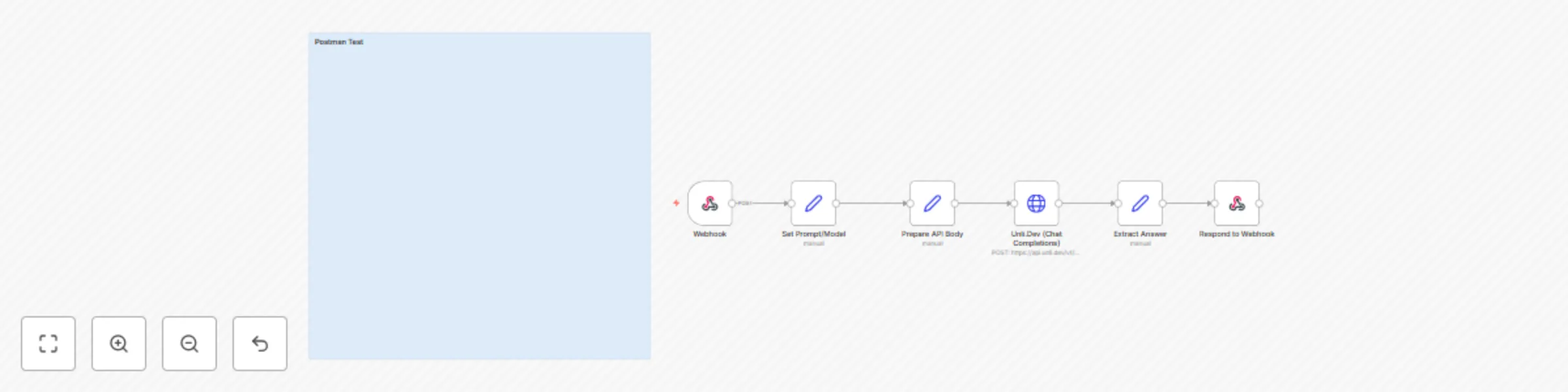
  2. 📎 Process: Webhook → Set Prompt/Model (map incoming fields) → Prepare API Body (compose messages) → Unli.Dev (Chat Completions) → Extract Answer → Respond to Webhook.
  3. 🤖 Smart Logic: Unli.dev (chat completions) runs a single-turn generation using the embedded system-template that builds persona, operational protocol, rules, output format, and designer notes automatically.
  4. 💌 Output: The generated system prompt (with Designer's Notes) is returned in the webhook response for immediate use in your app or CI pipeline.

⚠️ Security Note: You'll want to swap in your Unli.dev API key under the HTTP header auth credential—don't share it in Slack. Seriously.

🧩 Requirements

  • Active n8n instances
  • Unli.dev API key / account
  • HTTP Header Auth credential configured in n8n
  • Optional: Postman or curl for testing

🛠️ Level Up Ideas

  • Add a lightweight front-end form to let non-technical PMs generate prompts and preview outputs
  • Add validation rules or automated tests that run generated system prompts against sample user queries to catch unwanted behavior early

Made by: Khaisa Studio
Category: system-prompt, unli.dev

Need custom work? Contact me!

1.2 Logical Blocks

This catalog entry is organized from the workflow JSON. The node-level section below shows the executable blocks available for review before importing the template.

2. Block-by-Block Analysis

Block 1 - Set Prompt/Model

Type / Role
n8n-nodes-base.set - set
Config choices
Version 3

Block 2 - Prepare API Body

Type / Role
n8n-nodes-base.set - set
Config choices
Version 3

Block 3 - Webhook

Type / Role
n8n-nodes-base.webhook - webhook
Config choices
Version 2.1

Block 4 - Respond to Webhook

Type / Role
n8n-nodes-base.respondToWebhook - respondToWebhook
Config choices
Version 1.4

Block 5 - Unli.Dev (Chat Completions)

Type / Role
n8n-nodes-base.httpRequest - httpRequest
Config choices
Version 4.2

Block 6 - Extract Answer

Type / Role
n8n-nodes-base.set - set
Config choices
Version 3

Block 7 - Sticky Note

Type / Role
n8n-nodes-base.stickyNote - stickyNote
Config choices
Version 1

3. Summary Table

Workflow Generate AI system prompts for LLMs with Unli.dev
Complexity intermediate
Nodes 7
Categories Engineering, Multimodal AI
Author Khairul Muhtadin
Published 21 Aug 2025

4. Reproducing the Workflow from Scratch

  1. 1. Download the workflow JSON

    Use the JSON export at /data/workflows/7696/7696.json as the source template for this automation.

  2. 2. Import the template into n8n

    Open n8n, import the downloaded JSON, and review each node before activating the workflow.

  3. 3. Configure credentials and variables

    Replace placeholder credentials, API keys, webhook URLs, account IDs, and environment-specific values with your own settings.

  4. 4. Test with sample data

    Run the workflow manually or in a staging workspace, inspect node output, and confirm downstream systems receive the expected data.

  5. 5. Activate and monitor

    Enable the workflow only after testing, then monitor executions, errors, and rate limits during the first production runs.

5. General Notes & Resources

Review imported nodes carefully before activation. This catalog entry is intended to help you inspect the workflow structure, understand required services, and find related templates faster.

Node names, credentials, schedules, webhook paths, and external service limits may need adjustment for your workspace.

Frequently asked questions

What does Generate AI system prompts for LLMs with Unli.dev do?

System Prompt Generator Using Unli.dev turns human input ideas into a polished, repeatable system prompt blueprint. It uses an n8n webhook, a small Set/Prepare pipeline, and Unli.dev's chat complet...

What do I need before importing this workflow?

Review the workflow JSON, configure any required credentials in n8n, and test the automation in a safe workspace before using it in production.

Can I customize this workflow?

Yes. Use the block-by-block analysis and the downloadable JSON to inspect each node, then adjust credentials, prompts, schedules, filters, or destinations for your Engineering, Multimodal AI use case.