Block 1 - Webhook
- Type / Role
- n8n-nodes-base.webhook - webhook
- Config choices
- Version 2.1


 Early Deal
This workflow is provided as-is. Please review and test before using in production.
AI Proposal Generator with PDF Delivery & Team Notifications Description Creating client proposals manually is slow, repetitive, and often inconsistent. This AI powered workflow transforms propo...
n8n-nodes-base.webhook, n8n-nodes-htmlcsstopdf.htmlcsstopdf, n8n-nodes-base.gmail, n8n-nodes-base.googledrive, n8n-nodes-base.merge, n8n-nodes-base.set, @n8n/n8n-nodes-langchain.openai, n8n-nodes-base.code
This workflow is cataloged by N8N Workflows and links back to its original n8n.io source page by Jitesh Dugar.
Original n8n.io sourceCreating client proposals manually is slow, repetitive, and often inconsistent. This AI-powered workflow transforms proposal creation from a manual task into a fully automated, professional process.
With a single submission, this workflow generates a customized AI-written proposal, converts it into a polished PDF, emails it to the client, stores it in Google Drive, and notifies your internal team — ensuring faster turnaround, consistent quality, and zero missed steps.
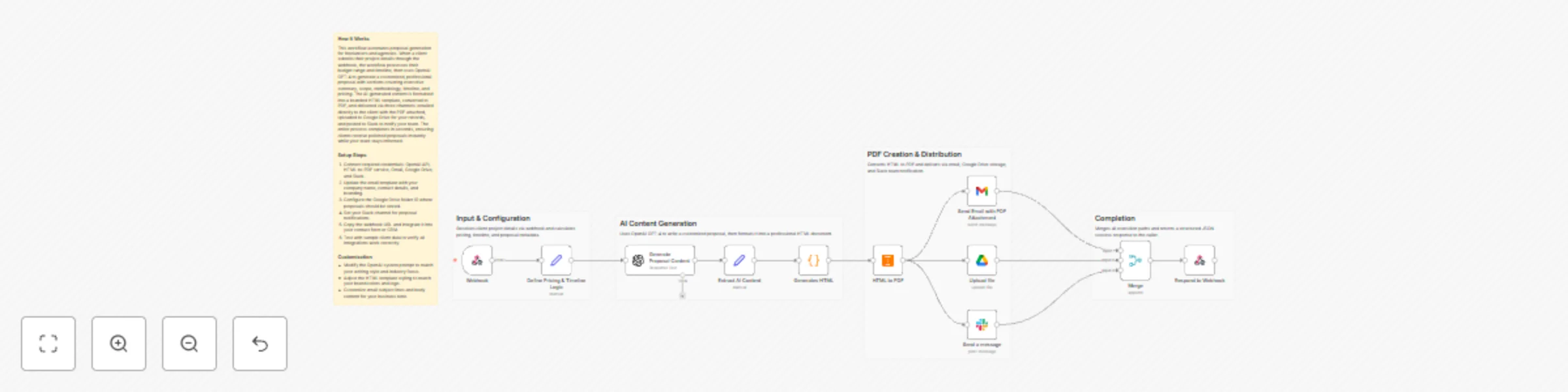
This workflow turns client requirements into ready-to-send proposals with minimal effort:
📝 Capture Client & Project Details – A webhook receives client information, project scope, budget range, and timeline.
🧠 AI-Powered Proposal Writing – AI generates a structured, client-ready proposal tailored to the project requirements.
📄 HTML Proposal Formatting – The proposal content is converted into a clean, professional HTML layout.
📑 PDF Generation – The HTML proposal is automatically converted into a downloadable PDF.
📧 Email Delivery – The proposal PDF is emailed directly to the client.
☁️ Google Drive Storage – A copy of the proposal is saved for record-keeping and reuse.
💬 Slack Notification – Your team is notified when a proposal is generated and sent.
🔁 Webhook Response – Returns a confirmation response for frontend or system integrations.
🤖 AI Proposal Generation – Automatically creates professional proposals based on project inputs.
⚙️ End-to-End Automation – From input submission to PDF delivery, everything runs automatically.
📄 Professional PDF Output – Client-ready proposals with clean formatting.
📧 Automated Email Sending – No manual follow-ups required.
☁️ Centralized Storage – All proposals stored securely in Google Drive.
💬 Team Notifications – Instant Slack alerts for visibility and tracking.
🔀 Flexible Integration – Can be triggered from forms, CRMs, or web apps.
🚀 Freelancers & Consultants – Send proposals faster without writing from scratch.
🏢 Agencies & Service Providers – Standardize proposal quality across teams.
📈 Sales & Operations Teams – Reduce manual work and response time.
💻 Startups & Small Businesses – Look professional without extra overhead.
🧠 Remote Teams – Keep everyone aligned with automated notifications.
🌐 Webhook Trigger – Receives client and project details.
🤖 OpenAI – Generates proposal content.
📄 HTMLCSS to PDF – Converts HTML proposals into PDFs.
📧 Gmail – Sends proposal emails to clients.
☁️ Google Drive – Stores generated proposal files.
💬 Slack – Sends internal notifications.
📊 CRM Integration – Save proposal data to HubSpot, Airtable, or Salesforce.
🎨 Brand Customization – Add logos, brand colors, and styling to proposals.
🌍 Multilingual Proposals – Generate proposals in different languages.
🔐 Approval Step – Add internal approval before sending proposals.
📈 Analytics Dashboard – Track proposal volume and turnaround time.
📎 File Attachments – Include additional documents with the proposal email.
1️⃣ Import the workflow template into your n8n workspace 2️⃣ Connect credentials for OpenAI, Gmail, Google Drive, Slack, and HTMLCSS to PDF 3️⃣ Send test data to the webhook with client and project details 4️⃣ Review the generated proposal PDF 5️⃣ Activate the workflow and start sending proposals automatically
1️⃣ Proposal Branding – Update HTML layout, fonts, and colors. 2️⃣ AI Prompt Tuning – Adjust tone, length, or structure of proposals. 3️⃣ Email Messaging – Customize email subject and content. 4️⃣ Slack Messages – Modify notification text or channels. 5️⃣ Drive Organization – Change folder structure for stored proposals. 6️⃣ Pricing Logic – Adjust calculations for budget or timeline.
⚡ Faster Proposal Turnaround – Generate proposals in minutes instead of hours.
🤖 Consistent Quality – Every proposal follows a structured format.
📧 Instant Delivery – Clients receive proposals immediately.
🗂️ Organized Records – All proposals stored automatically.
💬 Better Team Visibility – Everyone stays informed with Slack alerts.
📝 Webhook Input ↓ 🧠 AI Proposal Generation ↓ 📄 HTML Formatting ↓ 📑 PDF Conversion ↓ 📧 Email Delivery ↓ ☁️ Google Drive Storage ↓ 💬 Slack Notification ↓ 🔁 Webhook Response
Import this template and let AI handle proposal writing, formatting, delivery, and tracking — so you can focus on closing deals faster. ✨
This catalog entry is organized from the workflow JSON. The node-level section below shows the executable blocks available for review before importing the template.
| Workflow | Generate AI proposals as PDFs with GPT-4, Gmail, Google Drive and Slack |
|---|---|
| Complexity | advanced |
| Nodes | 16 |
| Categories | Document Extraction, Multimodal AI |
| Author | Jitesh Dugar |
| Published | 12 Dec 2025 |
Use the JSON export at /data/workflows/11731/11731.json as the source template for this automation.
Open n8n, import the downloaded JSON, and review each node before activating the workflow.
Replace placeholder credentials, API keys, webhook URLs, account IDs, and environment-specific values with your own settings.
Run the workflow manually or in a staging workspace, inspect node output, and confirm downstream systems receive the expected data.
Enable the workflow only after testing, then monitor executions, errors, and rate limits during the first production runs.
Review imported nodes carefully before activation. This catalog entry is intended to help you inspect the workflow structure, understand required services, and find related templates faster.
Node names, credentials, schedules, webhook paths, and external service limits may need adjustment for your workspace.
AI Proposal Generator with PDF Delivery & Team Notifications Description Creating client proposals manually is slow, repetitive, and often inconsistent. This AI powered workflow transforms propo...
Review the workflow JSON, configure any required credentials in n8n, and test the automation in a safe workspace before using it in production.
Yes. Use the block-by-block analysis and the downloadable JSON to inspect each node, then adjust credentials, prompts, schedules, filters, or destinations for your Document Extraction, Multimodal AI use case.