Generate AI-powered markdown posts from workflow JSON with Gemini & LlamaIndex

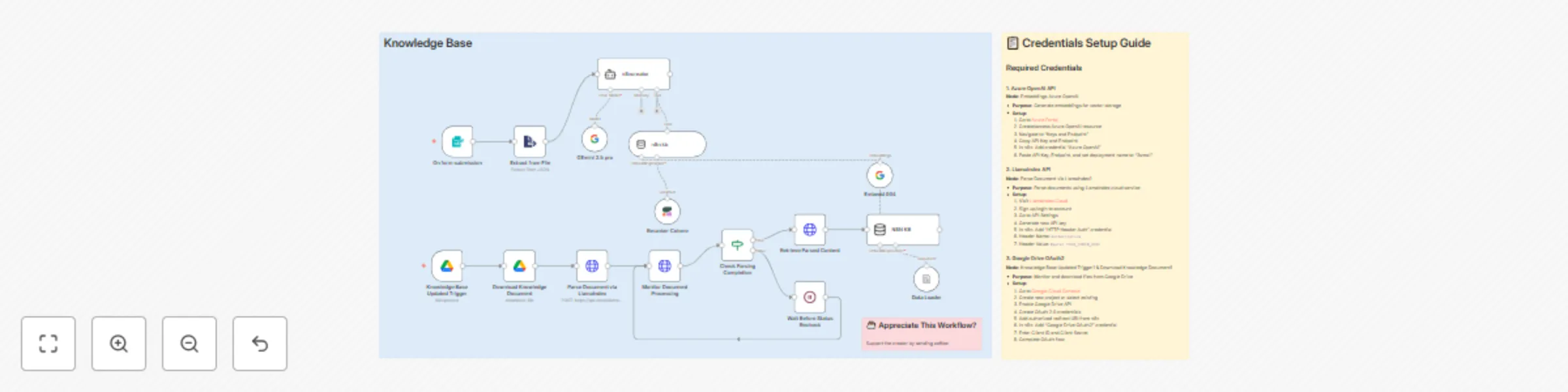
Workflow preview

Workflow preview
100%
Generate AI-powered markdown posts from workflow JSON with Gemini & LlamaIndex preview
Open on n8n.io

Important notice

This workflow is provided as-is. Please review and test before using in production.

1. Workflow Overview

This AI powered workflow transforms n8n workflow JSON files into publication ready, SEO optimized markdown posts for the n8n community. Simply upload your workflow's JSON, and let Google Gemini 2.5...

Best for

  • Content Creation automation workflows
  • Multimodal AI automation workflows
  • advanced n8n builders looking for reusable templates

Tools used

n8n-nodes-base.stickynote, n8n-nodes-base.formtrigger, n8n-nodes-base.extractfromfile, @n8n/n8n-nodes-langchain.vectorstoreinmemory, n8n-nodes-base.httprequest, n8n-nodes-base.if, n8n-nodes-base.wait, n8n-nodes-base.googledrive

Source and attribution

This workflow is cataloged by N8N Workflows and links back to its original n8n.io source page by Khairul Muhtadin.

Original n8n.io source

1.1 Workflow description

Title
Generate AI-powered markdown posts from workflow JSON with Gemini & LlamaIndex
Workflow name
Generate AI-powered markdown posts from workflow JSON with Gemini & LlamaIndex

This AI-powered workflow transforms n8n workflow JSON files into publication-ready, SEO-optimized markdown posts for the n8n community. Simply upload your workflow's JSON, and let Google Gemini 2.5 Pro, guided by a LlamaIndex-powered knowledge base of best practices, automatically generate compelling content.

Why Use This Workflow?

Time Savings: Reduces the time to create a detailed workflow post from over an hour of manual writing to under 2 minutes.

Cost Reduction: Eliminates the need for separate AI content subscriptions or outsourcing content creation tasks.

Error Prevention: Enforces content quality and structural consistency by using a knowledge base of n8n's official guidelines, minimizing formatting errors.

Ideal For

  • n8n Workflow Creators: To quickly document and share their creations on the community platform without the tedious, time-consuming writing process.
  • Developer Advocates: To standardize and accelerate the production of technical tutorials and workflow showcases.
  • Content & Marketing Teams: To streamline the content pipeline for n8n-related blog posts, tutorials, and community engagement initiatives.

How It Works

  1. Trigger: The process starts when you upload an n8n workflow JSON file via a simple web form.
  2. Data Extraction: The workflow automatically extracts the JSON content from the uploaded file.
  3. Intelligence Layer: An advanced AI agent, powered by Google Gemini 2.5 Pro, analyzes the structure, nodes, and metadata of your workflow.
  4. Knowledge Retrieval: The agent consults a specialized, in-memory knowledge base built from n8n's content guidelines. This knowledge base is created by parsing documents with LlamaIndex and refined with a Cohere Reranker for maximum accuracy.
  5. Content Generation: The AI agent synthesizes the technical details from your JSON with the best practices from the knowledge base to write a complete, benefit-driven markdown post.
  6. Output & Delivery: The final, polished markdown content is generated as the workflow's output, ready to be copied and pasted into the n8n community platform.

Setup Guide

Prerequisites

Requirement Type Purpose
n8n instance Essential Workflow execution platform
Google Gemini API Key Essential Powers the core AI content generation
LlamaIndex Cloud API Key Essential Parses documents for the knowledge base
Cohere API Key Optional Improves knowledge base search results
Google Drive Account Optional For automatically updating the knowledge base from a Google Doc

Installation Steps

  1. Import the JSON file to your n8n instance.
  2. Configure credentials:
    • Google Gemini: In the "GEmini 2.5 pro" node, create and add your Google Gemini API credential.
    • LlamaIndex: In the three HTTP Request nodes named "Parse Document...", "Monitor Document...", and "Retrieve Parsed...", create an HTTP Header Auth credential. The header name is Authorization and the value is Bearer YOUR_LLAMA_INDEX_API_KEY.
    • Cohere: (Optional) In the "Reranker Cohere" node, create and add your Cohere API credential.
    • Google Drive: (Optional) If you plan to auto-update the knowledge base, configure Google Drive OAuth2 credentials for the "Knowledge Base Updated Trigger" and "Download Knowledge Document" nodes.
  3. Update environment-specific values:
    • To use the knowledge base auto-update feature, go to the "Knowledge Base Updated Trigger" node and select the Google Drive file containing your content guidelines.
  4. Customize settings:
    • The primary system prompt in the "n8ncreator" agent node can be modified to adjust the tone, style, or structure of the generated content.
  5. Test execution:
    • Run the workflow manually and use the form to upload a sample n8n workflow JSON file to verify that all connections work correctly.

Technical Details

Core Nodes

Node Purpose Key Configuration
Form Trigger Initiates the workflow via a file upload. Set the "Input Json Workflow" field to required.
Langchain Agent Orchestrates the entire content creation process. The system prompt contains all instructions for the AI.
ChatGoogleGemini Provides the core generative AI capabilities. Select your Gemini model of choice (e.g., gemini-2.5-pro).
VectorStoreInMemory Acts as the agent's knowledge base tool. Configured to use embeddings from a Google Gemini model.
HTTPRequest Interacts with the LlamaIndex API to parse documents. Set up with LlamaIndex API endpoint and authentication.

Customization Options

Basic Adjustments:

  • Change AI Model: Replace the ChatGoogleGemini node with another LLM node (e.g., OpenAI, Anthropic) to use a different provider.
  • Adjust System Prompt: Modify the prompt in the "n8ncreator" node to tailor the output for different platforms (e.g., blog, internal wiki) or change the writing style.

Advanced Enhancements:

  • Automated Publishing: Connect the output of the "n8ncreator" node to a Ghost, WordPress, or GitHub node to automatically publish the generated post.
  • Add Web Search: Equip the Langchain Agent with a web search tool to allow it to fetch live information about new n8n nodes or services.
  • Batch Processing: Replace the Form Trigger with a Read Binary Files node to process an entire folder of workflow JSON files in a single run.

Performance & Optimization

Metric Expected Performance Optimization Tips
Execution time ~1 minute per run Largely dependent on the Gemini API response time.
API calls 1 LLM call per post Knowledge base updates trigger LlamaIndex/Google calls separately.
Error handling Built-in retry logic for document parsing Add an error workflow path after the "n8ncreator" node to handle AI generation failures.

Troubleshooting

Common Issues:

Problem Cause Solution
AI output is generic or incomplete The input JSON file is invalid or lacks key information (e.g., no node names). Ensure you are uploading a valid, exported n8n workflow JSON. Verify the workflow has been saved with descriptive node names.
LlamaIndex parsing fails The LlamaIndex API key is incorrect or the source document is inaccessible. Double-check your LlamaIndex API credential. Ensure the Google Doc sharing settings allow access.
Credential Error API keys are missing or incorrect for Gemini, LlamaIndex, or Cohere. Go to the specified nodes and verify that the correct credentials have been created and selected.

Created by: khaisa Studio Category: AI Tags: AI, Content Generation, Google Gemini, LlamaIndex, Automation Need custom workflows? Contact us

Connect with the creator: PortfolioWorkflowsLinkedInMediumThreads

1.2 Logical Blocks

This catalog entry is organized from the workflow JSON. The node-level section below shows the executable blocks available for review before importing the template.

2. Block-by-Block Analysis

Block 1 - Sticky Note4

Type / Role
n8n-nodes-base.stickyNote - stickyNote
Config choices
Version 1

Block 2 - On form submission

Type / Role
n8n-nodes-base.formTrigger - formTrigger
Config choices
Version 2.2

Block 3 - Extract from File

Type / Role
n8n-nodes-base.extractFromFile - extractFromFile
Config choices
Version 1

Block 4 - n8n kb

Type / Role
@n8n/n8n-nodes-langchain.vectorStoreInMemory - vectorStoreInMemory
Config choices
Version 1.2

Block 5 - Sticky Note2

Type / Role
n8n-nodes-base.stickyNote - stickyNote
Config choices
Version 1

Block 6 - Parse Document via LlamaIndex

Type / Role
n8n-nodes-base.httpRequest - httpRequest
Config choices
Version 4.2

Block 7 - Monitor Document Processing

Type / Role
n8n-nodes-base.httpRequest - httpRequest
Config choices
Version 4.2

Block 8 - Check Parsing Completion

Type / Role
n8n-nodes-base.if - if
Config choices
Version 2.2

Block 9 - Wait Before Status Recheck

Type / Role
n8n-nodes-base.wait - wait
Config choices
Version 1.1

Block 10 - Retrieve Parsed Content

Type / Role
n8n-nodes-base.httpRequest - httpRequest
Config choices
Version 4.2

Block 11 - Download Knowledge Document

Type / Role
n8n-nodes-base.googleDrive - googleDrive
Config choices
Version 3

Block 12 - Knowledge Base Updated Trigger

Type / Role
n8n-nodes-base.googleDriveTrigger - googleDriveTrigger
Config choices
Version 1

Block 13 - Sticky Note3

Type / Role
n8n-nodes-base.stickyNote - stickyNote
Config choices
Version 1

Block 14 - Reranker Cohere

Type / Role
@n8n/n8n-nodes-langchain.rerankerCohere - rerankerCohere
Config choices
Version 1

Block 15 - Embedd 004

Type / Role
@n8n/n8n-nodes-langchain.embeddingsGoogleGemini - embeddingsGoogleGemini
Config choices
Version 1

Block 16 - GEmini 2.5 pro

Type / Role
@n8n/n8n-nodes-langchain.lmChatGoogleGemini - lmChatGoogleGemini
Config choices
Version 1

Block 17 - N8N KB

Type / Role
@n8n/n8n-nodes-langchain.vectorStoreInMemory - vectorStoreInMemory
Config choices
Version 1.2

Block 18 - n8ncreator

Type / Role
@n8n/n8n-nodes-langchain.agent - agent
Config choices
Version 2.1

Block 19 - Data Loader

Type / Role
@n8n/n8n-nodes-langchain.documentDefaultDataLoader - documentDefaultDataLoader
Config choices
Version 1.1

3. Summary Table

Workflow Generate AI-powered markdown posts from workflow JSON with Gemini & LlamaIndex
Complexity advanced
Nodes 19
Categories Content Creation, Multimodal AI
Author Khairul Muhtadin
Published 17 Oct 2025

4. Reproducing the Workflow from Scratch

  1. 1. Download the workflow JSON

    Use the JSON export at /data/workflows/9807/9807.json as the source template for this automation.

  2. 2. Import the template into n8n

    Open n8n, import the downloaded JSON, and review each node before activating the workflow.

  3. 3. Configure credentials and variables

    Replace placeholder credentials, API keys, webhook URLs, account IDs, and environment-specific values with your own settings.

  4. 4. Test with sample data

    Run the workflow manually or in a staging workspace, inspect node output, and confirm downstream systems receive the expected data.

  5. 5. Activate and monitor

    Enable the workflow only after testing, then monitor executions, errors, and rate limits during the first production runs.

5. General Notes & Resources

Review imported nodes carefully before activation. This catalog entry is intended to help you inspect the workflow structure, understand required services, and find related templates faster.

Node names, credentials, schedules, webhook paths, and external service limits may need adjustment for your workspace.

Frequently asked questions

What does Generate AI-powered markdown posts from workflow JSON with Gemini & LlamaIndex do?

This AI powered workflow transforms n8n workflow JSON files into publication ready, SEO optimized markdown posts for the n8n community. Simply upload your workflow's JSON, and let Google Gemini 2.5...

What do I need before importing this workflow?

Review the workflow JSON, configure any required credentials in n8n, and test the automation in a safe workspace before using it in production.

Can I customize this workflow?

Yes. Use the block-by-block analysis and the downloadable JSON to inspect each node, then adjust credentials, prompts, schedules, filters, or destinations for your Content Creation, Multimodal AI use case.