Block 1 - Webhook
- Type / Role
- n8n-nodes-base.webhook - webhook
- Config choices
- Version 2.1


 Early Deal
This workflow is provided as-is. Please review and test before using in production.
AI Powered Incident Report Generator with Severity Alerts & PDF Delivery Description Automate incident reporting from detection to delivery with AI driven analysis and professional documentation. T...
n8n-nodes-base.webhook, n8n-nodes-htmlcsstopdf.htmlcsstopdf, n8n-nodes-base.set, @n8n/n8n-nodes-langchain.openai, n8n-nodes-base.code, n8n-nodes-base.if, n8n-nodes-base.slack, n8n-nodes-base.googledrive
This workflow is cataloged by N8N Workflows and links back to its original n8n.io source page by Jitesh Dugar.
Original n8n.io sourceAutomate incident reporting from detection to delivery with AI-driven analysis and professional documentation.
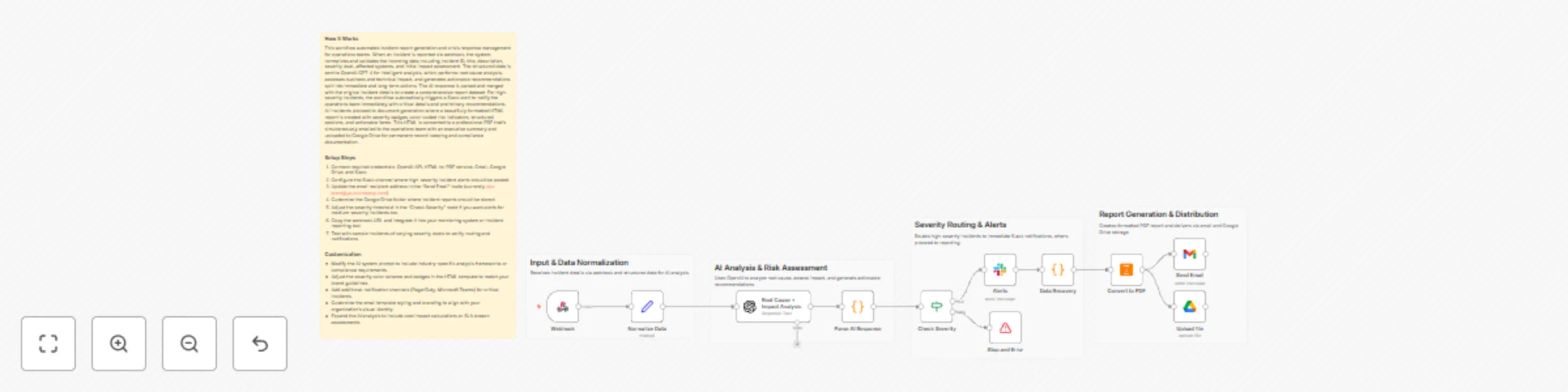
This workflow transforms raw incident details into a clear, structured incident report, performs AI-based root cause and impact analysis, triggers real-time alerts for high-severity issues, and delivers a polished PDF report to your operations team — all with minimal manual effort.
Turns incident reporting into a fast, reliable, and repeatable process:
🚨 Receive Incident Details – Accepts incident data via webhook (ID, severity, systems affected, description).
🧠 AI Analysis – Uses AI to generate root cause analysis, impact assessment, and recommended actions.
⚠️ Severity Check – Automatically detects high-severity incidents.
💬 Slack Alerts – Sends instant alerts for critical incidents to the ops channel.
📄 Professional Report Generation – Formats incident details into a clean, readable report.
📑 PDF Creation – Converts the report into a downloadable PDF.
📧 Email Delivery – Sends the report to the operations team.
☁️ Secure Storage – Saves a copy to Google Drive for records and compliance.
🤖 AI-Generated Analysis – Automated root cause, impact, and action recommendations ⚡ Real-Time Severity Alerts – Immediate Slack notifications for high-risk incidents 📄 Professional PDF Reports – Clean, structured, and ready for audits 📧 Automated Delivery – Email reports without manual follow-ups ☁️ Centralized Storage – Securely archive reports in Google Drive
🏢 IT & Operations Teams 🔐 Security & Compliance Teams 🧑💼 Internal Ops & Risk Management 🏭 Enterprises handling system or process incidents 📊 Teams needing audit-ready incident documentation
🤖 OpenAI – Incident analysis and recommendations 📄 HTMLCSS to PDF – Convert reports into PDFs 📧 Gmail – Send incident reports 💬 Slack – Severity-based alerts
☁️ Google Drive – Store incident reports securely
1️⃣ Import the workflow into n8n 2️⃣ Connect OpenAI, Slack, Gmail, and HTMLCSS to PDF credentials 3️⃣ Update Slack channel and email recipients 4️⃣ Trigger the webhook with incident data 5️⃣ Activate the workflow
⚡ Faster incident response 🤖 Consistent AI-driven analysis 📉 Reduced manual reporting work 📄 Audit-ready incident documentation 🚨 Immediate visibility into critical incidents
This catalog entry is organized from the workflow JSON. The node-level section below shows the executable blocks available for review before importing the template.
| Workflow | Generate AI incident reports with GPT-4, Slack alerts, Gmail and PDF export |
|---|---|
| Complexity | advanced |
| Nodes | 16 |
| Categories | Document Extraction, AI Summarization |
| Author | Jitesh Dugar |
| Published | 12 Dec 2025 |
Use the JSON export at /data/workflows/11733/11733.json as the source template for this automation.
Open n8n, import the downloaded JSON, and review each node before activating the workflow.
Replace placeholder credentials, API keys, webhook URLs, account IDs, and environment-specific values with your own settings.
Run the workflow manually or in a staging workspace, inspect node output, and confirm downstream systems receive the expected data.
Enable the workflow only after testing, then monitor executions, errors, and rate limits during the first production runs.
Review imported nodes carefully before activation. This catalog entry is intended to help you inspect the workflow structure, understand required services, and find related templates faster.
Node names, credentials, schedules, webhook paths, and external service limits may need adjustment for your workspace.
AI Powered Incident Report Generator with Severity Alerts & PDF Delivery Description Automate incident reporting from detection to delivery with AI driven analysis and professional documentation. T...
Review the workflow JSON, configure any required credentials in n8n, and test the automation in a safe workspace before using it in production.
Yes. Use the block-by-block analysis and the downloadable JSON to inspect each node, then adjust credentials, prompts, schedules, filters, or destinations for your Document Extraction, AI Summarization use case.