Block 1 - Telegram Trigger
- Type / Role
- n8n-nodes-base.telegramTrigger - telegramTrigger
- Config choices
- Version 1.2


 Early Deal
This workflow is provided as-is. Please review and test before using in production.
AI Spotify Playlist Generator (Telegram → Spotify) instantly create a curated Spotify playlist based on a single song recommendation sent via Telegram. This workflow uses an AI Agent to generate...
n8n-nodes-base.telegramtrigger, @n8n/n8n-nodes-langchain.agent, @n8n/n8n-nodes-langchain.lmchatopenrouter, @n8n/n8n-nodes-langchain.outputparserstructured, n8n-nodes-base.splitout, n8n-nodes-base.splitinbatches, n8n-nodes-base.spotify, n8n-nodes-base.telegram
This workflow is cataloged by N8N Workflows and links back to its original n8n.io source page by raas.
Original n8n.io source🎵 AI Spotify Playlist Generator (Telegram → Spotify)
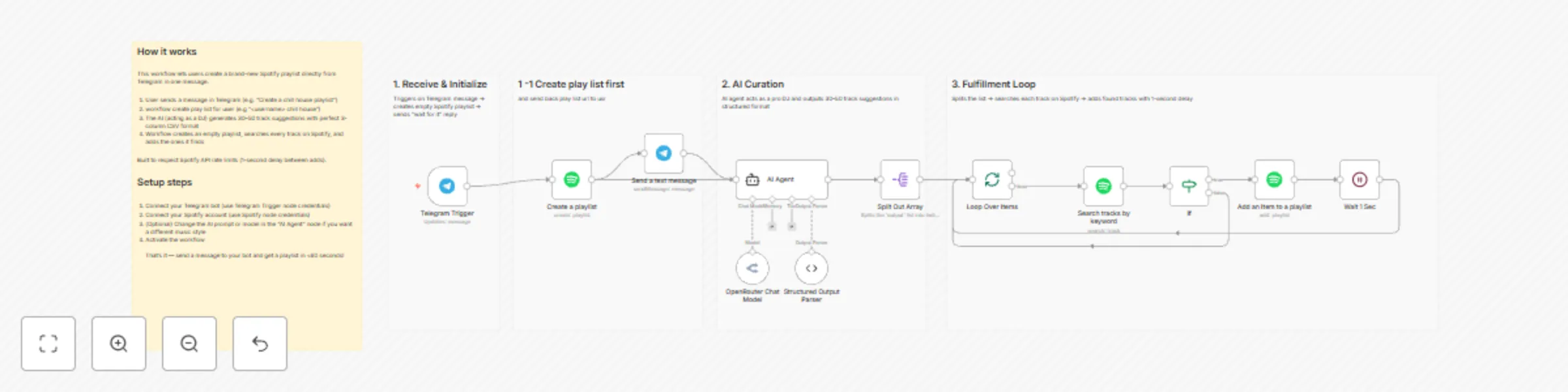
instantly create a curated Spotify playlist based on a single song recommendation sent via Telegram. This workflow uses an AI Agent to generate similar tracks, creates a new playlist, sends you the link immediately, and then populates the playlist in the background. ✨ Features
Instant Feedback: Creates the Spotify playlist and sends the URL back to your Telegram chat immediately, before the AI finishes processing.

AI Curation: Uses an AI Agent (via OpenRouter) to act as a "Greatest DJ," generating 25 songs similar to your input.

Smart Searching: Automatically searches Spotify for the generated tracks.

Error Handling: Includes logic to skip tracks that cannot be found on Spotify.

Rate Limiting: Includes a wait loop to ensure Spotify API rate limits are respected during population.
🛠️ Prerequisites
To use this workflow, you need:
n8n: An active instance of n8n.

Spotify Developer Account: You need a Client ID and Client Secret to authenticate the Spotify node.

Telegram Bot: A bot token created via @BotFather.

OpenRouter Account: An API key for OpenRouter to access the LLM (Language Model).

    Note: You can easily swap the OpenRouter node for an OpenAI or Anthropic node if preferred.
🔄 How it Works
Trigger: You send a message to your Telegram Bot (e.g., "Daft Punk - One More Time").

Create Playlist: The workflow immediately creates a new empty playlist on your Spotify account named with your username and the prompt.

Reply: The bot replies to you with the link to the new playlist.

AI Generation: The prompt is sent to an AI Agent which generates a JSON list of ~25 similar tracks and artists.

Processing:

    The workflow splits the list into individual items.

    It loops through every item.

    It searches Spotify for the specific Track + Artist.

    If found, it adds the track to the playlist.

    It waits 1 second between adds to prevent API errors.
⚙️ Setup Instructions
Credentials:

    Set up your Telegram API credentials in the Trigger and Send Message nodes.

    Set up your Spotify OAuth2 credentials in the Create, Search, and Add Item nodes.

    Set up your OpenRouter API credentials in the Chat Model node.

Model Selection:

    The template is configured to use openai/gpt-5-nano via OpenRouter. If this model is unavailable to you, simply open the OpenRouter Chat Model node and change the model to openai/gpt-4o or meta-llama/llama-3-70b-instruct.

Activate:

    Save the workflow and click Activate.

    Open your Telegram bot and send it a song name!
📦 Dependencies
n8n-nodes-base.telegramTrigger

@n8n/n8n-nodes-langchain.agent

n8n-nodes-base.spotify

n8n-nodes-base.splitOut

n8n-nodes-base.splitInBatches
This catalog entry is organized from the workflow JSON. The node-level section below shows the executable blocks available for review before importing the template.
| Workflow | Generate AI-curated Spotify playlists from Telegram using OpenRouter GPT |
|---|---|
| Complexity | advanced |
| Nodes | 17 |
| Categories | Content Creation, AI Chatbot |
| Author | raas |
| Published | 20 Nov 2025 |
Use the JSON export at /data/workflows/11030/11030.json as the source template for this automation.
Open n8n, import the downloaded JSON, and review each node before activating the workflow.
Replace placeholder credentials, API keys, webhook URLs, account IDs, and environment-specific values with your own settings.
Run the workflow manually or in a staging workspace, inspect node output, and confirm downstream systems receive the expected data.
Enable the workflow only after testing, then monitor executions, errors, and rate limits during the first production runs.
Review imported nodes carefully before activation. This catalog entry is intended to help you inspect the workflow structure, understand required services, and find related templates faster.
Node names, credentials, schedules, webhook paths, and external service limits may need adjustment for your workspace.
AI Spotify Playlist Generator (Telegram → Spotify) instantly create a curated Spotify playlist based on a single song recommendation sent via Telegram. This workflow uses an AI Agent to generate...
Review the workflow JSON, configure any required credentials in n8n, and test the automation in a safe workspace before using it in production.
Yes. Use the block-by-block analysis and the downloadable JSON to inspect each node, then adjust credentials, prompts, schedules, filters, or destinations for your Content Creation, AI Chatbot use case.