Block 1 - Main Overview
- Type / Role
- n8n-nodes-base.stickyNote - stickyNote
- Config choices
- Version 1


 Early Deal
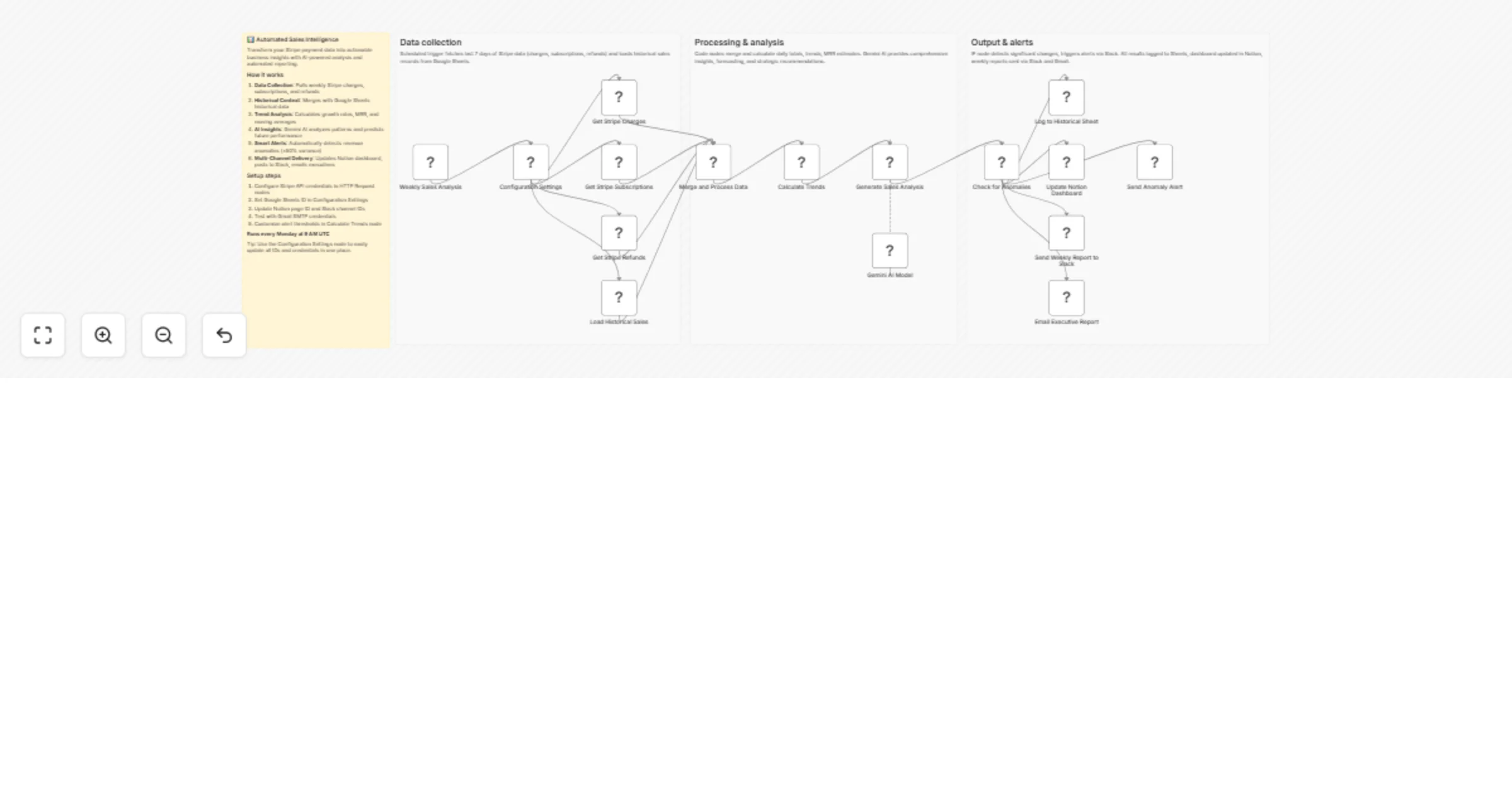
Forecast sales trends and generate reports with Stripe, Sheets, and Gemini AI Who is this for Revenue operations teams, SaaS growth managers, and sales directors who need automated weekly insights ...
n8n-nodes-base.stickynote, n8n-nodes-base.scheduletrigger, n8n-nodes-base.httprequest, n8n-nodes-base.googlesheets, n8n-nodes-base.code, @n8n/n8n-nodes-langchain.lmchatgooglegemini, @n8n/n8n-nodes-langchain.chainllm, n8n-nodes-base.if
This workflow is cataloged by N8N Workflows and links back to its original n8n.io source page by Oka Hironobu.
Original n8n.io sourceRevenue operations teams, SaaS growth managers, and sales directors who need automated weekly insights from their Stripe payment data. Perfect for small to medium businesses tracking subscription revenue, one-time charges, and refund patterns without manual spreadsheet work.
Every Monday morning, the workflow pulls the previous week's charges, subscriptions, and refunds from Stripe's API. It merges this fresh data with historical sales records stored in Google Sheets, then calculates key metrics like week-over-week growth, moving averages, and MRR estimates.
Google Gemini AI analyzes the compiled data to identify trends, predict next week's performance, and flag unusual revenue patterns. When significant changes are detected (20%+ variance), the system triggers targeted alerts through a separate Slack channel.
All insights get logged to a Google Sheets history for tracking, while a comprehensive dashboard page updates automatically in Notion. The weekly summary posts to your main sales Slack channel, and executives receive detailed email reports with strategic recommendations.
Configure Stripe API credentials with read access to charges, subscriptions, and refunds. Set up Google Sheets OAuth for both reading historical data and writing analysis logs. Create a Notion integration with page update permissions for your sales dashboard.
Add Slack OAuth credentials for posting to your chosen sales and alerts channels. Configure Gmail SMTP for executive email delivery. Update the Configuration Settings node with your specific IDs, channels, and email addresses.
Adjust the anomaly detection threshold in the Calculate Trends code node (currently 50% variance triggers alerts). Modify the Slack message templates, email formatting, or add additional metrics to the Notion dashboard. Change the schedule trigger from weekly to daily or monthly based on your reporting needs.
This catalog entry is organized from the workflow JSON. The node-level section below shows the executable blocks available for review before importing the template.
| Workflow | Forecast sales trends and weekly reports with Stripe, Sheets, Slack, and Gemini AI |
|---|---|
| Complexity | advanced |
| Nodes | 20 |
| Categories | CRM, AI Summarization |
| Author | Oka Hironobu |
| Published | 10 Mar 2026 |
Use the JSON export at /data/workflows/13982/13982.json as the source template for this automation.
Open n8n, import the downloaded JSON, and review each node before activating the workflow.
Replace placeholder credentials, API keys, webhook URLs, account IDs, and environment-specific values with your own settings.
Run the workflow manually or in a staging workspace, inspect node output, and confirm downstream systems receive the expected data.
Enable the workflow only after testing, then monitor executions, errors, and rate limits during the first production runs.
Review imported nodes carefully before activation. This catalog entry is intended to help you inspect the workflow structure, understand required services, and find related templates faster.
Node names, credentials, schedules, webhook paths, and external service limits may need adjustment for your workspace.
Forecast sales trends and generate reports with Stripe, Sheets, and Gemini AI Who is this for Revenue operations teams, SaaS growth managers, and sales directors who need automated weekly insights ...
Review the workflow JSON, configure any required credentials in n8n, and test the automation in a safe workspace before using it in production.
Yes. Use the block-by-block analysis and the downloadable JSON to inspect each node, then adjust credentials, prompts, schedules, filters, or destinations for your CRM, AI Summarization use case.