Extract & store receipt data with GPT-4, OCR, Google Sheets & Notion via Telegram Bot

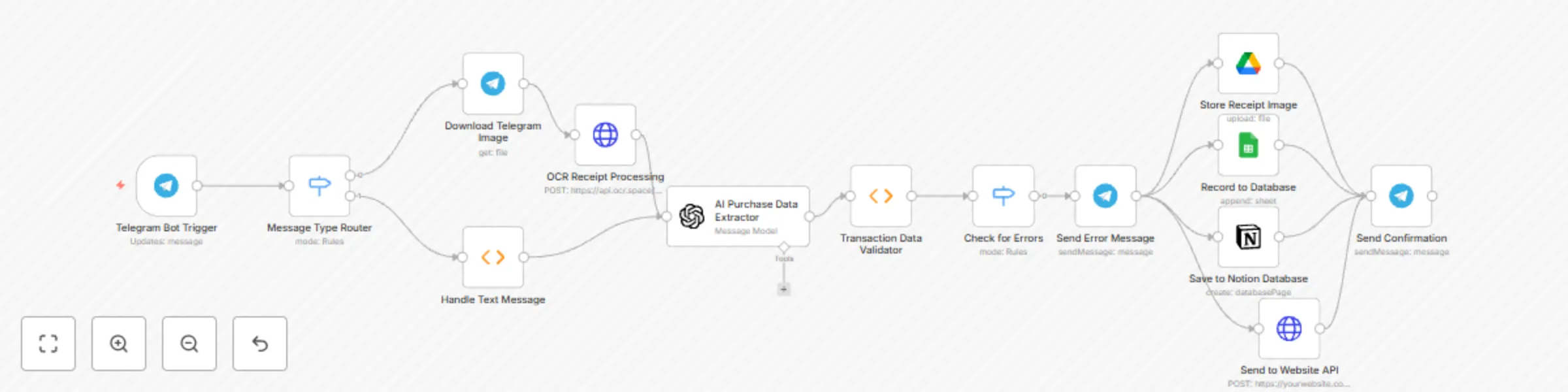
Workflow preview

Workflow preview
100%
Extract & store receipt data with GPT-4, OCR, Google Sheets & Notion via Telegram Bot preview
Open on n8n.io

Important notice

This workflow is provided as-is. Please review and test before using in production.

1. Workflow Overview

Transform your receipt management with this comprehensive n8n workflow that automatically processes receipts through Telegram, extracts transaction data using AI, and stores it across multiple plat...

Best for

  • Document Extraction automation workflows
  • AI Chatbot automation workflows
  • intermediate n8n builders looking for reusable templates

Tools used

n8n-nodes-base.telegramtrigger, n8n-nodes-base.switch, n8n-nodes-base.telegram, n8n-nodes-base.httprequest, n8n-nodes-base.function, @n8n/n8n-nodes-langchain.openai, n8n-nodes-base.googlesheets, n8n-nodes-base.googledrive

Source and attribution

This workflow is cataloged by N8N Workflows and links back to its original n8n.io source page by Tegar karunia ilham.

Original n8n.io source

1.1 Workflow description

Title
Extract & store receipt data with GPT-4, OCR, Google Sheets & Notion via Telegram Bot
Workflow name
Extract & store receipt data with GPT-4, OCR, Google Sheets & Notion via Telegram Bot

Overview

Transform your receipt management with this comprehensive n8n workflow that automatically processes receipts through Telegram, extracts transaction data using AI, and stores it across multiple platforms for seamless expense tracking.

Key Features

  • πŸ“± Telegram Bot Integration: Send receipts via photo or manual text entry
  • πŸ” OCR Processing: Automatic text extraction from receipt images using OCR.space API
  • πŸ€– AI Data Extraction: OpenAI GPT-4 intelligently extracts vendor, amount, date, and category
  • πŸ“Š Multi-Platform Storage: Automatically saves to Google Sheets, Notion, and custom APIs
  • πŸ’Ύ Receipt Archival: Stores original receipt images in Google Drive
  • βœ… Smart Validation: Validates extracted data and handles errors gracefully
  • πŸ“² Real-time Feedback: Sends confirmation messages with transaction details

How It Works

  1. Input Methods: Send receipt photos or text messages to your Telegram bot
  2. Image Processing: Downloads and processes receipt images using OCR technology
  3. AI Analysis: GPT-4 extracts structured transaction data from OCR text
  4. Data Validation: Ensures data quality and handles missing information
  5. Multi-Storage: Simultaneously saves to Google Sheets, Notion database, and external APIs
  6. Confirmation: Sends formatted confirmation with all transaction details

Use Cases

  • Personal expense tracking and budgeting
  • Small business receipt management
  • Travel expense documentation
  • Tax preparation and record keeping
  • Automated bookkeeping workflows

Required Credentials

  • Telegram Bot API (for bot functionality)
  • OCR.space API (for receipt text extraction)
  • OpenAI API (for AI data processing)
  • Google Sheets OAuth2 (for spreadsheet storage)
  • Google Drive OAuth2 (for image storage)
  • Notion API (for database integration)

Setup Notes

Replace placeholder values in the workflow:

  • YOUR_GOOGLE_SHEET_ID_HERE in Google Sheets node
  • YOUR_NOTION_DATABASE_ID_HERE in Notion node
  • YOUR_API_KEY_HERE and API endpoint in Website API node

This workflow provides a complete solution for automated receipt processing, making expense tracking effortless through simple Telegram interactions while maintaining data across multiple platforms for maximum accessibility and backup.

1.2 Logical Blocks

This catalog entry is organized from the workflow JSON. The node-level section below shows the executable blocks available for review before importing the template.

2. Block-by-Block Analysis

Block 1 - Telegram Bot Trigger

Type / Role
n8n-nodes-base.telegramTrigger - telegramTrigger
Config choices
Version 1.2

Block 2 - Message Type Router

Type / Role
n8n-nodes-base.switch - switch
Config choices
Version 3.2

Block 3 - Download Telegram Image

Type / Role
n8n-nodes-base.telegram - telegram
Config choices
Version 1.2

Block 4 - OCR Receipt Processing

Type / Role
n8n-nodes-base.httpRequest - httpRequest
Config choices
Version 4.2

Block 5 - Handle Text Message

Type / Role
n8n-nodes-base.function - function
Config choices
Version 1

Block 6 - AI Purchase Data Extractor

Type / Role
@n8n/n8n-nodes-langchain.openAi - openAi
Config choices
Version 1.8

Block 7 - Transaction Data Validator

Type / Role
n8n-nodes-base.function - function
Config choices
Version 1

Block 8 - Check for Errors

Type / Role
n8n-nodes-base.switch - switch
Config choices
Version 3.2

Block 9 - Send Error Message

Type / Role
n8n-nodes-base.telegram - telegram
Config choices
Version 1.2

Block 10 - Record to Database

Type / Role
n8n-nodes-base.googleSheets - googleSheets
Config choices
Version 4.7

Block 11 - Store Receipt Image

Type / Role
n8n-nodes-base.googleDrive - googleDrive
Config choices
Version 3

Block 12 - Save to Notion Database

Type / Role
n8n-nodes-base.notion - notion
Config choices
Version 2

Block 13 - Send to Website API

Type / Role
n8n-nodes-base.httpRequest - httpRequest
Config choices
Version 4.2

Block 14 - Send Confirmation

Type / Role
n8n-nodes-base.telegram - telegram
Config choices
Version 1.2

3. Summary Table

Workflow Extract & store receipt data with GPT-4, OCR, Google Sheets & Notion via Telegram Bot
Complexity intermediate
Nodes 14
Categories Document Extraction, AI Chatbot
Author Tegar karunia ilham
Published 05 Sept 2025

4. Reproducing the Workflow from Scratch

  1. 1. Download the workflow JSON

    Use the JSON export at /data/workflows/8279/8279.json as the source template for this automation.

  2. 2. Import the template into n8n

    Open n8n, import the downloaded JSON, and review each node before activating the workflow.

  3. 3. Configure credentials and variables

    Replace placeholder credentials, API keys, webhook URLs, account IDs, and environment-specific values with your own settings.

  4. 4. Test with sample data

    Run the workflow manually or in a staging workspace, inspect node output, and confirm downstream systems receive the expected data.

  5. 5. Activate and monitor

    Enable the workflow only after testing, then monitor executions, errors, and rate limits during the first production runs.

5. General Notes & Resources

Review imported nodes carefully before activation. This catalog entry is intended to help you inspect the workflow structure, understand required services, and find related templates faster.

Node names, credentials, schedules, webhook paths, and external service limits may need adjustment for your workspace.

Frequently asked questions

What does Extract & store receipt data with GPT-4, OCR, Google Sheets & Notion via Telegram Bot do?

Transform your receipt management with this comprehensive n8n workflow that automatically processes receipts through Telegram, extracts transaction data using AI, and stores it across multiple plat...

What do I need before importing this workflow?

Review the workflow JSON, configure any required credentials in n8n, and test the automation in a safe workspace before using it in production.

Can I customize this workflow?

Yes. Use the block-by-block analysis and the downloadable JSON to inspect each node, then adjust credentials, prompts, schedules, filters, or destinations for your Document Extraction, AI Chatbot use case.