Extract and convert PDF documents to Markdown with LlamaIndex Cloud API

Workflow preview

Workflow preview
100%
Extract and convert PDF documents to Markdown with LlamaIndex Cloud API preview
Open on n8n.io

Important notice

This workflow is provided as-is. Please review and test before using in production.

1. Workflow Overview

Extract and Convert PDF Documents to Markdown with LlamaIndex Cloud API Overview This workflow automatically converts PDF documents to Markdown format using the LlamaIndex Cloud API. LlamaIndex is ...

Best for

  • Document Extraction automation workflows
  • Multimodal AI automation workflows
  • intermediate n8n builders looking for reusable templates

Tools used

n8n-nodes-base.wait, n8n-nodes-base.httprequest, n8n-nodes-base.if, n8n-nodes-base.formtrigger

Source and attribution

This workflow is cataloged by N8N Workflows and links back to its original n8n.io source page by franck fambou.

Original n8n.io source

1.1 Workflow description

Title
Extract and convert PDF documents to Markdown with LlamaIndex Cloud API
Workflow name
Extract and convert PDF documents to Markdown with LlamaIndex Cloud API

Extract and Convert PDF Documents to Markdown with LlamaIndex Cloud API

Overview

This workflow automatically converts PDF documents to Markdown format using the LlamaIndex Cloud API. LlamaIndex is a powerful data framework that specializes in connecting large language models with external data sources, offering advanced document processing capabilities with high accuracy and intelligent content extraction.

How It Works

Automatic Processing Pipeline:

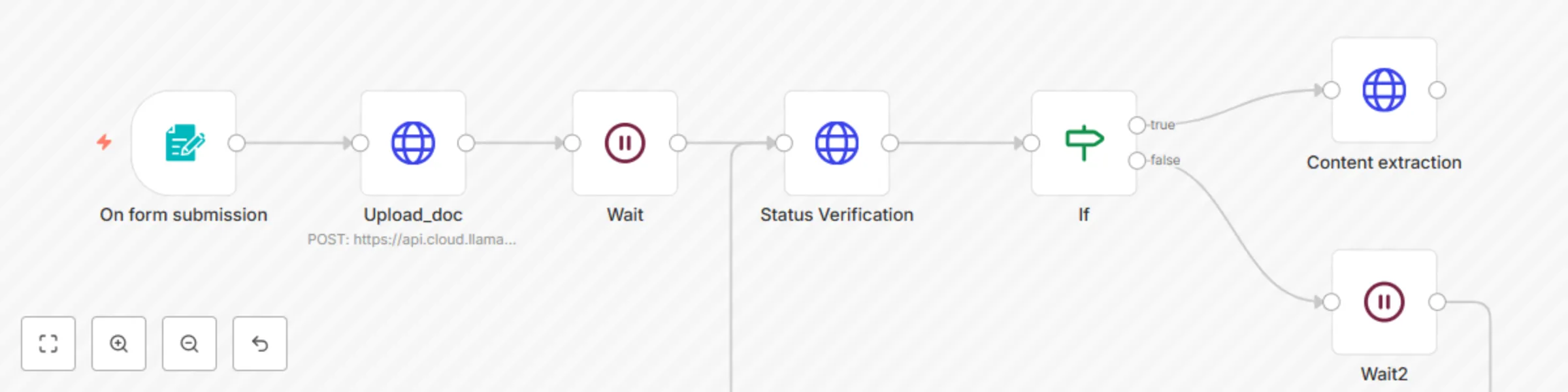
  • Form Submission Trigger: Workflow initiates when a user submits a document through a web form
  • Document Upload: PDF files are automatically uploaded to LlamaIndex Cloud for processing
  • Smart Status Monitoring: The system continuously checks processing status and adapts the workflow based on results
  • Conditional Content Extraction: Upon successful processing, extracted Markdown content is retrieved for further use

Setup Instructions

Estimated Setup Time: 5-10 minutes

Prerequisites

  • LlamaIndex Cloud account and API credentials
  • Access to n8n instance (cloud or self-hosted)

Configuration Steps

  1. Configure Form Trigger

    • Set up the webhook form trigger with file upload capability
    • Add required fields to capture document metadata and processing preferences
  2. Setup LlamaIndex API Connection

    • Obtain your API key from LlamaIndex Cloud dashboard
    • Configure the HTTP Request node with your credentials and endpoint URL
    • Set proper authentication headers and request parameters
  3. Configure Status Verification

    • Define polling intervals for status checks (recommended: 10-30 seconds)
    • Set maximum retry attempts to avoid infinite loops
    • Configure success/failure criteria based on API response codes
  4. Setup Content Extractor

    • Configure output format preferences (Markdown styling, headers, etc.)
    • Set up error handling for failed extractions
    • Define content storage or forwarding destinations

Use Cases

  • Document Digitization: Convert legacy PDF documents to editable Markdown format
  • Content Management: Prepare documents for CMS integration or static site generators
  • Knowledge Base Creation: Transform PDF manuals and guides into searchable Markdown content
  • Academic Research: Convert research papers and publications for analysis and citation
  • Technical Documentation: Process PDF specifications and manuals for developer documentation

Key Features

  • Fully automated PDF to Markdown conversion
  • Intelligent content structure preservation
  • Error handling and retry mechanisms
  • Status monitoring with real-time feedback
  • Scalable processing for batch operations

Requirements

  • LlamaIndex Cloud API key
  • n8n instance (v0.200.0 or higher recommended)
  • Internet connectivity for API access

Support

For issues related to LlamaIndex API, consult their official documentation docs. For n8n-specific questions, refer to the n8n community forum.

1.2 Logical Blocks

This catalog entry is organized from the workflow JSON. The node-level section below shows the executable blocks available for review before importing the template.

2. Block-by-Block Analysis

Block 1 - Wait

Type / Role
n8n-nodes-base.wait - wait
Config choices
Version 1.1

Block 2 - Upload_doc

Type / Role
n8n-nodes-base.httpRequest - httpRequest
Config choices
Version 4.2

Block 3 - If

Type / Role
n8n-nodes-base.if - if
Config choices
Version 2.2

Block 4 - On form submission

Type / Role
n8n-nodes-base.formTrigger - formTrigger
Config choices
Version 2.2

Block 5 - Wait2

Type / Role
n8n-nodes-base.wait - wait
Config choices
Version 1.1

Block 6 - Status Verification

Type / Role
n8n-nodes-base.httpRequest - httpRequest
Config choices
Version 4.2

Block 7 - Content extraction

Type / Role
n8n-nodes-base.httpRequest - httpRequest
Config choices
Version 4.2

3. Summary Table

Workflow Extract and convert PDF documents to Markdown with LlamaIndex Cloud API
Complexity intermediate
Nodes 7
Categories Document Extraction, Multimodal AI
Author franck fambou
Published 08 Aug 2025

4. Reproducing the Workflow from Scratch

  1. 1. Download the workflow JSON

    Use the JSON export at /data/workflows/7164/7164.json as the source template for this automation.

  2. 2. Import the template into n8n

    Open n8n, import the downloaded JSON, and review each node before activating the workflow.

  3. 3. Configure credentials and variables

    Replace placeholder credentials, API keys, webhook URLs, account IDs, and environment-specific values with your own settings.

  4. 4. Test with sample data

    Run the workflow manually or in a staging workspace, inspect node output, and confirm downstream systems receive the expected data.

  5. 5. Activate and monitor

    Enable the workflow only after testing, then monitor executions, errors, and rate limits during the first production runs.

5. General Notes & Resources

Review imported nodes carefully before activation. This catalog entry is intended to help you inspect the workflow structure, understand required services, and find related templates faster.

Node names, credentials, schedules, webhook paths, and external service limits may need adjustment for your workspace.

Frequently asked questions

What does Extract and convert PDF documents to Markdown with LlamaIndex Cloud API do?

Extract and Convert PDF Documents to Markdown with LlamaIndex Cloud API Overview This workflow automatically converts PDF documents to Markdown format using the LlamaIndex Cloud API. LlamaIndex is ...

What do I need before importing this workflow?

Review the workflow JSON, configure any required credentials in n8n, and test the automation in a safe workspace before using it in production.

Can I customize this workflow?

Yes. Use the block-by-block analysis and the downloadable JSON to inspect each node, then adjust credentials, prompts, schedules, filters, or destinations for your Document Extraction, Multimodal AI use case.