Execute forex trading signals from Telegram on MetaTrader 5 with Claude

Workflow preview

Workflow preview
100%
Execute forex trading signals from Telegram on MetaTrader 5 with Claude preview
Open on n8n.io

1. Workflow Overview

Telegram Signal Receiver and Processor This n8n template is the missing link between your Telegram trading signal channels and MetaTrader 5. It listens to your Telegram bot, uses AI to detect and p...

Best for

  • Crypto Trading automation workflows
  • AI Summarization automation workflows
  • advanced n8n builders looking for reusable templates

Tools used

n8n-nodes-base.stickynote, n8n-nodes-base.webhook, n8n-nodes-base.code, n8n-nodes-base.if, @n8n/n8n-nodes-langchain.chainllm, n8n-nodes-base.respondtowebhook, n8n-nodes-base.httprequest, @n8n/n8n-nodes-langchain.lmchatanthropic

Source and attribution

This workflow is cataloged by N8N Workflows and links back to its original n8n.io source page by Cj Elijah Garay.

Original n8n.io source

1.1 Workflow description

Title
Execute forex trading signals from Telegram on MetaTrader 5 with Claude
Workflow name
Execute forex trading signals from Telegram on MetaTrader 5 with Claude

Telegram Signal Receiver and Processor

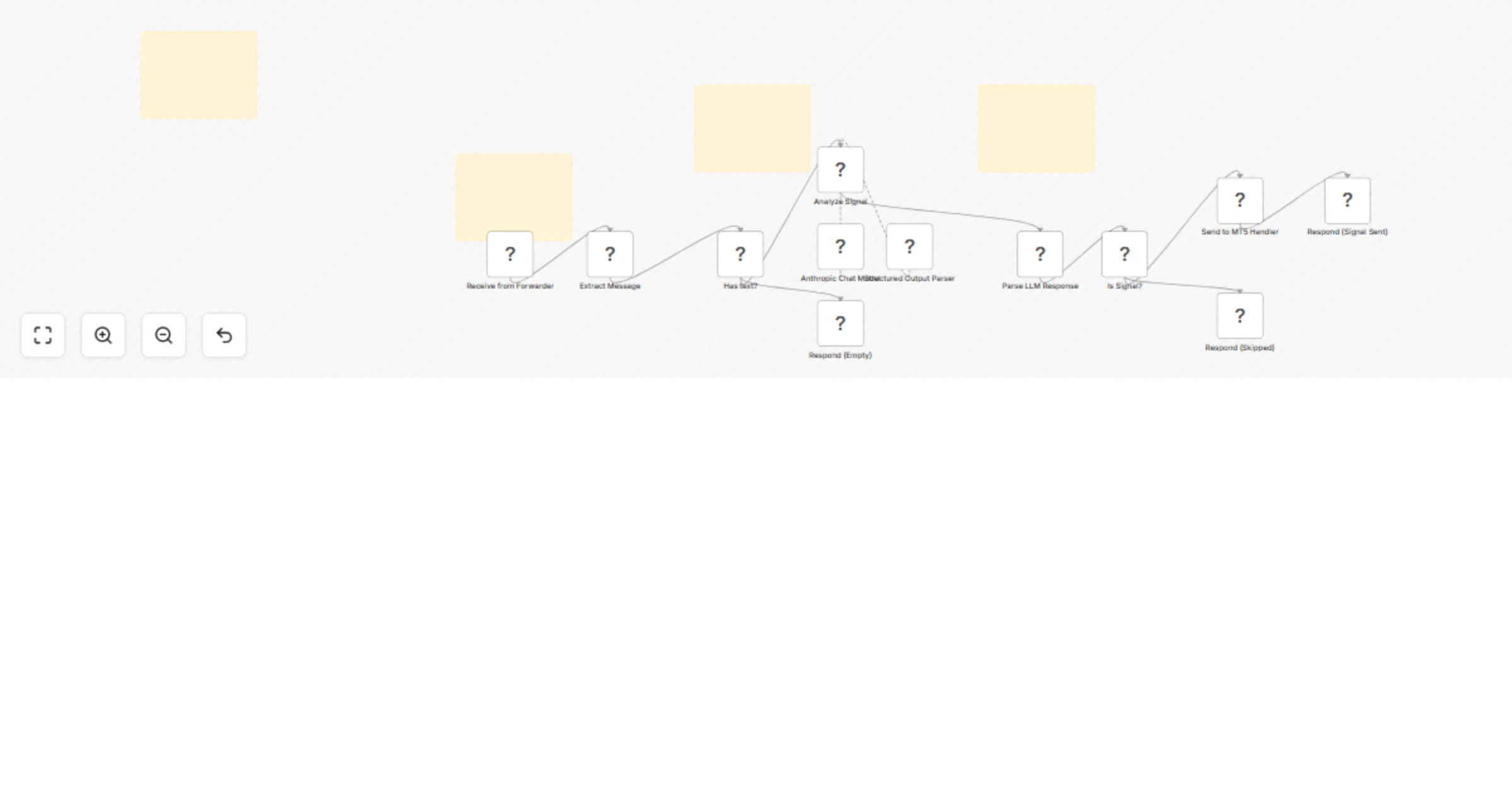
This n8n template is the missing link between your Telegram trading signal channels and MetaTrader 5. It listens to your Telegram bot, uses AI to detect and parse trading signals in real time, then forwards them directly to your MT5 instance via the signal handler webhook — no manual copying required.

The full system includes an n8n workflow, a Python forwarder script, a compiled MT5 Expert Advisor (.mq5), and a setup guide. Everything you need to run copy trading from Telegram, out of the box.

How it works

  • A Python forwarder script monitors your target Telegram signal channel and relays messages to your personal bot
  • The n8n Telegram Trigger receives each message from your bot
  • An LLM (Claude/Anthropic) checks whether the message is a valid trading signal — it looks for direction, asset, and stop loss
  • If it's a signal, the parsed data (asset, direction, entry, SL, TP, risk, order type) is forwarded to the MT5 Signal Handler webhook
  • If it's not a signal, the workflow skips it silently
  • MQL5 code handles position sizing as well

Set up steps

  • Create a Telegram bot via @BotFather and save your bot token
  • Get your Telegram API credentials (api_id and api_hash) from my.telegram.org
  • Install Python dependencies and configure the forwarder script with your credentials and target channel
  • Add your Telegram Bot and Anthropic API credentials to n8n
  • Activate this workflow and run the Python forwarder
  • Make sure your MT5 Signal Handler workflow is also running and the webhook URL is correct in the "Send to MT5 Handler" node

Requirements

  • n8n instance running locally or on a private VPS
  • MetaTrader 5 with the included Expert Advisor compiled and attached to a chart
  • Anthropic API key (or swap in any compatible LLM node)
  • Python 3.8+ with Telethon library installed
  • The MT5 Signal Handler workflow (sold together with this template)

(Or you can run everything on a virtual computer so it runs on the cloud 24/7)

Customising this workflow

  • Use it for crypto or stocks since this works only for forex and gold for now.
  • Add authentication to be more secure with this workflow or run it privately on a demo account since this is meant for educational purposes

Purchasing this N8N workflow comes with the Python file and MQL EA as well so it is sold together. Everything you need to execute trades from telegram signals to MT5 is included at the price of 99 usd.

Questions?

If you have questions or need help with this workflow, feel free to reach out:

[email protected] [email protected]

Important Disclaimer: This workflow is provided for educational purposes and demo account testing only. It demonstrates technical concepts for signal routing and automation architecture. Always test thoroughly on demo accounts, implement proper security measures, and understand that automated trading involves substantial risk. No warranties, financial advice, or guarantees are provided. See the full disclaimer in the workflow sticky notes for complete terms.

1.2 Logical Blocks

This catalog entry is organized from the workflow JSON. The node-level section below shows the executable blocks available for review before importing the template.

2. Block-by-Block Analysis

Block 1 - Instructions1

Type / Role
n8n-nodes-base.stickyNote - stickyNote
Config choices
Version 1

Block 2 - Sticky Note

Type / Role
n8n-nodes-base.stickyNote - stickyNote
Config choices
Version 1

Block 3 - Sticky Note1

Type / Role
n8n-nodes-base.stickyNote - stickyNote
Config choices
Version 1

Block 4 - Sticky Note2

Type / Role
n8n-nodes-base.stickyNote - stickyNote
Config choices
Version 1

Block 5 - Receive from Forwarder

Type / Role
n8n-nodes-base.webhook - webhook
Config choices
Version 2

Block 6 - Extract Message

Type / Role
n8n-nodes-base.code - code
Config choices
Version 2

Block 7 - Has text?

Type / Role
n8n-nodes-base.if - if
Config choices
Version 2.3

Block 8 - Analyze Signal

Type / Role
@n8n/n8n-nodes-langchain.chainLlm - chainLlm
Config choices
Version 1.4

Block 9 - Respond (Empty)

Type / Role
n8n-nodes-base.respondToWebhook - respondToWebhook
Config choices
Version 1.1

Block 10 - Parse LLM Response

Type / Role
n8n-nodes-base.code - code
Config choices
Version 2

Block 11 - Is Signal?

Type / Role
n8n-nodes-base.if - if
Config choices
Version 2.2

Block 12 - Send to MT5 Handler

Type / Role
n8n-nodes-base.httpRequest - httpRequest
Config choices
Version 4.2

Block 13 - Respond (Signal Sent)

Type / Role
n8n-nodes-base.respondToWebhook - respondToWebhook
Config choices
Version 1.1

Block 14 - Respond (Skipped)

Type / Role
n8n-nodes-base.respondToWebhook - respondToWebhook
Config choices
Version 1.1

Block 15 - Anthropic Chat Model

Type / Role
@n8n/n8n-nodes-langchain.lmChatAnthropic - lmChatAnthropic
Config choices
Version 1.3

Block 16 - Structured Output Parser

Type / Role
@n8n/n8n-nodes-langchain.outputParserStructured - outputParserStructured
Config choices
Version 1.2

3. Summary Table

Workflow Execute forex trading signals from Telegram on MetaTrader 5 with Claude
Complexity advanced
Nodes 16
Categories Crypto Trading, AI Summarization
Author Cj Elijah Garay
Published 22 Mar 2026

4. Reproducing the Workflow from Scratch

  1. 1. Download the workflow JSON

    Use the JSON export at /data/workflows/14235/14235.json as the source template for this automation.

  2. 2. Import the template into n8n

    Open n8n, import the downloaded JSON, and review each node before activating the workflow.

  3. 3. Configure credentials and variables

    Replace placeholder credentials, API keys, webhook URLs, account IDs, and environment-specific values with your own settings.

  4. 4. Test with sample data

    Run the workflow manually or in a staging workspace, inspect node output, and confirm downstream systems receive the expected data.

  5. 5. Activate and monitor

    Enable the workflow only after testing, then monitor executions, errors, and rate limits during the first production runs.

5. General Notes & Resources

Review imported nodes carefully before activation. This catalog entry is intended to help you inspect the workflow structure, understand required services, and find related templates faster.

Node names, credentials, schedules, webhook paths, and external service limits may need adjustment for your workspace.

Frequently asked questions

What does Execute forex trading signals from Telegram on MetaTrader 5 with Claude do?

Telegram Signal Receiver and Processor This n8n template is the missing link between your Telegram trading signal channels and MetaTrader 5. It listens to your Telegram bot, uses AI to detect and p...

What do I need before importing this workflow?

Review the workflow JSON, configure any required credentials in n8n, and test the automation in a safe workspace before using it in production.

Can I customize this workflow?

Yes. Use the block-by-block analysis and the downloadable JSON to inspect each node, then adjust credentials, prompts, schedules, filters, or destinations for your Crypto Trading, AI Summarization use case.