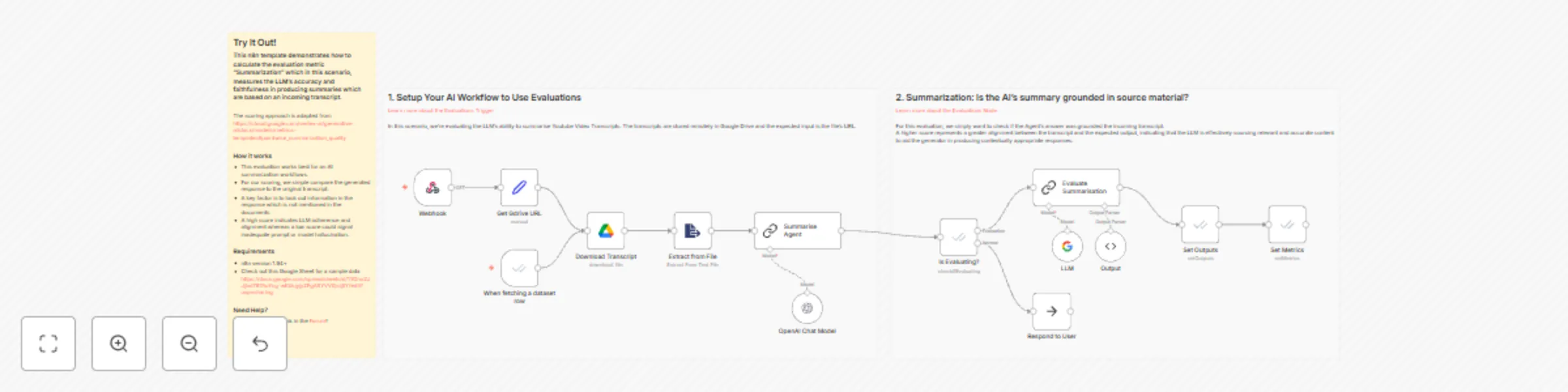
Evaluation metric: summarization

Workflow preview

Workflow preview
100%
Evaluation metric: summarization preview
Open on n8n.io

Important notice

This workflow is provided as-is. Please review and test before using in production.

1. Workflow Overview

This n8n template demonstrates how to calculate the evaluation metric "Summarization" which in this scenario, measures the LLM's accuracy and faithfulness in producing summaries which are based on ...

Best for

  • Engineering automation workflows
  • AI Summarization automation workflows
  • advanced n8n builders looking for reusable templates

Tools used

n8n-nodes-base.evaluation, @n8n/n8n-nodes-langchain.lmchatopenai, n8n-nodes-base.evaluationtrigger, n8n-nodes-base.noop, @n8n/n8n-nodes-langchain.lmchatgooglegemini, @n8n/n8n-nodes-langchain.outputparserstructured, n8n-nodes-base.googledrive, @n8n/n8n-nodes-langchain.chainllm

Source and attribution

This workflow is cataloged by N8N Workflows and links back to its original n8n.io source page by Jimleuk.

Original n8n.io source

1.1 Workflow description

Title
Evaluation metric: summarization
Workflow name
Evaluation metric: summarization

This n8n template demonstrates how to calculate the evaluation metric "Summarization" which in this scenario, measures the LLM's accuracy and faithfulness in producing summaries which are based on an incoming Youtube transcript.

The scoring approach is adapted from https://cloud.google.com/vertex-ai/generative-ai/docs/models/metrics-templates#pointwise_summarization_quality

How it works

  • This evaluation works best for an AI summarization workflows.
  • For our scoring, we simple compare the generated response to the original transcript.
  • A key factor is to look out information in the response which is not mentioned in the documents.
  • A high score indicates LLM adherence and alignment whereas a low score could signal inadequate prompt or model hallucination.

Requirements

1.2 Logical Blocks

This catalog entry is organized from the workflow JSON. The node-level section below shows the executable blocks available for review before importing the template.

2. Block-by-Block Analysis

Block 1 - Is Evaluating?

Type / Role
n8n-nodes-base.evaluation - evaluation
Config choices
Version 4.6

Block 2 - OpenAI Chat Model

Type / Role
@n8n/n8n-nodes-langchain.lmChatOpenAi - lmChatOpenAi
Config choices
Version 1.2

Block 3 - When fetching a dataset row

Type / Role
n8n-nodes-base.evaluationTrigger - evaluationTrigger
Config choices
Version 4.6

Block 4 - Respond to User

Type / Role
n8n-nodes-base.noOp - noOp
Config choices
Version 1

Block 5 - LLM

Type / Role
@n8n/n8n-nodes-langchain.lmChatGoogleGemini - lmChatGoogleGemini
Config choices
Version 1

Block 6 - Output

Type / Role
@n8n/n8n-nodes-langchain.outputParserStructured - outputParserStructured
Config choices
Version 1.2

Block 7 - Set Outputs

Type / Role
n8n-nodes-base.evaluation - evaluation
Config choices
Version 4.6

Block 8 - Set Metrics

Type / Role
n8n-nodes-base.evaluation - evaluation
Config choices
Version 4.6

Block 9 - Download Transcript

Type / Role
n8n-nodes-base.googleDrive - googleDrive
Config choices
Version 3

Block 10 - Summarise Agent

Type / Role
@n8n/n8n-nodes-langchain.chainLlm - chainLlm
Config choices
Version 1.7

Block 11 - Extract from File

Type / Role
n8n-nodes-base.extractFromFile - extractFromFile
Config choices
Version 1

Block 12 - Webhook

Type / Role
n8n-nodes-base.webhook - webhook
Config choices
Version 2

Block 13 - Get Gdrive URL

Type / Role
n8n-nodes-base.set - set
Config choices
Version 3.4

Block 14 - Evaluate Summarisation

Type / Role
@n8n/n8n-nodes-langchain.chainLlm - chainLlm
Config choices
Version 1.7

Block 15 - Sticky Note1

Type / Role
n8n-nodes-base.stickyNote - stickyNote
Config choices
Version 1

Block 16 - Sticky Note2

Type / Role
n8n-nodes-base.stickyNote - stickyNote
Config choices
Version 1

Block 17 - Sticky Note3

Type / Role
n8n-nodes-base.stickyNote - stickyNote
Config choices
Version 1

3. Summary Table

Workflow Evaluation metric: summarization
Complexity advanced
Nodes 17
Categories Engineering, AI Summarization
Author Jimleuk
Published 27 May 2025

4. Reproducing the Workflow from Scratch

  1. 1. Download the workflow JSON

    Use the JSON export at /data/workflows/4428/4428.json as the source template for this automation.

  2. 2. Import the template into n8n

    Open n8n, import the downloaded JSON, and review each node before activating the workflow.

  3. 3. Configure credentials and variables

    Replace placeholder credentials, API keys, webhook URLs, account IDs, and environment-specific values with your own settings.

  4. 4. Test with sample data

    Run the workflow manually or in a staging workspace, inspect node output, and confirm downstream systems receive the expected data.

  5. 5. Activate and monitor

    Enable the workflow only after testing, then monitor executions, errors, and rate limits during the first production runs.

5. General Notes & Resources

Review imported nodes carefully before activation. This catalog entry is intended to help you inspect the workflow structure, understand required services, and find related templates faster.

Node names, credentials, schedules, webhook paths, and external service limits may need adjustment for your workspace.

Frequently asked questions

What does Evaluation metric: summarization do?

This n8n template demonstrates how to calculate the evaluation metric "Summarization" which in this scenario, measures the LLM's accuracy and faithfulness in producing summaries which are based on ...

What do I need before importing this workflow?

Review the workflow JSON, configure any required credentials in n8n, and test the automation in a safe workspace before using it in production.

Can I customize this workflow?

Yes. Use the block-by-block analysis and the downloadable JSON to inspect each node, then adjust credentials, prompts, schedules, filters, or destinations for your Engineering, AI Summarization use case.