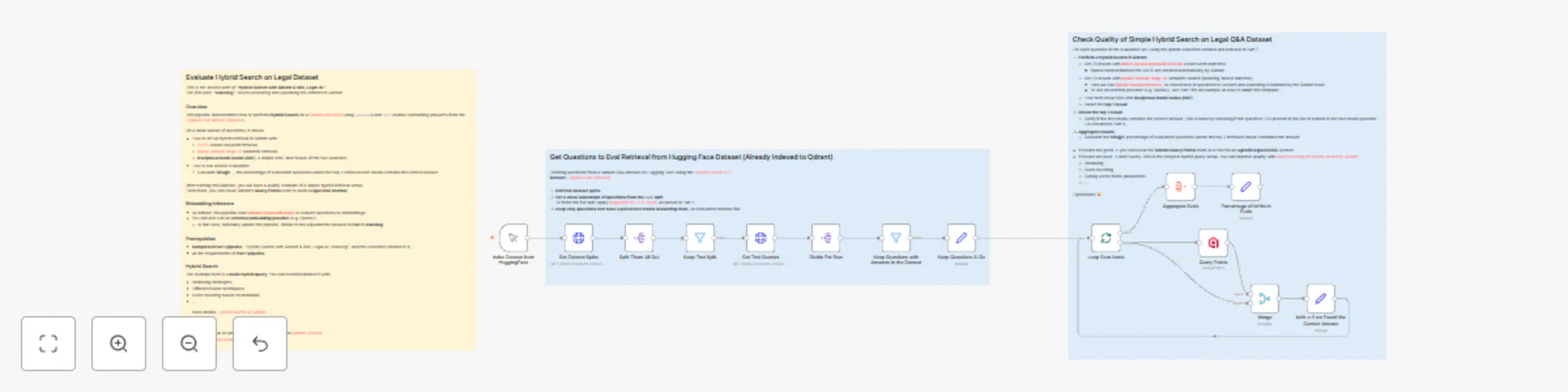
Evaluate hybrid search for legal question-answering using Qdrant & BM25/mxbai

Workflow preview

Workflow preview
100%
Evaluate hybrid search for legal question-answering using Qdrant & BM25/mxbai preview
Open on n8n.io

Important notice

This workflow is provided as-is. Please review and test before using in production.

1. Workflow Overview

Evaluate Hybrid Search on Legal Dataset This is the second part of "Hybrid Search with Qdrant & n8n, Legal AI." The first part, [ "Indexing" ](https://n8n.io/workflows/7945 hybrid search with qdran...

Best for

  • AI RAG automation workflows
  • Multimodal AI automation workflows
  • advanced n8n builders looking for reusable templates

Tools used

n8n-nodes-base.manualtrigger, n8n-nodes-base.splitout, n8n-nodes-base.httprequest, n8n-nodes-base.filter, n8n-nodes-qdrant.qdrant, n8n-nodes-base.merge, n8n-nodes-base.splitinbatches, n8n-nodes-base.set

Source and attribution

This workflow is cataloged by N8N Workflows and links back to its original n8n.io source page by Jenny .

Original n8n.io source

1.1 Workflow description

Title
Evaluate hybrid search for legal question-answering using Qdrant & BM25/mxbai
Workflow name
Evaluate hybrid search for legal question-answering using Qdrant & BM25/mxbai

Evaluate Hybrid Search on Legal Dataset

This is the second part of "Hybrid Search with Qdrant & n8n, Legal AI." The first part, "Indexing", covers preparing and uploading the dataset to Qdrant.

Overview

This pipeline demonstrates how to perform Hybrid Search on a Qdrant collection using questions and text chunks (containing answers) from the
LegalQAEval dataset (isaacus).

On a small subset of questions, it shows:

  • How to set up hybrid retrieval in Qdrant with:
    • BM25-based keyword retrieval;
    • mxbai-embed-large-v1 semantic retrieval;
    • Reciprocal Rank Fusion (RRF), a simple zero-shot fusion of the two searches;
  • How to run a basic evaluation:
    • Calculate hits@1 — the percentage of evaluation questions where the top-1 retrieved text chunk contains the correct answer

After running this pipeline, you will have a quality estimate of a simple hybrid retrieval setup.
From there, you can reuse Qdrant’s Query Points node to build a legal RAG chatbot.

Embedding Inference

  • By default, this pipeline uses Qdrant Cloud Inference to convert questions to embeddings.
  • You can also use an external embedding provider (e.g. OpenAI).
    • In that case, minimally update the pipeline, similar to the adjustments showed in Part 1: Indexing.

Prerequisites

  • Completed Part 1 pipeline, "Hybrid Search with Qdrant & n8n, Legal AI: Indexing", and the collection created in it;
  • All the requirements of Part 1 pipeline;

Hybrid Search

The example here is a basic hybrid query. You can extend/enhance it with:

  • Reranking strategies;
  • Different fusion techniques;
  • Score boosting based on metadata;
  • ...

More details: Hybrid Queries in Qdrant.

P.S.

1.2 Logical Blocks

This catalog entry is organized from the workflow JSON. The node-level section below shows the executable blocks available for review before importing the template.

2. Block-by-Block Analysis

Block 1 - Index Dataset from HuggingFace

Type / Role
n8n-nodes-base.manualTrigger - manualTrigger
Config choices
Version 1

Block 2 - Split Them All Out

Type / Role
n8n-nodes-base.splitOut - splitOut
Config choices
Version 1

Block 3 - Get Dataset Splits

Type / Role
n8n-nodes-base.httpRequest - httpRequest
Config choices
Version 4.2

Block 4 - Divide Per Row

Type / Role
n8n-nodes-base.splitOut - splitOut
Config choices
Version 1

Block 5 - Keep Test Split

Type / Role
n8n-nodes-base.filter - filter
Config choices
Version 2.2

Block 6 - Get Test Queries

Type / Role
n8n-nodes-base.httpRequest - httpRequest
Config choices
Version 4.2

Block 7 - Query Points

Type / Role
n8n-nodes-qdrant.qdrant - qdrant
Config choices
Version 1

Block 8 - Merge

Type / Role
n8n-nodes-base.merge - merge
Config choices
Version 3.2

Block 9 - Loop Over Items

Type / Role
n8n-nodes-base.splitInBatches - splitInBatches
Config choices
Version 3

Block 10 - Keep Questions with Answers in the Dataset

Type / Role
n8n-nodes-base.filter - filter
Config choices
Version 2.2

Block 11 - Keep Questions & IDs

Type / Role
n8n-nodes-base.set - set
Config choices
Version 3.4

Block 12 - Aggregate Evals

Type / Role
n8n-nodes-base.aggregate - aggregate
Config choices
Version 1

Block 13 - Percentage of isHits in Evals

Type / Role
n8n-nodes-base.set - set
Config choices
Version 3.4

Block 14 - Sticky Note2

Type / Role
n8n-nodes-base.stickyNote - stickyNote
Config choices
Version 1

Block 15 - Sticky Note4

Type / Role
n8n-nodes-base.stickyNote - stickyNote
Config choices
Version 1

Block 16 - Sticky Note1

Type / Role
n8n-nodes-base.stickyNote - stickyNote
Config choices
Version 1

Block 17 - isHit = If we Found the Correct Answer

Type / Role
n8n-nodes-base.set - set
Config choices
Version 3.4

3. Summary Table

Workflow Evaluate hybrid search for legal question-answering using Qdrant & BM25/mxbai
Complexity advanced
Nodes 17
Categories AI RAG, Multimodal AI
Author Jenny
Published 27 Aug 2025

4. Reproducing the Workflow from Scratch

  1. 1. Download the workflow JSON

    Use the JSON export at /data/workflows/7946/7946.json as the source template for this automation.

  2. 2. Import the template into n8n

    Open n8n, import the downloaded JSON, and review each node before activating the workflow.

  3. 3. Configure credentials and variables

    Replace placeholder credentials, API keys, webhook URLs, account IDs, and environment-specific values with your own settings.

  4. 4. Test with sample data

    Run the workflow manually or in a staging workspace, inspect node output, and confirm downstream systems receive the expected data.

  5. 5. Activate and monitor

    Enable the workflow only after testing, then monitor executions, errors, and rate limits during the first production runs.

5. General Notes & Resources

Review imported nodes carefully before activation. This catalog entry is intended to help you inspect the workflow structure, understand required services, and find related templates faster.

Node names, credentials, schedules, webhook paths, and external service limits may need adjustment for your workspace.

Frequently asked questions

What does Evaluate hybrid search for legal question-answering using Qdrant & BM25/mxbai do?

Evaluate Hybrid Search on Legal Dataset This is the second part of "Hybrid Search with Qdrant & n8n, Legal AI." The first part, [ "Indexing" ](https://n8n.io/workflows/7945 hybrid search with qdran...

What do I need before importing this workflow?

Review the workflow JSON, configure any required credentials in n8n, and test the automation in a safe workspace before using it in production.

Can I customize this workflow?

Yes. Use the block-by-block analysis and the downloadable JSON to inspect each node, then adjust credentials, prompts, schedules, filters, or destinations for your AI RAG, Multimodal AI use case.