Block 1 - Create task1
- Type / Role
- n8n-nodes-base.googleTasksTool - googleTasksTool
- Config choices
- Version 1


 Early Deal
This workflow is provided as-is. Please review and test before using in production.
Description Automate your personal productivity by transforming actionable emails from Gmail and Outlook into structured tasks within Google Tasks or Microsoft To Do, all managed by a multi agent A...
n8n-nodes-base.googletaskstool, n8n-nodes-base.microsofttodotool, @n8n/n8n-nodes-langchain.memorybufferwindow, @n8n/n8n-nodes-langchain.lmchatmistralcloud, @n8n/n8n-nodes-langchain.agenttool, @n8n/n8n-nodes-langchain.agent, n8n-nodes-base.gmail, n8n-nodes-base.microsoftoutlook
This workflow is cataloged by N8N Workflows and links back to its original n8n.io source page by Jordan Hoyle.
Original n8n.io sourceAutomate your personal productivity by transforming actionable emails from Gmail and Outlook into structured tasks within Google Tasks or Microsoft To Do, all managed by a multi-agent AI system.
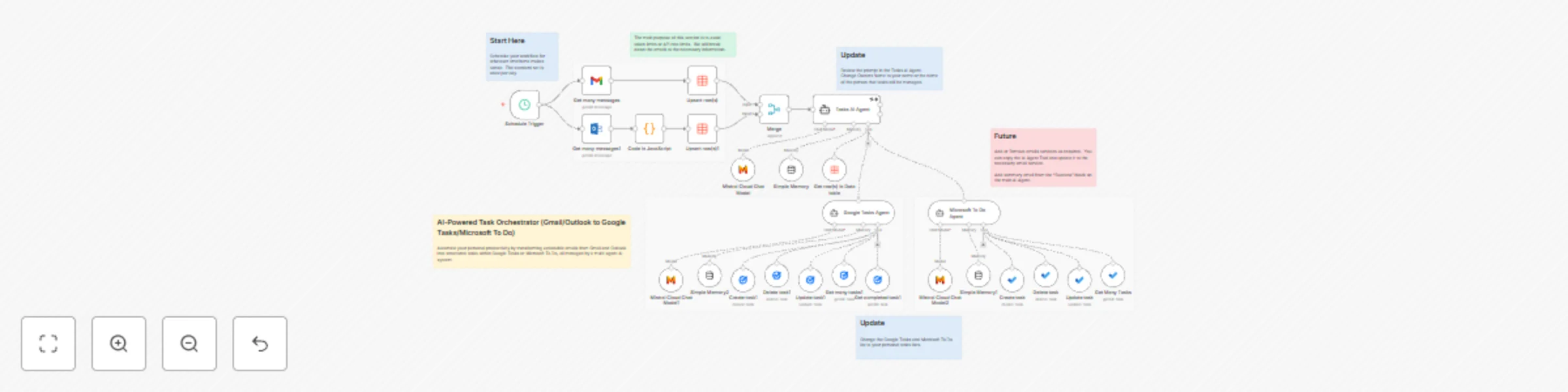
This advanced workflow utilizes a powerful Mistral Large AI Agent to orchestrate your daily task management. It operates by fetching recent emails, structuring the data, determining the correct task manager, and delegating the execution to specialized sub-agents. It's built with rate-limiting in mind, ensuring efficient and reliable operation across your connected services.
Unified Email Input: Automatically fetches and merges emails from Gmail and Microsoft Outlook received within the last 24 hours.
Centralized Data Storage: Stores and deduplicates raw email data in an n8n Data Table, converting HTML content to plain text for AI processing.
Intelligent Task Extraction: A Main Task Orchestration Agent (powered by Mistral Large) reads the email data, identifies actionable tasks, and structures them with a Title, Due Date, Notes, and a Target System (Google Tasks or Microsoft To Do).
Dedicated Task Execution: Leverages two specialized sub-agents (Google Tasks Agent and Microsoft To Do Agent) that handle the creation or updating of tasks, ensuring API integrity and focused execution.
Scalable and Safe: Implements batch processing (max 5 tasks) and mandatory 5-second delays between sub-agent calls to prevent API rate limits and token overruns.
Conversation History: Uses Memory Buffer Window nodes to maintain context within the AI agents.
Credentials: Connect your credentials for Gmail, Microsoft Outlook, Google Tasks, Microsoft To Do, and the Mistral Cloud Chat Model.
Data Table: Ensure the 'To Do Database' Data Table exists.
Customize AI Agents:
In the Tasks AI Agent (the main orchestrator), review the system prompt and verify the mandatory "Jordan Hoyle" filter. Change this to your name or the name of the person whose tasks are being managed.
In the Google Tasks Agent and Microsoft To Do Agent nodes, ensure the Task List ID fields are correctly set to your desired task lists.
Schedule: Set the workflow to run on a schedule (e.g., once daily) or run it manually.
This workflow is the perfect solution for anyone overwhelmed by managing tasks scattered across their inbox and multiple to-do apps, bringing AI-driven order to your digital life!
This catalog entry is organized from the workflow JSON. The node-level section below shows the executable blocks available for review before importing the template.
Showing the first 24 of 35 workflow blocks. Download the JSON for the full node graph.
| Workflow | Email-to-task automation with Mistral AI (Gmail/Outlook to Google Tasks/Microsoft To Do) |
|---|---|
| Complexity | advanced |
| Nodes | 35 |
| Categories | Personal Productivity, AI Summarization |
| Author | Jordan Hoyle |
| Published | 26 Oct 2025 |
Use the JSON export at /data/workflows/10186/10186.json as the source template for this automation.
Open n8n, import the downloaded JSON, and review each node before activating the workflow.
Replace placeholder credentials, API keys, webhook URLs, account IDs, and environment-specific values with your own settings.
Run the workflow manually or in a staging workspace, inspect node output, and confirm downstream systems receive the expected data.
Enable the workflow only after testing, then monitor executions, errors, and rate limits during the first production runs.
Review imported nodes carefully before activation. This catalog entry is intended to help you inspect the workflow structure, understand required services, and find related templates faster.
Node names, credentials, schedules, webhook paths, and external service limits may need adjustment for your workspace.
Description Automate your personal productivity by transforming actionable emails from Gmail and Outlook into structured tasks within Google Tasks or Microsoft To Do, all managed by a multi agent A...
Review the workflow JSON, configure any required credentials in n8n, and test the automation in a safe workspace before using it in production.
Yes. Use the block-by-block analysis and the downloadable JSON to inspect each node, then adjust credentials, prompts, schedules, filters, or destinations for your Personal Productivity, AI Summarization use case.