Block 1 - Every week on monday morning
- Type / Role
- n8n-nodes-base.scheduleTrigger - scheduleTrigger
- Config choices
- Version 1.2


 Early Deal
This workflow is provided as-is. Please review and test before using in production.
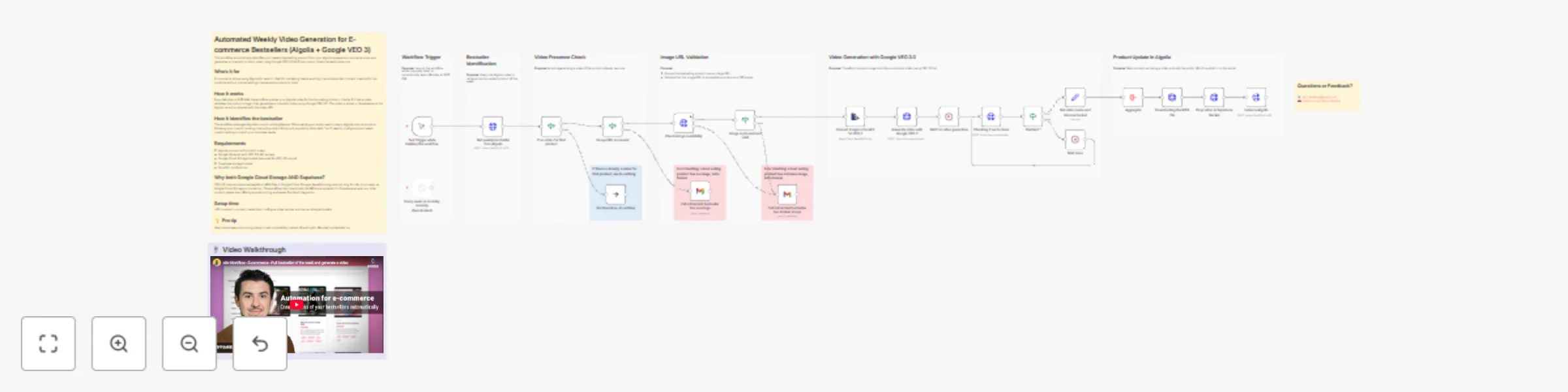
E commerce Weekly Bestseller Video Generator (Algolia + Google VEO 3) This workflow automatically identifies your weekly bestselling product from your Algolia powered e commerce store and generates...
n8n-nodes-base.scheduletrigger, n8n-nodes-base.manualtrigger, n8n-nodes-base.httprequest, n8n-nodes-base.if, n8n-nodes-base.noop, n8n-nodes-base.stickynote, n8n-nodes-base.gmail, n8n-nodes-base.wait
This workflow is cataloged by N8N Workflows and links back to its original n8n.io source page by Emir Belkahia.
Original n8n.io sourceThis workflow automatically identifies your weekly bestselling product from your Algolia-powered e-commerce store and generates a cinematic product video using Google VEO 3.0 AI, helping marketing teams create engaging video content without manual editing or expensive production tools.
E-commerce stores using Algolia for search. Ideal for marketing teams who want to automate video content creation for top-performing products and maximize conversion potential with engaging visual content.
✅ It DOES:
❌ It DOESN'T:
Think of it as: An automated video production assistant that doubles down on your bestsellers with engaging content, not a full video editing suite.
Setup time: ~20 minutes
ALGOLIA_APP_ID with your Algolia Application IDYOUR_INDEX_NAME with your product index namePROJECT-ID-GOOGLE-CLOUD with your Google Cloud Project IDGOOGLE_STORAGE_BUCKET_NAME with your GCS bucket nameYOUR_SUPABASE_PROJECT with your Supabase project IDYOUR_BUCKET_NAME with your Supabase bucket name[email protected] with your email addresshasVideo, images[], name, description attributeshasVideo, images[], name, description, objectIDVEO 3.0 can only output videos as base64 strings or MP4 files in Google Cloud Storage. Base64 strings are too large for n8n to process (even with code nodes), making Google Cloud Storage mandatory. The workflow then downloads the MP4 and uploads it to Supabase because:
Think of Google Cloud Storage as a temporary staging area required by VEO 3.0's limitations, and Supabase as your actual production storage.
For a typical 6-second product video:
💰 Bottom line: About $0.15-0.30 per video. Running weekly for a year = $8-16 in video generation costs.
Customize the video prompt: The default prompt creates a cinematic studio dolly shot. Edit the jsonBody in "Generate video with Google VEO 3" to match your brand style (fast-paced, minimalist, lifestyle, etc.).
Adjust bestseller logic: Modify the Algolia query to add filters like category:electronics or brand:Nike to focus on specific product segments.
Use manual execution during setup: Don't wait until Monday! Run the workflow manually to catch configuration issues like broken image URLs or missing credentials immediately.
Monitor your email alerts: If you frequently get "no image" or "broken image" alerts, audit your product data quality in Algolia. Missing images = lost video opportunities.
Start with test products: Before going live, manually trigger the workflow on a product you know has good images. Verify the video appears correctly in your Supabase bucket and Algolia record.
Check your GCS bucket occasionally: Videos accumulate in Google Cloud Storage after each run. Set up a lifecycle policy to auto-delete files older than 7 days to avoid unnecessary storage costs.
Adjust the schedule: If Monday 9PM doesn't work for your team's workflow, change the trigger to run on a different day or time that aligns with your content calendar.
This workflow leverages Algolia's custom ranking feature. When you send an empty search query to Algolia, the first result returned follows your custom ranking criteria. This is an Algolia best practice that ensures your most relevant products appear first even without search terms.
In the example configuration, custom ranking uses:
inStock attribute - Prioritizes available productspopularity attribute - A computed metric based on sales volume, views, and other signalsYou'll need to configure your own custom ranking in your Algolia index settings to match your business criteria. The workflow assumes your index is already configured to return your bestselling product first when queried with no search terms.
This catalog entry is organized from the workflow JSON. The node-level section below shows the executable blocks available for review before importing the template.
Showing the first 24 of 33 workflow blocks. Download the JSON for the full node graph.
| Workflow | E-commerce bestseller video generator (Algolia + Google VEO 3) |
|---|---|
| Complexity | advanced |
| Nodes | 33 |
| Categories | Content Creation, Multimodal AI |
| Author | Emir Belkahia |
| Published | 21 Nov 2025 |
Use the JSON export at /data/workflows/11119/11119.json as the source template for this automation.
Open n8n, import the downloaded JSON, and review each node before activating the workflow.
Replace placeholder credentials, API keys, webhook URLs, account IDs, and environment-specific values with your own settings.
Run the workflow manually or in a staging workspace, inspect node output, and confirm downstream systems receive the expected data.
Enable the workflow only after testing, then monitor executions, errors, and rate limits during the first production runs.
Review imported nodes carefully before activation. This catalog entry is intended to help you inspect the workflow structure, understand required services, and find related templates faster.
Node names, credentials, schedules, webhook paths, and external service limits may need adjustment for your workspace.
E commerce Weekly Bestseller Video Generator (Algolia + Google VEO 3) This workflow automatically identifies your weekly bestselling product from your Algolia powered e commerce store and generates...
Review the workflow JSON, configure any required credentials in n8n, and test the automation in a safe workspace before using it in production.
Yes. Use the block-by-block analysis and the downloadable JSON to inspect each node, then adjust credentials, prompts, schedules, filters, or destinations for your Content Creation, Multimodal AI use case.