Block 1 - Error Trigger
- Type / Role
- n8n-nodes-base.errorTrigger - errorTrigger
- Config choices
- Version 1


 Early Deal
This workflow is provided as-is. Please review and test before using in production.
Error Handler: WhatsApp Alert & Gmail Report for Failed Workflows What This Template Does / How it Works This template provides a robust, two step system for handling critical errors in your n8n...
n8n-nodes-base.errortrigger, n8n-nodes-base.whatsapp, n8n-nodes-base.set, n8n-nodes-base.code, n8n-nodes-base.gmail, n8n-nodes-base.stickynote, n8n-nodes-base.wait
This workflow is cataloged by N8N Workflows and links back to its original n8n.io source page by rayane .
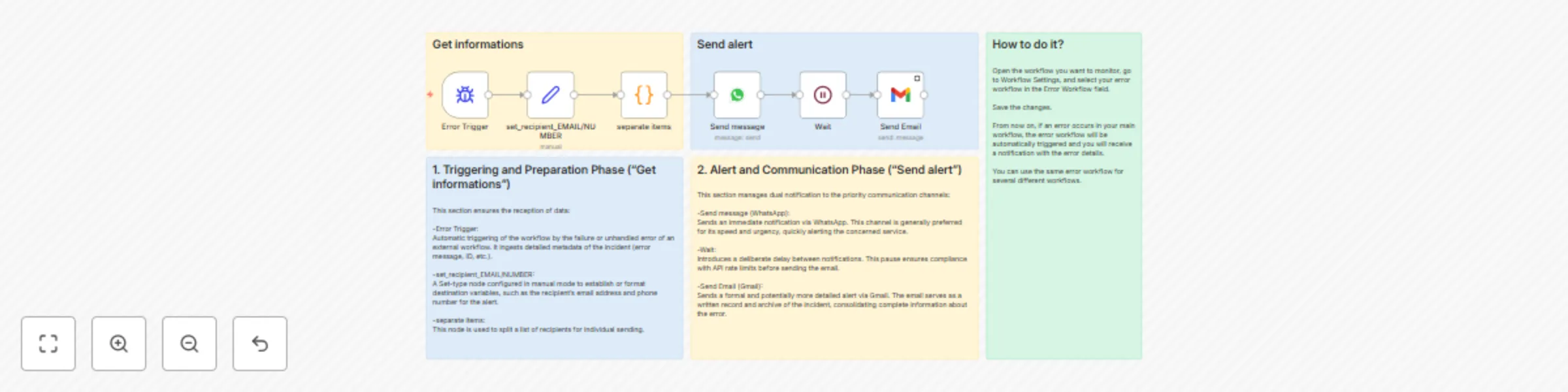
Original n8n.io sourceThis template provides a robust, two-step system for handling critical errors in your n8n workflows. It ensures that no workflow failure goes unnoticed, immediately notifying your team via a fast, urgent channel and providing a detailed record via a formal channel.
Instant Trigger & Data Capture: The Error Trigger automatically captures all necessary metadata when an assigned workflow fails, including the error message and ID.
Contact Configuration: The Set node centralizes and prepares recipient contact information (email and phone number) from the error data.
Rapid Response: An urgent notification is sent via WhatsApp for immediate team awareness.
Traceability & Record-Keeping: A short Wait node introduces a delay to prevent notification spam. Following the pause, a comprehensive report is sent via Gmail, ensuring a detailed record of the incident is archived.
This design guarantees high-priority alerts are handled rapidly, while still maintaining essential documentation.
This template is ideal for Ops Teams, Developers, and Automation Engineers who rely on mission-critical n8n workflows (e.g., payment processing, lead capture, data synchronization). If a failure requires immediate human intervention, this system is essential.
Setting up this robust error handler is quick and essential for workflow stability:
Configure Credentials: Ensure you have the necessary credentials added to your n8n instance for:
WhatsApp Business API (for the Send message node).
Gmail (for the Send Email node).
Define Recipients: In the set_recipient_EMAIL/NUMBER node, replace the placeholder values with the actual email address and phone number of your incident team.
Activate the Listener: Open the settings of the primary workflow you wish to monitor.Go to settings ,navigate to the Error Workflow field and select the name of this template (the Error Handler).
Save Changes: Save both this Error Handler workflow and the primary workflow.
Done! Any failure in the primary workflow will now automatically trigger this alert system.
Gmail Account (Configured as a resource). WhatsApp Business API Access (Configured as a resource and a pre-approved template available).
This catalog entry is organized from the workflow JSON. The node-level section below shows the executable blocks available for review before importing the template.
| Workflow | Dual-channel workflow error alerts with WhatsApp & Gmail reporting |
|---|---|
| Complexity | intermediate |
| Nodes | 11 |
| Categories | DevOps |
| Author | rayane |
| Published | 01 Oct 2025 |
Use the JSON export at /data/workflows/9169/9169.json as the source template for this automation.
Open n8n, import the downloaded JSON, and review each node before activating the workflow.
Replace placeholder credentials, API keys, webhook URLs, account IDs, and environment-specific values with your own settings.
Run the workflow manually or in a staging workspace, inspect node output, and confirm downstream systems receive the expected data.
Enable the workflow only after testing, then monitor executions, errors, and rate limits during the first production runs.
Review imported nodes carefully before activation. This catalog entry is intended to help you inspect the workflow structure, understand required services, and find related templates faster.
Node names, credentials, schedules, webhook paths, and external service limits may need adjustment for your workspace.
Error Handler: WhatsApp Alert & Gmail Report for Failed Workflows What This Template Does / How it Works This template provides a robust, two step system for handling critical errors in your n8n...
Review the workflow JSON, configure any required credentials in n8n, and test the automation in a safe workspace before using it in production.
Yes. Use the block-by-block analysis and the downloadable JSON to inspect each node, then adjust credentials, prompts, schedules, filters, or destinations for your DevOps use case.