Block 1 - Sticky Note1
- Type / Role
- n8n-nodes-base.stickyNote - stickyNote
- Config choices
- Version 1


 Early Deal
This workflow is provided as-is. Please review and test before using in production.
This workflow automatically checks a list of desired domain names for availability every 30 minutes. Using the Porkbun API and Google Sheets, it instantly sends detailed notifications via Gmail and...
n8n-nodes-base.stickynote, n8n-nodes-base.httprequest, n8n-nodes-base.splitinbatches, n8n-nodes-base.if, n8n-nodes-base.gmail, n8n-nodes-base.discord, n8n-nodes-base.googlesheets, n8n-nodes-base.wait
This workflow is cataloged by N8N Workflows and links back to its original n8n.io source page by Khairul Muhtadin.
Original n8n.io sourceThis workflow automatically checks a list of desired domain names for availability every 30 minutes. Using the Porkbun API and Google Sheets, it instantly sends detailed notifications via Gmail and Discord the moment a domain becomes available, so you can secure it before anyone else.
Time Savings: Eliminates hours of manual domain checking each week. Set your list once and let the automation monitor your targets 24/7.
Competitive Edge: Gain a critical speed advantage in acquiring high-value or expiring domains the second they become available.
Scalability: Effortlessly monitor hundreds of domains simultaneously without any extra effort or performance degradation.
avail == yes).| Requirement | Type | Purpose |
|---|---|---|
| n8n instance | Essential | Workflow execution platform |
| Porkbun Account | Essential | API Access for domain checks |
| Google Cloud Platform | Essential | Storing domain list (Sheets) & sending alerts (Gmail) |
| Discord Server | Optional | Real-time channel notifications |
Domain (e.g., example.com) and isAvailable (e.g., no).isAvailable set to "no"). Run the workflow manually to verify that all connections work and you receive notifications.| Node | Purpose | Key Configuration |
|---|---|---|
| Schedule Trigger | Initiates the workflow on a recurring basis. | Set the desired interval (default: 30 minutes). |
| Google Sheets | Reads the domain list and updates its status. | Sheet ID, Sheet Name, and column mapping. |
| SplitInBatches | Processes each domain from the list individually. | Batch size is set to 1 to check domains sequentially. |
| HTTP Request | Queries the Porkbun API for domain availability. | Porkbun API endpoint and credentials. |
| IF | Routes the workflow based on the API response. | Checks if response.avail equals "yes". |
| Gmail | Sends a detailed email alert for available domains. | Recipient email, subject, and HTML body. |
| Discord | Sends a concise notification to a Discord channel. | Server ID, Channel ID, and message content. |
| Wait | Prevents API rate-limiting. | Pauses for 10 seconds between checking domains. |
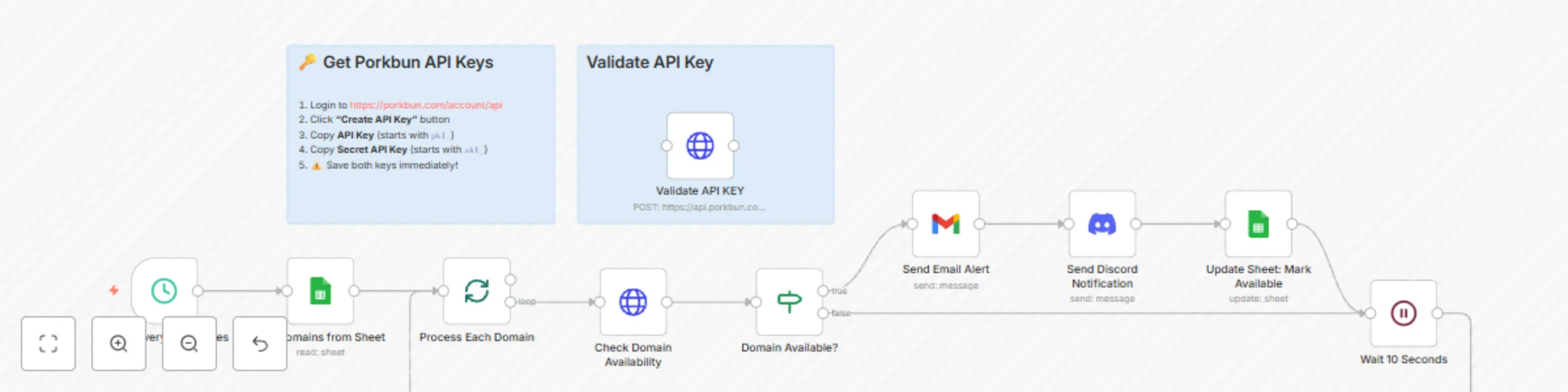
The workflow is triggered by a schedule, fetching a list of domains from a Google Sheet.
It uses the SplitInBatches node to loop through each domain sequentially.
For every domain, it calls the Porkbun API. An IF node checks the response; if available, it triggers notifications and updates the Google Sheet.
A Wait node is crucial for respecting API rate limits, ensuring the workflow runs smoothly even with large domain lists.
Basic Adjustments:
Advanced Enhancements:
Common Issues:
| Problem | Cause | Solution |
|---|---|---|
| Workflow fails at HTTP Request node | Invalid Porkbun API credentials. | Use the separate "Validate API KEY" node to test your keys directly. Regenerate them if needed. |
| No domains are processed | Google Sheets node configuration error or the sheet is empty. | Verify the Sheet ID is correct and that the isAvailable column contains "no" for the domains you want to check. |
| Authentication errors | Google or Discord credentials have expired or lack permissions. | Re-authenticate the respective nodes in the n8n credentials panel. |
Created by: Khaisa Studio
Category: Monitoring Tags: Porkbun, Domain, Automation, Google Sheets, Notifications
Need custom workflows? Contact us
Connect with the creator:
This catalog entry is organized from the workflow JSON. The node-level section below shows the executable blocks available for review before importing the template.
| Workflow | Domain availability monitor with Porkbun, Google Sheets & multi-channel alerts |
|---|---|
| Complexity | intermediate |
| Nodes | 12 |
| Categories | Miscellaneous |
| Author | Khairul Muhtadin |
| Published | 31 Oct 2025 |
Use the JSON export at /data/workflows/10378/10378.json as the source template for this automation.
Open n8n, import the downloaded JSON, and review each node before activating the workflow.
Replace placeholder credentials, API keys, webhook URLs, account IDs, and environment-specific values with your own settings.
Run the workflow manually or in a staging workspace, inspect node output, and confirm downstream systems receive the expected data.
Enable the workflow only after testing, then monitor executions, errors, and rate limits during the first production runs.
Review imported nodes carefully before activation. This catalog entry is intended to help you inspect the workflow structure, understand required services, and find related templates faster.
Node names, credentials, schedules, webhook paths, and external service limits may need adjustment for your workspace.
This workflow automatically checks a list of desired domain names for availability every 30 minutes. Using the Porkbun API and Google Sheets, it instantly sends detailed notifications via Gmail and...
Review the workflow JSON, configure any required credentials in n8n, and test the automation in a safe workspace before using it in production.
Yes. Use the block-by-block analysis and the downloadable JSON to inspect each node, then adjust credentials, prompts, schedules, filters, or destinations for your Miscellaneous use case.