Block 1 - On form submission4
- Type / Role
- n8n-nodes-base.formTrigger - formTrigger
- Config choices
- Version 2.2


 Early Deal
This workflow is provided as-is. Please review and test before using in production.
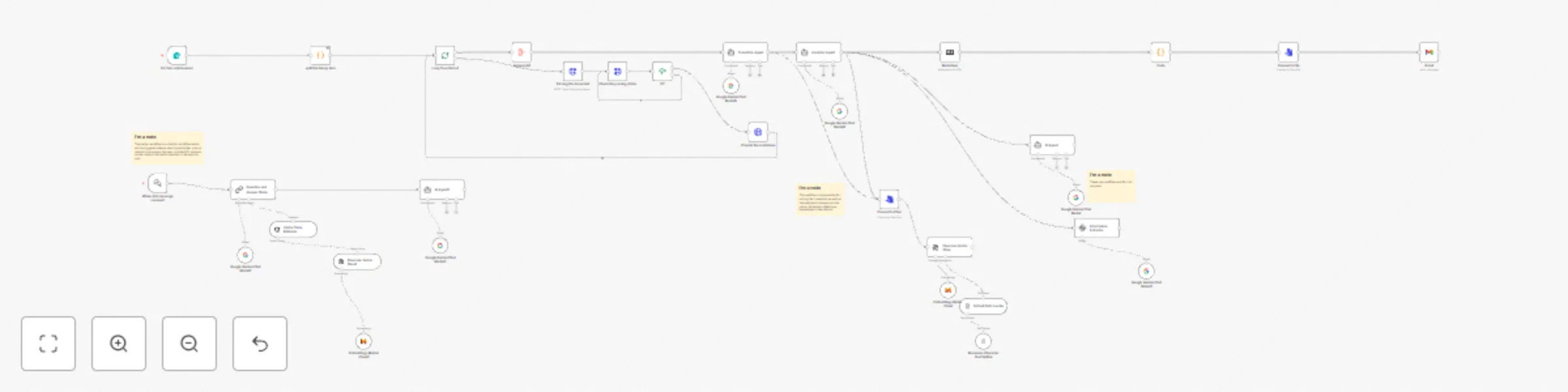
Description This automation workflow enables users to upload files via an N8N form, automatically analyzes the content using Google Gemini agents, and delivers the analyzed results via email alon...
n8n-nodes-base.formtrigger, n8n-nodes-base.splitinbatches, n8n-nodes-base.if, n8n-nodes-base.aggregate, @n8n/n8n-nodes-langchain.lmchatgooglegemini, n8n-nodes-base.code, n8n-nodes-base.httprequest, n8n-nodes-base.markdown
This workflow is cataloged by N8N Workflows and links back to its original n8n.io source page by pavith.
Original n8n.io sourceThis automation workflow enables users to upload files via an N8N form, automatically analyzes the content using Google Gemini agents, and delivers the analyzed results via email along with a chatbot link. The system leverages Llama Cloud API, Google Gemini LLM, Pinecone vector database, and Gmail to provide a seamless, multilingual content analysis experience.
Before setting up this workflow, ensure the following are in place:
An active N8N instance.
Access to Llama Cloud API.
Google Gemini LLM API keys (for Translator & Analyzer agents).
A Pinecone account with an active index.
A Gmail account with API access configured.
Basic knowledge of N8N workflow setup.
Deploy the N8N Form
Create a public-facing form using N8N.
Configure it to accept:
File uploads.
User email input.
File Preprocessing
Store the uploaded files temporarily.
Organize and preprocess them as needed.
Content Extraction using Llama Cloud API
Feed the files into the Llama Cloud API.
Extract and parse the content for further processing.
Use a Translator Agent (Google Gemini).
Check if the content is in English. If not, translate it.
Forward the (translated) content to the Analyzer Agent (Google Gemini).
Perform deep analysis to extract insights.
Vector Storage in Pinecone
The parsed and translated content.
The analyzed content.
Use Pinecone to store the content as embeddings for chatbot use.
Send the analyzed content and chatbot link to the user’s provided email using Gmail API.
To add more languages: Update the translation logic to include additional language support.
To modify analysis depth: Adjust the prompts sent to the Gemini Analyzer Agent.
To change the chatbot behavior: Retrain or reconfigure the chatbot to utilize the new Pinecone index contextually.
User uploads files and email via N8N form.
Files are parsed using Llama Cloud API.
Content is translated (if needed) using Gemini Translator Agent.
Translated content is analyzed by the Gemini Analyzer Agent.
Parsed and analyzed data is stored in Pinecone.
User receives email with analyzed results and a chatbot link.
This catalog entry is organized from the workflow JSON. The node-level section below shows the executable blocks available for review before importing the template.
Showing the first 24 of 36 workflow blocks. Download the JSON for the full node graph.
| Workflow | Document analysis & chatbot creation with Llama Parser, Gemini LLM & Pinecone DB |
|---|---|
| Complexity | advanced |
| Nodes | 36 |
| Categories | Document Extraction, AI RAG |
| Author | pavith |
| Published | 19 Apr 2025 |
Use the JSON export at /data/workflows/3606/3606.json as the source template for this automation.
Open n8n, import the downloaded JSON, and review each node before activating the workflow.
Replace placeholder credentials, API keys, webhook URLs, account IDs, and environment-specific values with your own settings.
Run the workflow manually or in a staging workspace, inspect node output, and confirm downstream systems receive the expected data.
Enable the workflow only after testing, then monitor executions, errors, and rate limits during the first production runs.
Review imported nodes carefully before activation. This catalog entry is intended to help you inspect the workflow structure, understand required services, and find related templates faster.
Node names, credentials, schedules, webhook paths, and external service limits may need adjustment for your workspace.
Description This automation workflow enables users to upload files via an N8N form, automatically analyzes the content using Google Gemini agents, and delivers the analyzed results via email alon...
Review the workflow JSON, configure any required credentials in n8n, and test the automation in a safe workspace before using it in production.
Yes. Use the block-by-block analysis and the downloadable JSON to inspect each node, then adjust credentials, prompts, schedules, filters, or destinations for your Document Extraction, AI RAG use case.