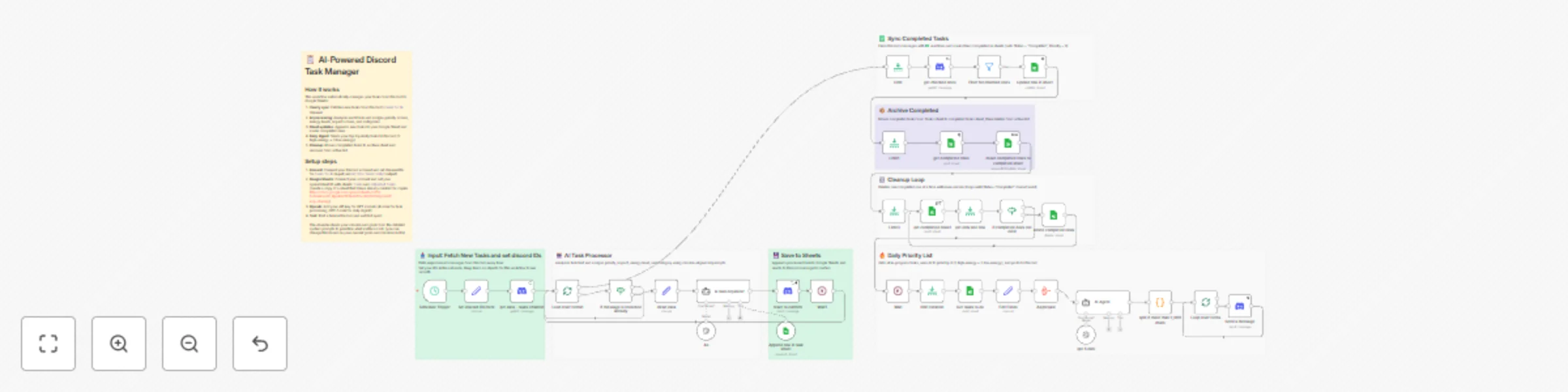
Discord to Google Sheets task manager with GPT prioritization and deep work focus

Workflow preview

Workflow preview
100%
Discord to Google Sheets task manager with GPT prioritization and deep work focus preview
Open on n8n.io

Important notice

This workflow is provided as-is. Please review and test before using in production.

1. Workflow Overview

AI Powered Discord Task Manager with Priority Intelligence Mission Aligned Task Tracker: Discord + AI + Google Sheets Opening Summary This n8n template demonstrates how to automate task management ...

Best for

  • Personal Productivity automation workflows
  • AI Summarization automation workflows
  • advanced n8n builders looking for reusable templates

Tools used

n8n-nodes-base.scheduletrigger, n8n-nodes-base.splitinbatches, n8n-nodes-base.set, n8n-nodes-base.stickynote, n8n-nodes-base.discord, n8n-nodes-base.googlesheetstool, @n8n/n8n-nodes-langchain.agent, n8n-nodes-base.googlesheets

Source and attribution

This workflow is cataloged by N8N Workflows and links back to its original n8n.io source page by Cj Elijah Garay.

Original n8n.io source

1.1 Workflow description

Title
Discord to Google Sheets task manager with GPT prioritization and deep work focus
Workflow name
Discord to Google Sheets task manager with GPT prioritization and deep work focus

AI-Powered Discord Task Manager with Priority Intelligence

Mission-Aligned Task Tracker: Discord + AI + Google Sheets

Opening Summary

This n8n template demonstrates how to automate task management by syncing tasks from a Discord channel to Google Sheets, enriching them with AI-driven prioritization, and delivering a daily prioritized digest back to Discord. It streamlines task organization aligned with personal mission and productivity frameworks.

Use cases are many:

  • Try managing your team’s project tasks by automatically prioritizing them based on strategic goals!
  • Try personal task tracking with AI-powered prioritization for optimized daily productivity!
  • Try automating follow-ups and completed task archiving seamlessly between Discord and Google Sheets!

Good to know

  • Using OpenAI GPT-4.1 and GPT-5 mini models may incur API costs based on usage (check your OpenAI pricing plan).
  • Google Sheets API has rate limits; large task volumes may require batch adjustments to avoid quota errors.
  • Discord API OAuth2 authentication is needed with permissions to read messages, add reactions, and post messages.
  • The workflow requires shared Google Sheets with specific sheets named Tasks and completed tasks (template link provided).
  • Reaction emojis in Discord (✍️ for processed, ✅ for completed) are used to track task status within Discord.
  • AI-driven prioritization follows mission alignment based on Eisenhower Matrix, energy levels, and impact scoring.

Uses concepts from:

  • Deep work by Cal Newport
  • Essentialism: The Disciplined Pursuit of Less – Greg McKeown (2014)
  • Getting Results the Agile Way – J.D. Meier
  • Hyperfocus – Chris Bailey (2018)
  • Slow Productivity – Cal Newport (2024) Newport’s newest book. Explicitly about doing fewer things, working at a natural pace, and obsessing over quality—basically Deep Work 2.0

How it works

  • Schedule Trigger fires hourly to initiate task syncing.
  • Set discord IDs here node defines Discord server and channel IDs for input/output.
  • get data - tasks Channel fetches all messages from the Discord input channel.
  • Loop Over Items1 and if message is recorded already prevent reprocessing tasks.
  • clean data prepares message information to uniform structure.
  • ai task organizer node sends each task text to OpenAI GPT-4.1 mini agent, which analyzes and assigns priority, impact, energy level, category, and other metadata aligned to the user's mission.
  • Tasks are appended to Google Sheets Tasks sheet using Append row in task sheet.
  • react to confirm adds a reaction on Discord to mark the message as processed.
  • Get tasks to do retrieves all in-progress tasks from Google Sheets for daily prioritization.
  • Aggregated task data is analyzed by the AI Agent with GPT-5 mini to select top 6 tasks (3 high-energy, 3 low-energy).
  • The daily prioritized list is split into acceptable message sizes and sent back to a Discord output channel by Send a message node.
  • The workflow checks for tasks with ✅ reactions in Discord (get checked ones), updates their status to "Completed" in Google Sheets (Update row in sheet).
  • Completed tasks are moved to a separate completed tasks sheet (move completed rows to completed sheet) and deleted from active list (delete completed rows) in a loop until none remain.
  • Wait nodes and limits are used to control API call pacing and batch sizes.

How to use

  • Set your Discord server and channel IDs for input (tasks-to-do) and output (my-prio-tasks-today) in the Set discord IDs here node.
  • Connect your Google Sheets account and set the Spreadsheet ID in all relevant nodes (the sheet must have Tasks and completed tasks sheets with expected columns).
  • Add your OpenAI API credentials for GPT-4.1 mini (task processing) and GPT-5 mini (daily digest).
  • Ensure your Discord app has OAuth2 tokens with message read, react, and post permissions.
  • Post tasks as messages in the configured Discord input channel.
  • Run the workflow or activate it; it will sync, process, prioritize, and update tasks automatically on schedule.
  • Customize the schedule trigger if you want more frequent or different syncing intervals.

Requirements

  • Discord account and bot/app with OAuth2 app credentials for message read, react, and post permissions.
  • Google Sheets account for task data storage, with a spreadsheet structured as specified (Sheets: Tasks, completed tasks).
  • OpenAI API account with access to GPT-4.1 mini and GPT-5 mini models for AI task analysis and summarization.
  • Google Sheets OAuth2 credentials configured in n8n.
  • Properly set Discord server and channel IDs in the workflow.

Customising this workflow

  • Try adding support for multiple Discord servers or channels to centralize tasks from different teams or projects.
  • Extend AI prompts to include deadlines parsing or automated reminders.
  • Customize the Google Sheets columns or the scoring logic to fit your unique productivity frameworks or KPIs.
  • Incorporate notifications via email or Slack based on task priority or completion.
  • Replace Google Sheets with other databases if scalable storage is required.
  • Adjust the energy level and impact criteria in AI prompts to match your personal productivity rhythms.

Sample inputs:

  • "publish tasks tracker asap"
  • "Improve personal portfolio asap"
  • "Watch new movie - Jujutsu Kaisen"

Sample output:

🔥 Today's Agenda ━━━━━━━━━━━━━━━━━━━━━━━━━━━━━━━━

Morning Deep Work Blocks (High Energy Required) Do these during peak hours (6 AM to 2 PM or whenever you're sharpest)

1️⃣ Improve personal portfolio for job applications 💡 Why: Critical for landing > 50k automation job - enhances job application success
📊 Priority: 100 | Impact: 10/10
Link: (https://discord.com/channels/1373770435146689/1481777943919293/1440107502032)

2️⃣ Complete all Udemy n8n courses ASAP 💡 Why: Essential skill for landing >50k automation job and digital product creation
📊 Priority: 88 | Impact: 9/10
Link: (https://discord.com/channels/137770435134668/14348177539192/14365639629204)

3️⃣ Finish finance debt tracker and publish as template 💡 Why: Generates immediate income potential and supports income generation 📊 Priority: 86 | Impact: 9/10
Link: (https://discord.com/channels/1373767704351346/1434817779453919/1436445965471973)

━━━━━━━━━━━━━━━━━━━━━━━━━━━━━━━━

🎯 DOWNTIME BLOCK (Low-Medium Energy) Do these during energy dips (post-lunch, late afternoon, tired moments)

1️⃣ Call Bank collections agency (09277055515 / 09559050973) 💡 Why: Limited-time offer; could significantly monthly payments
📊 Priority: 96 | Impact: 10/10 | Energy: Medium
Link: (https://discord.com/channels/13767704351/14348177453/14379926889894)

2️⃣ Publish n8n workflow and submit for verification 💡 Why: Enables earning from this and future n8n workflows — immediate income opportunity
📊 Priority: 96 | Impact: 9/10 | Energy: Medium
Link: (https://discord.com/channels/1373767435134/14347794539/143810998822)

3️⃣ Plan and pay Loan 💡 Why: Immediate debt payments reduce penalties/interest and support financial stability
📊 Priority: 96 | Impact: 10/10 | Energy: Medium Link: (https://discord.com/channels/1373767704351346/143481777945391/14382823609982)

━━━━━━━━━━━━━━━━━━━━━━━━━━━━━━━━

💪 EXECUTION STRATEGY

🛡️ Morning Block: Protect this ruthlessly — no meetings, no social, deep work only.
⚙️ Downtime Block: Tackle these during lower-energy windows; they move the money/debt needle without burning you out.
🎯 Win Condition: Complete all 6 = massive progress toward landing high-paying work and eliminating high-priority debt.

Protect your morning deep work at all costs — it's your leverage.
You're building financial freedom one prioritized action at a time.
If you finish all 6 today: your portfolio and skills will be significantly closer to landing high-paying work, and you'll make a major dent in urgent debt obligations.

Questions?

If you have questions or need help with this workflow, feel free to reach out:

1.2 Logical Blocks

This catalog entry is organized from the workflow JSON. The node-level section below shows the executable blocks available for review before importing the template.

2. Block-by-Block Analysis

Block 1 - Schedule Trigger

Type / Role
n8n-nodes-base.scheduleTrigger - scheduleTrigger
Config choices
Version 1.2

Block 2 - Loop Over Items1

Type / Role
n8n-nodes-base.splitInBatches - splitInBatches
Config choices
Version 3

Block 3 - clean data

Type / Role
n8n-nodes-base.set - set
Config choices
Version 3.4

Block 4 - Sticky Note

Type / Role
n8n-nodes-base.stickyNote - stickyNote
Config choices
Version 1

Block 5 - get data - tasks Channel

Type / Role
n8n-nodes-base.discord - discord
Config choices
Version 2

Block 6 - Append row in task sheet

Type / Role
n8n-nodes-base.googleSheetsTool - googleSheetsTool
Config choices
Version 4.7

Block 7 - ai task organizer

Type / Role
@n8n/n8n-nodes-langchain.agent - agent
Config choices
Version 2.2

Block 8 - Get tasks to do

Type / Role
n8n-nodes-base.googleSheets - googleSheets
Config choices
Version 4.7

Block 9 - Edit Fields

Type / Role
n8n-nodes-base.set - set
Config choices
Version 3.4

Block 10 - react to confirm

Type / Role
n8n-nodes-base.discord - discord
Config choices
Version 2

Block 11 - AI Agent

Type / Role
@n8n/n8n-nodes-langchain.agent - agent
Config choices
Version 2.2

Block 12 - Aggregate

Type / Role
n8n-nodes-base.aggregate - aggregate
Config choices
Version 1

Block 13 - Send a message

Type / Role
n8n-nodes-base.discord - discord
Config choices
Version 2

Block 14 - Loop Over Items

Type / Role
n8n-nodes-base.splitInBatches - splitInBatches
Config choices
Version 3

Block 15 - Update row in sheet

Type / Role
n8n-nodes-base.googleSheets - googleSheets
Config choices
Version 4.7

Block 16 - Wait

Type / Role
n8n-nodes-base.wait - wait
Config choices
Version 1.1

Block 17 - gpt 5 mini

Type / Role
@n8n/n8n-nodes-langchain.lmChatOpenAi - lmChatOpenAi
Config choices
Version 1.2

Block 18 - get checked ones

Type / Role
n8n-nodes-base.discord - discord
Config choices
Version 2

Block 19 - Wait1

Type / Role
n8n-nodes-base.wait - wait
Config choices
Version 1.1

Block 20 - Sticky Note1

Type / Role
n8n-nodes-base.stickyNote - stickyNote
Config choices
Version 1

Block 21 - Filter for checked ones

Type / Role
n8n-nodes-base.filter - filter
Config choices
Version 2.2

Block 22 - Limit

Type / Role
n8n-nodes-base.limit - limit
Config choices
Version 1

Block 23 - limit iteration

Type / Role
n8n-nodes-base.limit - limit
Config choices
Version 1

Block 24 - Sticky Note2

Type / Role
n8n-nodes-base.stickyNote - stickyNote
Config choices
Version 1

Showing the first 24 of 41 workflow blocks. Download the JSON for the full node graph.

3. Summary Table

Workflow Discord to Google Sheets task manager with GPT prioritization and deep work focus
Complexity advanced
Nodes 41
Categories Personal Productivity, AI Summarization
Author Cj Elijah Garay
Published 18 Nov 2025

4. Reproducing the Workflow from Scratch

  1. 1. Download the workflow JSON

    Use the JSON export at /data/workflows/10945/10945.json as the source template for this automation.

  2. 2. Import the template into n8n

    Open n8n, import the downloaded JSON, and review each node before activating the workflow.

  3. 3. Configure credentials and variables

    Replace placeholder credentials, API keys, webhook URLs, account IDs, and environment-specific values with your own settings.

  4. 4. Test with sample data

    Run the workflow manually or in a staging workspace, inspect node output, and confirm downstream systems receive the expected data.

  5. 5. Activate and monitor

    Enable the workflow only after testing, then monitor executions, errors, and rate limits during the first production runs.

5. General Notes & Resources

Review imported nodes carefully before activation. This catalog entry is intended to help you inspect the workflow structure, understand required services, and find related templates faster.

Node names, credentials, schedules, webhook paths, and external service limits may need adjustment for your workspace.

Frequently asked questions

What does Discord to Google Sheets task manager with GPT prioritization and deep work focus do?

AI Powered Discord Task Manager with Priority Intelligence Mission Aligned Task Tracker: Discord + AI + Google Sheets Opening Summary This n8n template demonstrates how to automate task management ...

What do I need before importing this workflow?

Review the workflow JSON, configure any required credentials in n8n, and test the automation in a safe workspace before using it in production.

Can I customize this workflow?

Yes. Use the block-by-block analysis and the downloadable JSON to inspect each node, then adjust credentials, prompts, schedules, filters, or destinations for your Personal Productivity, AI Summarization use case.