Block 1 - Daily Check
- Type / Role
- n8n-nodes-base.scheduleTrigger - scheduleTrigger
- Config choices
- Version 1.2


 Early Deal
This workflow is provided as-is. Please review and test before using in production.
Who’s it for Remote and distributed teams that schedule across time zones and want to avoid meetings landing on public holidays—PMs, CS/AM teams, and ops leads who own cross regional calendars. Wha...
n8n-nodes-base.scheduletrigger, n8n-nodes-base.set, n8n-nodes-base.code, n8n-nodes-base.googlecalendar, n8n-nodes-base.if, n8n-nodes-base.slack, n8n-nodes-base.splitinbatches, n8n-nodes-base.httprequest
This workflow is cataloged by N8N Workflows and links back to its original n8n.io source page by Takuya Ojima.
Original n8n.io sourceWho’s it for
Remote and distributed teams that schedule across time zones and want to avoid meetings landing on public holidays—PMs, CS/AM teams, and ops leads who own cross-regional calendars.
What it does / How it works
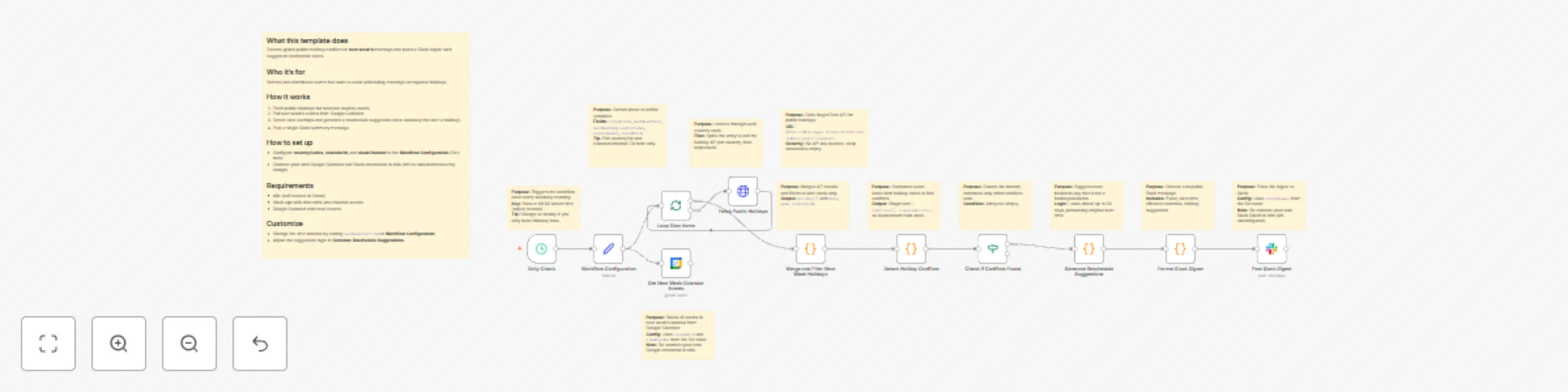
The workflow checks next week’s Google Calendar events, compares event dates against public holidays for selected country codes, and produces a single Slack digest with any conflicts plus suggested alternative dates. Core steps: Workflow Configuration (Set) → Fetch Public Holidays (via a public holiday API such as Calendarific/Nager.Date) → Get Next Week Calendar Events (Google Calendar) → Detect Holiday Conflicts (compare dates) → Generate Reschedule Suggestions (find nearest business day that isn’t a holiday/weekend) → Format Slack Digest → Post Slack Digest.
How to set up
Open Workflow Configuration (Set) and edit: countryCodes, calendarId, slackChannel, nextWeekStart, nextWeekEnd.
Connect your own Google Calendar and Slack credentials in n8n (no hardcoded keys).
(Optional) Adjust the Trigger to run daily or only on Mondays.
Requirements
n8n (Cloud or self-hosted)
Google Calendar read access to the target calendar
Slack app with permission to post to the chosen channel
A public-holiday API (no secrets needed for Nager.Date; Calendarific requires an API key)
How to customize the workflow
Time window: Change nextWeekStart/End to scan a different period.
Holiday sources: Add or swap APIs; merge multiple regions.
Suggestion logic: Tweak the look-ahead window or rules (e.g., skip Fridays).
Output: Post per-calendar messages, DM owners, or create tentative reschedule events automatically.
This catalog entry is organized from the workflow JSON. The node-level section below shows the executable blocks available for review before importing the template.
| Workflow | Detect holiday conflicts & suggest meeting reschedules with Google Calendar and Slack |
|---|---|
| Complexity | advanced |
| Nodes | 23 |
| Categories | Personal Productivity |
| Author | Takuya Ojima |
| Published | 25 Oct 2025 |
Use the JSON export at /data/workflows/10144/10144.json as the source template for this automation.
Open n8n, import the downloaded JSON, and review each node before activating the workflow.
Replace placeholder credentials, API keys, webhook URLs, account IDs, and environment-specific values with your own settings.
Run the workflow manually or in a staging workspace, inspect node output, and confirm downstream systems receive the expected data.
Enable the workflow only after testing, then monitor executions, errors, and rate limits during the first production runs.
Review imported nodes carefully before activation. This catalog entry is intended to help you inspect the workflow structure, understand required services, and find related templates faster.
Node names, credentials, schedules, webhook paths, and external service limits may need adjustment for your workspace.
Who’s it for Remote and distributed teams that schedule across time zones and want to avoid meetings landing on public holidays—PMs, CS/AM teams, and ops leads who own cross regional calendars. Wha...
Review the workflow JSON, configure any required credentials in n8n, and test the automation in a safe workspace before using it in production.
Yes. Use the block-by-block analysis and the downloadable JSON to inspect each node, then adjust credentials, prompts, schedules, filters, or destinations for your Personal Productivity use case.