Deliver encrypted payroll PDFs via Google Drive, Sheets, Gmail and Slack

Workflow preview

Workflow preview
100%
Deliver encrypted payroll PDFs via Google Drive, Sheets, Gmail and Slack preview
Open on n8n.io

1. Workflow Overview

Enterprise secure payroll distribution with encryption and error handling Description Achieve a high security, compliant payroll distribution system by using this automation to encrypt sensitive...

Best for

  • Document Extraction automation workflows
  • intermediate n8n builders looking for reusable templates

Tools used

n8n-nodes-base.googledrive, n8n-nodes-base.googlesheets, n8n-nodes-base.code, n8n-nodes-htmlcsstopdf.htmlcsstopdf, n8n-nodes-base.if, n8n-nodes-base.gmail, n8n-nodes-base.slack, n8n-nodes-base.stickynote

Source and attribution

This workflow is cataloged by N8N Workflows and links back to its original n8n.io source page by Jitesh Dugar.

Original n8n.io source

1.1 Workflow description

Title
Deliver encrypted payroll PDFs via Google Drive, Sheets, Gmail and Slack
Workflow name
Deliver encrypted payroll PDFs via Google Drive, Sheets, Gmail and Slack

Enterprise secure payroll distribution with encryption and error handling

🎯 Description

Achieve a high-security, compliant payroll distribution system by using this automation to encrypt sensitive documents and manage delivery failures. This workflow provides an enterprise-grade solution by monitoring secure storage for payslips, fetching unique employee credentials from a database, and applying 128-bit AES password protection before dispatching via Gmail.

A technical highlight of this template is the resilient fail-safe architecture. By utilizing a Switch node and custom Code node logic, the workflow identifies missing employee metadata and prevents the delivery of unencrypted files. Furthermore, it uses Luxon expressions such as {{ $now.minus({ months: 1 }).toFormat('MMMM_yyyy') }} to dynamically tag files with the correct payroll period, ensuring that the audit trail remains perfectly synced with your fiscal calendar.

✨ How to achieve secure document delivery

You can achieve a GDPR-compliant document pipeline by using the available tools to:

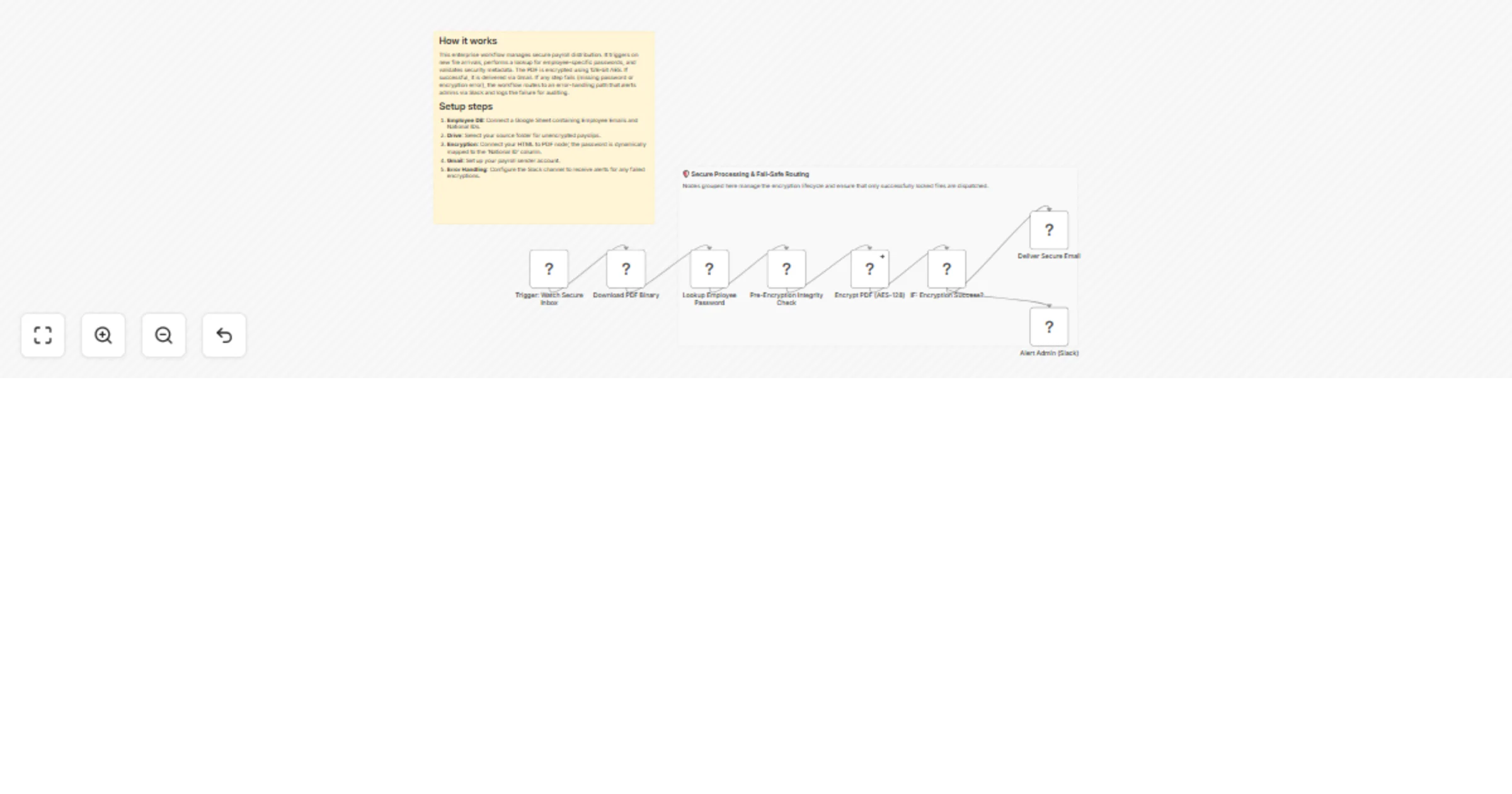
  1. Trigger and pre-validate β€” Monitor Google Drive for new files and perform an integrity check to ensure the binary data is valid before processing begins.
  2. Fetch security metadata β€” Dynamically retrieve the unique user password (e.g., National ID) from Google Sheets based on the file's metadata or employee email.
  3. Apply 128-bit AES encryption β€” Pass the binary through the HTML to PDF security engine to apply user-specific password protection and restrict permissions.
  4. Route with error logic β€” Use an IF node to verify encryption success; if valid, deliver via Gmail. If metadata is missing, route to an Error Handler that alerts the team via Slack.

πŸ’‘ Key features

  • Fail-closed security β€” The workflow is designed so that no unencrypted document can ever accidentally be dispatched if the security step fails.
  • Intelligent period mapping β€” Uses Luxon to automatically identify and label documents by the preceding month's payroll period.
  • Centralized incident logging β€” Separates successful deliveries from system errors, providing a transparent audit trail for IT compliance.

πŸ“¦ What you will need

  1. Google Drive β€” To act as the landing zone for your unencrypted source payslips.
  2. HTML to PDF Node β€” For the 128-bit AES encryption and password protection engine.
  3. Google Sheets β€” To host your employee security database and audit logs.
  4. Gmail & Slack β€” For secure document delivery and real-time administrative failure alerts.

Ready to secure your payroll? Import this template, connect your database, and ensure your sensitive financial documents are always encrypted and delivered safely.

1.2 Logical Blocks

This catalog entry is organized from the workflow JSON. The node-level section below shows the executable blocks available for review before importing the template.

2. Block-by-Block Analysis

Block 1 - Trigger: Watch Secure Inbox

Type / Role
n8n-nodes-base.googleDrive - googleDrive
Config choices
Version 3

Block 2 - Download PDF Binary

Type / Role
n8n-nodes-base.googleDrive - googleDrive
Config choices
Version 3

Block 3 - Lookup Employee Password

Type / Role
n8n-nodes-base.googleSheets - googleSheets
Config choices
Version 4

Block 4 - Pre-Encryption Integrity Check

Type / Role
n8n-nodes-base.code - code
Config choices
Version 2

Block 5 - Encrypt PDF (AES-128)

Type / Role
n8n-nodes-htmlcsstopdf.htmlcsstopdf - htmlcsstopdf
Config choices
Version 1

Block 6 - IF: Encryption Success?

Type / Role
n8n-nodes-base.if - if
Config choices
Version 1

Block 7 - Deliver Secure Email

Type / Role
n8n-nodes-base.gmail - gmail
Config choices
Version 2.1

Block 8 - Alert Admin (Slack)

Type / Role
n8n-nodes-base.slack - slack
Config choices
Version 2.1

Block 9 - Main Documentation

Type / Role
n8n-nodes-base.stickyNote - stickyNote
Config choices
Version 1

Block 10 - Security Overview

Type / Role
n8n-nodes-base.stickyNote - stickyNote
Config choices
Version 1

3. Summary Table

Workflow Deliver encrypted payroll PDFs via Google Drive, Sheets, Gmail and Slack
Complexity intermediate
Nodes 10
Categories Document Extraction
Author Jitesh Dugar
Published 12 Jan 2026

4. Reproducing the Workflow from Scratch

  1. 1. Download the workflow JSON

    Use the JSON export at /data/workflows/12660/12660.json as the source template for this automation.

  2. 2. Import the template into n8n

    Open n8n, import the downloaded JSON, and review each node before activating the workflow.

  3. 3. Configure credentials and variables

    Replace placeholder credentials, API keys, webhook URLs, account IDs, and environment-specific values with your own settings.

  4. 4. Test with sample data

    Run the workflow manually or in a staging workspace, inspect node output, and confirm downstream systems receive the expected data.

  5. 5. Activate and monitor

    Enable the workflow only after testing, then monitor executions, errors, and rate limits during the first production runs.

5. General Notes & Resources

Review imported nodes carefully before activation. This catalog entry is intended to help you inspect the workflow structure, understand required services, and find related templates faster.

Node names, credentials, schedules, webhook paths, and external service limits may need adjustment for your workspace.

Frequently asked questions

What does Deliver encrypted payroll PDFs via Google Drive, Sheets, Gmail and Slack do?

Enterprise secure payroll distribution with encryption and error handling Description Achieve a high security, compliant payroll distribution system by using this automation to encrypt sensitive...

What do I need before importing this workflow?

Review the workflow JSON, configure any required credentials in n8n, and test the automation in a safe workspace before using it in production.

Can I customize this workflow?

Yes. Use the block-by-block analysis and the downloadable JSON to inspect each node, then adjust credentials, prompts, schedules, filters, or destinations for your Document Extraction use case.