Block 1 - Query Builder
- Type / Role
- @n8n/n8n-nodes-langchain.agent - agent
- Config choices
- Version 1.7


 Early Deal
This workflow is provided as-is. Please review and test before using in production.
Want to check out all my flows, follow me on: https://maxmitcham.substack.com/ https://www.linkedin.com/in/max mitcham/ This automation flow is designed to generate comprehensive, research backed l...
@n8n/n8n-nodes-langchain.agent, @n8n/n8n-nodes-langchain.outputparserstructured, @n8n/n8n-nodes-langchain.toolworkflow, n8n-nodes-base.splitout, n8n-nodes-base.merge, n8n-nodes-base.code, n8n-nodes-base.googledocs, @n8n/n8n-nodes-langchain.chattrigger
This workflow is cataloged by N8N Workflows and links back to its original n8n.io source page by Max Mitcham.
Original n8n.io sourceWant to check out all my flows, follow me on:
https://maxmitcham.substack.com/
https://www.linkedin.com/in/max-mitcham/
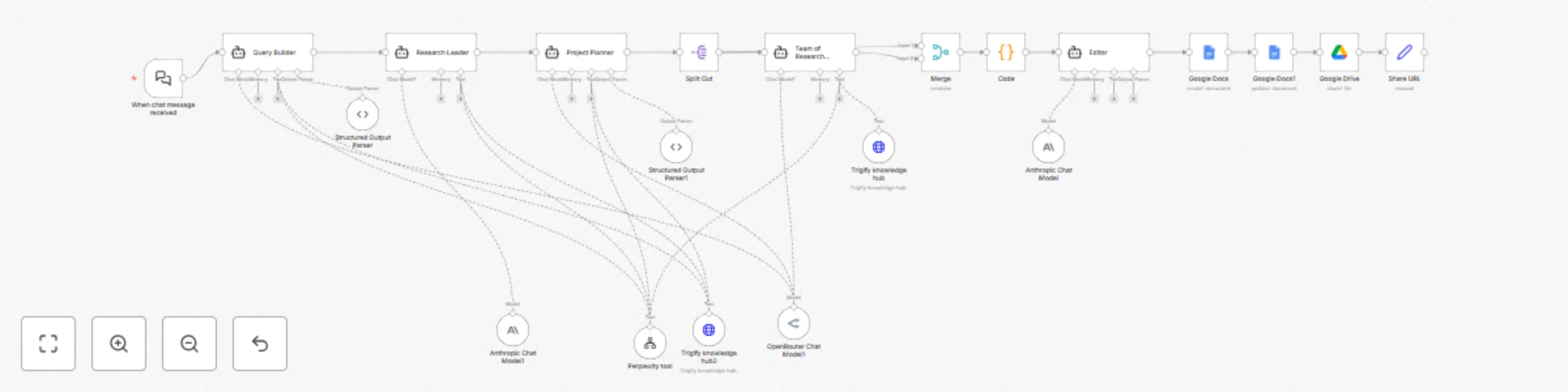
This automation flow is designed to generate comprehensive, research-backed lead magnet articles based on a user-submitted topic, conduct deep research across multiple sources, and automatically create a professional Google Doc ready for LinkedIn sharing.
⚙️ How It Works (Step-by-Step):
Topic for lead magnet content
Target audience (automatically detected)
Company context (when relevant)
Converting the topic into 5 targeted research queries
Determining if topic relates to *company for specialized research
Using structured output parsing for consistent results
Uses Perplexity API for real-time web research
Integrates *company knowledge base when relevant
Creates detailed table of contents with research insights
Identifies key trends, expert opinions, and case studies
Generating professional title and subtitle
Creating 8-10 logical chapter outlines
Developing detailed writing prompts for each section
Ensuring step-by-step actionable guidance
Each agent writes one chapter with proper citations
Maintains consistent voice across all sections
Includes real-world examples and implementation steps
Uses both web research and *company knowledge
Refines tone for authenticity and engagement
Adds image placeholders where appropriate
Ensures proper flow between chapters
Optimizes for LinkedIn lead magnet format
Creates new Google Doc with formatted content
Sets proper sharing permissions (public link)
Organizes in designated company folder
Returns shareable URL for immediate use
🛠️ Tools Used:
n8n: Workflow orchestration platform
Anthropic Claude: Primary AI model for content generation
OpenRouter: Backup AI model options
Perplexity API: Real-time research capabilities
*Company Knowledge Hub: Internal documentation access
Google Docs API: Document creation and formatting
Google Drive API: File management and sharing
📦 Key Features:
End-to-end automation from topic to published document
Multi-agent approach ensures comprehensive coverage
Real-time research with proper citations
Company-specific knowledge integration
Professional editing and formatting
Automatic Google Docs creation with sharing
Scalable content generation (3-5 minutes per article)
🚀 Ideal Use Cases:
B2B companies building thought leadership content
Sales teams creating industry-specific lead magnets
Marketing departments scaling content production
Consultants developing expertise-demonstrating resources
SaaS companies creating feature-focused educational content
Startups establishing market presence without content teams
This catalog entry is organized from the workflow JSON. The node-level section below shows the executable blocks available for review before importing the template.
| Workflow | Deep Research - Sales Lead Magnet Agent |
|---|---|
| Complexity | advanced |
| Nodes | 21 |
| Categories | Content Creation, AI RAG |
| Author | Max Mitcham |
| Published | 06 Jun 2025 |
Use the JSON export at /data/workflows/4721/4721.json as the source template for this automation.
Open n8n, import the downloaded JSON, and review each node before activating the workflow.
Replace placeholder credentials, API keys, webhook URLs, account IDs, and environment-specific values with your own settings.
Run the workflow manually or in a staging workspace, inspect node output, and confirm downstream systems receive the expected data.
Enable the workflow only after testing, then monitor executions, errors, and rate limits during the first production runs.
Review imported nodes carefully before activation. This catalog entry is intended to help you inspect the workflow structure, understand required services, and find related templates faster.
Node names, credentials, schedules, webhook paths, and external service limits may need adjustment for your workspace.
Want to check out all my flows, follow me on: https://maxmitcham.substack.com/ https://www.linkedin.com/in/max mitcham/ This automation flow is designed to generate comprehensive, research backed l...
Review the workflow JSON, configure any required credentials in n8n, and test the automation in a safe workspace before using it in production.
Yes. Use the block-by-block analysis and the downloadable JSON to inspect each node, then adjust credentials, prompts, schedules, filters, or destinations for your Content Creation, AI RAG use case.