Block 1 - When clicking 'Test workflow'
- Type / Role
- n8n-nodes-base.manualTrigger - manualTrigger
- Config choices
- Version 1


 Early Deal
This workflow is provided as-is. Please review and test before using in production.
How It Works – Data Deduplication in n8n This tutorial demonstrates how to remove duplicate records from a dataset using JavaScript logic inside n8n's Code nodes. It simulates real world data clean...
n8n-nodes-base.manualtrigger, n8n-nodes-base.stickynote, n8n-nodes-base.code
This workflow is cataloged by N8N Workflows and links back to its original n8n.io source page by David Olusola.
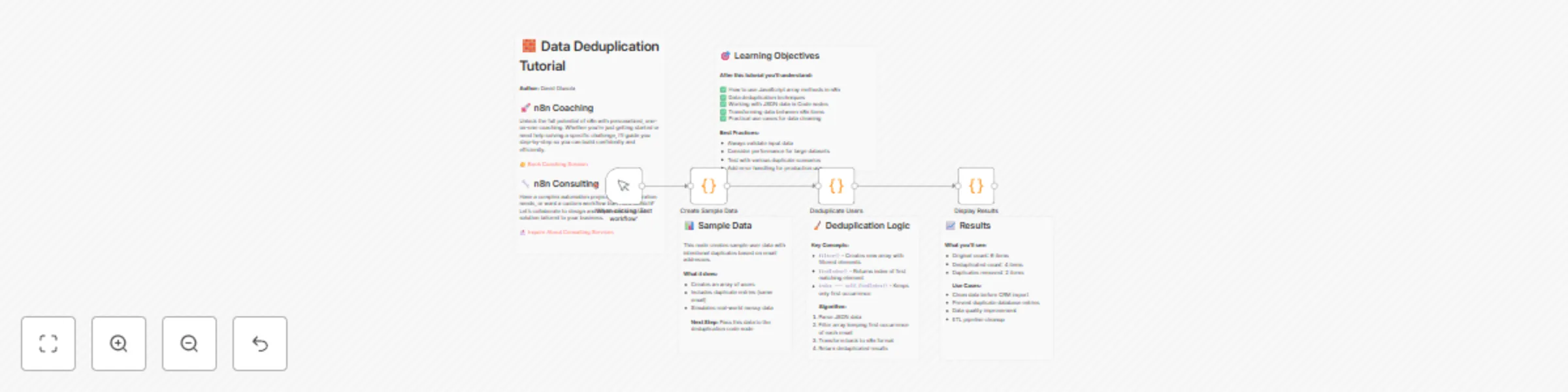
Original n8n.io sourceThis tutorial demonstrates how to remove duplicate records from a dataset using JavaScript logic inside n8n's Code nodes. It simulates real-world data cleaning by generating sample user data with intentional duplicates (based on email addresses) and walks you through the process of deduplication step-by-step.
The process includes:
Creating Sample Data with duplicates. Filtering Out Duplicates using filter() and findIndex() based on email. Displaying Cleaned Results with simple statistics for before-and-after comparison. This is ideal for scenarios like CRM imports, ETL processes, and general data hygiene.
🔹 Step 1: Manual Trigger Node: When clicking 'Test workflow' Purpose: Initiates the workflow manually for testing.
🔹 Step 2: Generate Sample Data Node: Create Sample Data (Code node) What it does:
Creates 6 users, including 2 intentional duplicates (by email). Outputs data as usersJson with metadata (totalCount, message). Mimics real-world messy datasets. 🔹 Step 3: Deduplicate the Data Node: Deduplicate Users (Code node) What it does:
Parses usersJson. Uses .filter() + .findIndex() to keep only the first instance of each email. Logs total, unique, and removed counts. Outputs clean user list as separate items. 🔹 Step 4: Display Results Node: Display Results (Code node) What it does:
Outputs structured summary: Unique users Status Timestamp Prepares results for review or downstream use. 📈 Sample Output
Original count: 6 users Deduplicated count: 4 users Duplicates removed: 2 users 🎯 Learning Objectives
You'll learn how to:
Use .filter() and .findIndex() in n8n Code nodes Clean JSON data within workflows Create simple, effective deduplication pipelines Output structured summaries for reporting or integration 🧠Best Practices
Validate input format (e.g., JSON schema) Handle null or missing fields gracefully Use logging for visibility Add error handling for production use Use pagination/chunking for large datasets
This catalog entry is organized from the workflow JSON. The node-level section below shows the executable blocks available for review before importing the template.
| Workflow | Deduplicate data records using JavaScript array methods |
|---|---|
| Complexity | intermediate |
| Nodes | 9 |
| Categories | Engineering |
| Author | David Olusola |
| Published | 07 Jul 2025 |
Use the JSON export at /data/workflows/5730/5730.json as the source template for this automation.
Open n8n, import the downloaded JSON, and review each node before activating the workflow.
Replace placeholder credentials, API keys, webhook URLs, account IDs, and environment-specific values with your own settings.
Run the workflow manually or in a staging workspace, inspect node output, and confirm downstream systems receive the expected data.
Enable the workflow only after testing, then monitor executions, errors, and rate limits during the first production runs.
Review imported nodes carefully before activation. This catalog entry is intended to help you inspect the workflow structure, understand required services, and find related templates faster.
Node names, credentials, schedules, webhook paths, and external service limits may need adjustment for your workspace.
How It Works – Data Deduplication in n8n This tutorial demonstrates how to remove duplicate records from a dataset using JavaScript logic inside n8n's Code nodes. It simulates real world data clean...
Review the workflow JSON, configure any required credentials in n8n, and test the automation in a safe workspace before using it in production.
Yes. Use the block-by-block analysis and the downloadable JSON to inspect each node, then adjust credentials, prompts, schedules, filters, or destinations for your Engineering use case.