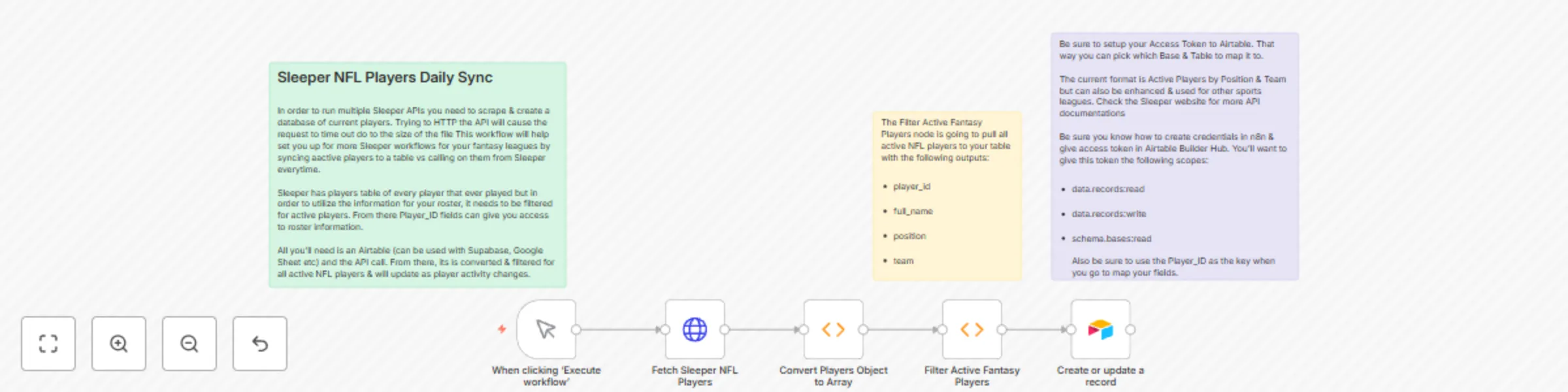
Daily sync of NFL players from Sleeper API to Airtable for fantasy football

Workflow preview

Workflow preview
100%
Daily sync of NFL players from Sleeper API to Airtable for fantasy football preview
Open on n8n.io

Important notice

This workflow is provided as-is. Please review and test before using in production.

1. Workflow Overview

Sleeper NFL Players Sync This template uses the Sleeper API to fetch the complete list of NFL players and stores them in an Airtable base. It’s built to run daily and e...

Best for

  • Engineering automation workflows
  • intermediate n8n builders looking for reusable templates

Tools used

n8n-nodes-base.httprequest, n8n-nodes-base.function, n8n-nodes-base.stickynote, n8n-nodes-base.manualtrigger, n8n-nodes-base.airtable

Source and attribution

This workflow is cataloged by N8N Workflows and links back to its original n8n.io source page by Patrick Jennings.

Original n8n.io source

1.1 Workflow description

Title
Daily sync of NFL players from Sleeper API to Airtable for fantasy football
Workflow name
Daily sync of NFL players from Sleeper API to Airtable for fantasy football

Sleeper NFL Players Sync

This template uses the Sleeper API to fetch the complete list of NFL players and stores them in an Airtable base. It’s built to run daily and ensures you have the most up-to-date player list for fantasy football workflows


What it Does

  • Maintain a current player list for fantasy league automations for Sleeper app users / NFL fantasy football managers
  • Pull Sleeper player IDs once daily instead of every request
  • Build smarter workflows using Airtable as your structured dataset
  • Create a subworkflow in n8n for even more Sleeper app workflows

Setup Instructions

  1. Install n8n (Cloud or self-hosted)

  2. Import the template JSON

  3. Create Airtable Credentials:

    • Generate an API key at airtable.com/account
    • Connect your base and table (you’ll be prompted to do this in n8n)
    • If you would like to customize how you store data please feel free to use what works best for you
  4. Match your fields with the data you're storing:

    • player_id (text/number)
    • full_name
    • position
    • team
    • etc.
  5. Activate your workflow

Remember, you can customize how you trigger this workflow and where you store the data if you choose to do so.


Notes

  • Sleeper's player API returns 6,000+ entries, including inactive players, retired players, etc. You can filter this down as needed via position, status, or metadata.
  • Airtable record limit on the free tier is 1,000 rows per base — consider upgrading or filtering further.
  • Be careful of rate limits: both Sleeper and Airtable have them (but this workflow stays well within safe boundaries).
  • The Airtable node can be replaced with other data storage nodes (Google Sheets, Excel, etc) if you prefer

Difficulty Rating & Comment (from the author)

  • 2 out of 10 if this ain't you're first rodeo, respectfully.
  • If you use Sleeper for fantasy football, lets go win some games!

1.2 Logical Blocks

This catalog entry is organized from the workflow JSON. The node-level section below shows the executable blocks available for review before importing the template.

2. Block-by-Block Analysis

Block 1 - Fetch Sleeper NFL Players

Type / Role
n8n-nodes-base.httpRequest - httpRequest
Config choices
Version 1

Block 2 - Convert Players Object to Array

Type / Role
n8n-nodes-base.function - function
Config choices
Version 1

Block 3 - Filter Active Fantasy Players

Type / Role
n8n-nodes-base.function - function
Config choices
Version 1

Block 4 - Sticky Note

Type / Role
n8n-nodes-base.stickyNote - stickyNote
Config choices
Version 1

Block 5 - Sticky Note1

Type / Role
n8n-nodes-base.stickyNote - stickyNote
Config choices
Version 1

Block 6 - Sticky Note2

Type / Role
n8n-nodes-base.stickyNote - stickyNote
Config choices
Version 1

Block 7 - When clicking ‘Execute workflow’

Type / Role
n8n-nodes-base.manualTrigger - manualTrigger
Config choices
Version 1

Block 8 - Create or update a record

Type / Role
n8n-nodes-base.airtable - airtable
Config choices
Version 2.1

3. Summary Table

Workflow Daily sync of NFL players from Sleeper API to Airtable for fantasy football
Complexity intermediate
Nodes 8
Categories Engineering
Author Patrick Jennings
Published 28 Jul 2025

4. Reproducing the Workflow from Scratch

  1. 1. Download the workflow JSON

    Use the JSON export at /data/workflows/6602/6602.json as the source template for this automation.

  2. 2. Import the template into n8n

    Open n8n, import the downloaded JSON, and review each node before activating the workflow.

  3. 3. Configure credentials and variables

    Replace placeholder credentials, API keys, webhook URLs, account IDs, and environment-specific values with your own settings.

  4. 4. Test with sample data

    Run the workflow manually or in a staging workspace, inspect node output, and confirm downstream systems receive the expected data.

  5. 5. Activate and monitor

    Enable the workflow only after testing, then monitor executions, errors, and rate limits during the first production runs.

5. General Notes & Resources

Review imported nodes carefully before activation. This catalog entry is intended to help you inspect the workflow structure, understand required services, and find related templates faster.

Node names, credentials, schedules, webhook paths, and external service limits may need adjustment for your workspace.

Frequently asked questions

What does Daily sync of NFL players from Sleeper API to Airtable for fantasy football do?

Sleeper NFL Players Sync This template uses the Sleeper API to fetch the complete list of NFL players and stores them in an Airtable base. It’s built to run daily and e...

What do I need before importing this workflow?

Review the workflow JSON, configure any required credentials in n8n, and test the automation in a safe workspace before using it in production.

Can I customize this workflow?

Yes. Use the block-by-block analysis and the downloadable JSON to inspect each node, then adjust credentials, prompts, schedules, filters, or destinations for your Engineering use case.