Daily ETH wallet monitoring with Etherscan, CoinGecko pricing & Discord alerts

Workflow preview

Workflow preview
100%
Daily ETH wallet monitoring with Etherscan, CoinGecko pricing & Discord alerts preview
Open on n8n.io

Important notice

This workflow is provided as-is. Please review and test before using in production.

1. Workflow Overview

Daily ETH Wallet Balance & Holdings Alerts Never miss a snapshot of your (or others) ETH wallet, this workflow polls your wallet on a schedule, fetches balances and current ETH prices, formats a co...

Best for

  • Crypto Trading automation workflows
  • intermediate n8n builders looking for reusable templates

Tools used

n8n-nodes-base.scheduletrigger, n8n-nodes-base.httprequest, n8n-nodes-base.code, n8n-nodes-base.discord, n8n-nodes-base.stickynote

Source and attribution

This workflow is cataloged by N8N Workflows and links back to its original n8n.io source page by Kaden Reese.

Original n8n.io source

1.1 Workflow description

Title
Daily ETH wallet monitoring with Etherscan, CoinGecko pricing & Discord alerts
Workflow name
Daily ETH wallet monitoring with Etherscan, CoinGecko pricing & Discord alerts

Daily ETH Wallet Balance & Holdings Alerts

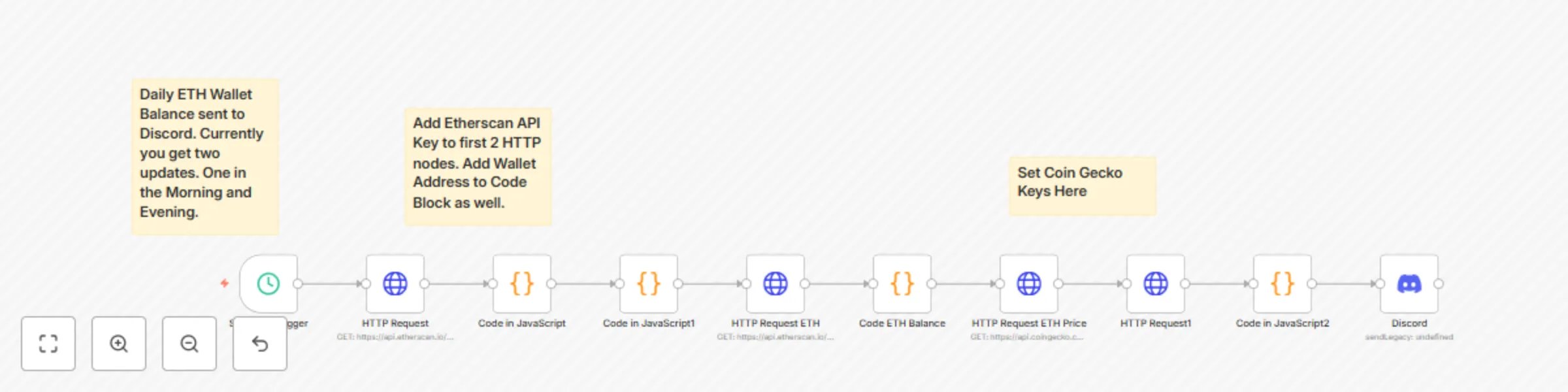
Never miss a snapshot of your (or others) ETH wallet, this workflow polls your wallet on a schedule, fetches balances and current ETH prices, formats a concise summary, and posts it to Discord (or email/Slack/Telegram). Easy to customize to track multiple wallets, tokens, or alert on thresholds.

How it works

  1. Schedule Trigger - Runs on your cadence (default: morning and evening).
  2. Query Blockchain - Calls Etherscan (or another API) to get wallet balances and token holdings.
  3. Process Balances - Calculates totals and converts values using CoinGecko price lookups.
  4. Format Summary - Creates a readable report (holdings, USD value, % change, etc.).
  5. Deliver Alert - Sends the snapshot to Discord (swap in Slack/Telegram/email/webhook as needed).

Quick setup notes

  • Add your Etherscan (or preferred) API key and CoinGecko key where indicated.
  • Set the wallet address(es) in the code node(s) supports one or many.
  • Adjust the schedule, number of snapshots, and message format to suit your needs.

Use cases / variations

  • Single-wallet daily snapshot - Quick morning/evening balances.
  • Multi-wallet portfolio digest - Aggregate several addresses into one report.
  • Token breakdown - Show ERC-20 token amounts and fiat values.
  • Price/threshold alerts - Ping when ETH or a token crosses a set price or % change.
  • On-demand reporting - Trigger via webhook or command to pull a live snapshot.
  • NFT & token inventory - Report owned collections and token counts.
  • Tax / bookkeeping exports - Add CSV output for record-keeping.

Why use this

  • Hands-off monitoring - automated snapshots replace manual checks.
  • Customizable - swap APIs, add wallets, or change channels in minutes.
  • Actionable - get the data you need (holdings, fiat value, alerts) where you already work.

1.2 Logical Blocks

This catalog entry is organized from the workflow JSON. The node-level section below shows the executable blocks available for review before importing the template.

2. Block-by-Block Analysis

Block 1 - Schedule Trigger

Type / Role
n8n-nodes-base.scheduleTrigger - scheduleTrigger
Config choices
Version 1.2

Block 2 - HTTP Request

Type / Role
n8n-nodes-base.httpRequest - httpRequest
Config choices
Version 4.2

Block 3 - Code in JavaScript

Type / Role
n8n-nodes-base.code - code
Config choices
Version 2

Block 4 - Code in JavaScript1

Type / Role
n8n-nodes-base.code - code
Config choices
Version 2

Block 5 - HTTP Request1

Type / Role
n8n-nodes-base.httpRequest - httpRequest
Config choices
Version 4.2

Block 6 - Code in JavaScript2

Type / Role
n8n-nodes-base.code - code
Config choices
Version 2

Block 7 - Discord

Type / Role
n8n-nodes-base.discord - discord
Config choices
Version 2

Block 8 - HTTP Request ETH

Type / Role
n8n-nodes-base.httpRequest - httpRequest
Config choices
Version 4.2

Block 9 - Code ETH Balance

Type / Role
n8n-nodes-base.code - code
Config choices
Version 2

Block 10 - HTTP Request ETH Price

Type / Role
n8n-nodes-base.httpRequest - httpRequest
Config choices
Version 4.2

Block 11 - Sticky Note

Type / Role
n8n-nodes-base.stickyNote - stickyNote
Config choices
Version 1

Block 12 - Sticky Note1

Type / Role
n8n-nodes-base.stickyNote - stickyNote
Config choices
Version 1

Block 13 - Sticky Note2

Type / Role
n8n-nodes-base.stickyNote - stickyNote
Config choices
Version 1

3. Summary Table

Workflow Daily ETH wallet monitoring with Etherscan, CoinGecko pricing & Discord alerts
Complexity intermediate
Nodes 13
Categories Crypto Trading
Author Kaden Reese
Published 26 Sept 2025

4. Reproducing the Workflow from Scratch

  1. 1. Download the workflow JSON

    Use the JSON export at /data/workflows/8992/8992.json as the source template for this automation.

  2. 2. Import the template into n8n

    Open n8n, import the downloaded JSON, and review each node before activating the workflow.

  3. 3. Configure credentials and variables

    Replace placeholder credentials, API keys, webhook URLs, account IDs, and environment-specific values with your own settings.

  4. 4. Test with sample data

    Run the workflow manually or in a staging workspace, inspect node output, and confirm downstream systems receive the expected data.

  5. 5. Activate and monitor

    Enable the workflow only after testing, then monitor executions, errors, and rate limits during the first production runs.

5. General Notes & Resources

Review imported nodes carefully before activation. This catalog entry is intended to help you inspect the workflow structure, understand required services, and find related templates faster.

Node names, credentials, schedules, webhook paths, and external service limits may need adjustment for your workspace.

Frequently asked questions

What does Daily ETH wallet monitoring with Etherscan, CoinGecko pricing & Discord alerts do?

Daily ETH Wallet Balance & Holdings Alerts Never miss a snapshot of your (or others) ETH wallet, this workflow polls your wallet on a schedule, fetches balances and current ETH prices, formats a co...

What do I need before importing this workflow?

Review the workflow JSON, configure any required credentials in n8n, and test the automation in a safe workspace before using it in production.

Can I customize this workflow?

Yes. Use the block-by-block analysis and the downloadable JSON to inspect each node, then adjust credentials, prompts, schedules, filters, or destinations for your Crypto Trading use case.