Block 1 - Daily 8AM Trigger
- Type / Role
- n8n-nodes-base.scheduleTrigger - scheduleTrigger
- Config choices
- Version 1.1


 Early Deal
This workflow is provided as-is. Please review and test before using in production.
Track Daily Fiat & Crypto Exchange Rates Report with ExchangeRate API & CoinGecko A simple, reliable workflow that emails you a beautiful HTML currency report every morning at 8:00 AM (your n8n ...
n8n-nodes-base.scheduletrigger, n8n-nodes-base.stickynote, n8n-nodes-base.httprequest, n8n-nodes-base.code, n8n-nodes-base.emailsend, n8n-nodes-base.merge
This workflow is cataloged by N8N Workflows and links back to its original n8n.io source page by David Olusola.
Original n8n.io sourceA simple, reliable workflow that emails you a beautiful HTML currency report every morning at 8:00 AM (your n8n server’s timezone).
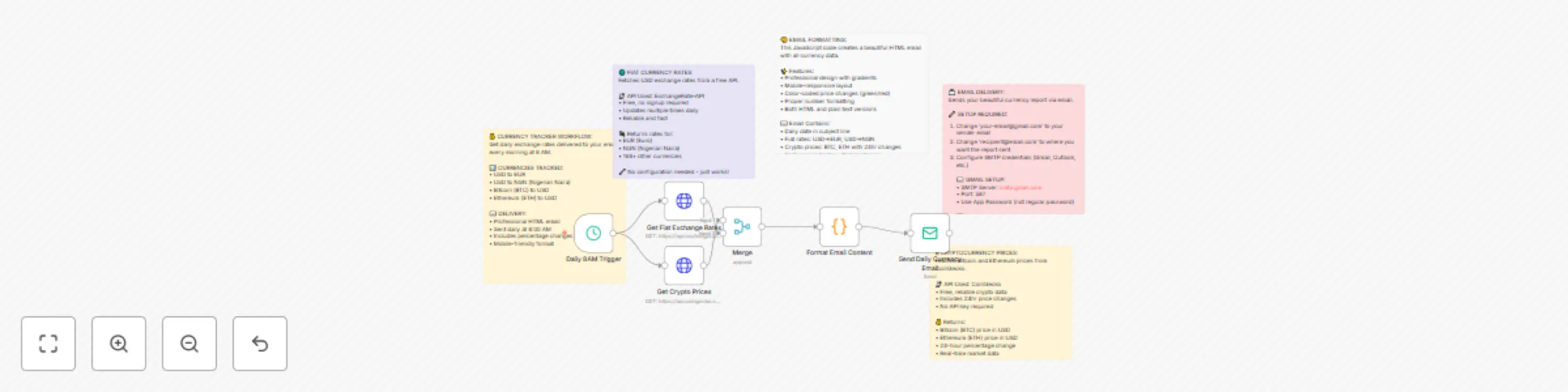
It pulls USD→EUR and USD→NGN fiat rates and BTC/ETH prices (+ 24h % change), then formats a clean HTML email.
| # | Node Name | Type | Purpose |
|---|---|---|---|
| 1 | Daily 8AM Trigger | Schedule Trigger |
Fires every day at 08:00 |
| 2 | Get Fiat Exchange Rates | HTTP Request |
https://api.exchangerate-api.com/v4/latest/USD |
| 3 | Get Crypto Prices | HTTP Request |
CoinGecko simple price endpoint |
| 4 | Merge | Merge |
Combines fiat + crypto responses |
| 5 | Format Email Content | Code (v2) |
Builds HTML + text, sets subject & summary |
| 6 | Send Daily Currency Email | Email Send |
Sends the HTML email via SMTP |
> 📝 Sticky Notes in the canvas explain each section. They’re optional and safe to delete.
0 8 * * * (server local time; if you’re in Lagos, ensure server timezone matches Africa/Lagos or adjust accordingly).[email protected]) smtp.gmail.com 587 (STARTTLS) or 465 (SSL) https://api.exchangerate-api.com/v4/latest/USD https://api.coingecko.com/api/v3/simple/price?ids=bitcoin,ethereum&vs_currencies=usd&include_24hr_change=trueThe Format Email Content node is written to auto-detect which input is fiat vs crypto, so the Merge order doesn’t matter. A clean pattern is:
rates.EUR and rates.NGN exist. usd and usd_24h_change. subject, html, text. rates (e.g., GBP, ZAR) and extend the HTML template. ids= in CoinGecko (e.g., bitcoin,ethereum,solana) and render extra cards. 30 7 * * * for 7:30 AM). This catalog entry is organized from the workflow JSON. The node-level section below shows the executable blocks available for review before importing the template.
| Workflow | Daily currency rates email report with USD→EUR/NGN & BTC/ETH price tracking |
|---|---|
| Complexity | intermediate |
| Nodes | 11 |
| Categories | Crypto Trading |
| Author | David Olusola |
| Published | 08 Sept 2025 |
Use the JSON export at /data/workflows/8380/8380.json as the source template for this automation.
Open n8n, import the downloaded JSON, and review each node before activating the workflow.
Replace placeholder credentials, API keys, webhook URLs, account IDs, and environment-specific values with your own settings.
Run the workflow manually or in a staging workspace, inspect node output, and confirm downstream systems receive the expected data.
Enable the workflow only after testing, then monitor executions, errors, and rate limits during the first production runs.
Review imported nodes carefully before activation. This catalog entry is intended to help you inspect the workflow structure, understand required services, and find related templates faster.
Node names, credentials, schedules, webhook paths, and external service limits may need adjustment for your workspace.
Track Daily Fiat & Crypto Exchange Rates Report with ExchangeRate API & CoinGecko A simple, reliable workflow that emails you a beautiful HTML currency report every morning at 8:00 AM (your n8n ...
Review the workflow JSON, configure any required credentials in n8n, and test the automation in a safe workspace before using it in production.
Yes. Use the block-by-block analysis and the downloadable JSON to inspect each node, then adjust credentials, prompts, schedules, filters, or destinations for your Crypto Trading use case.