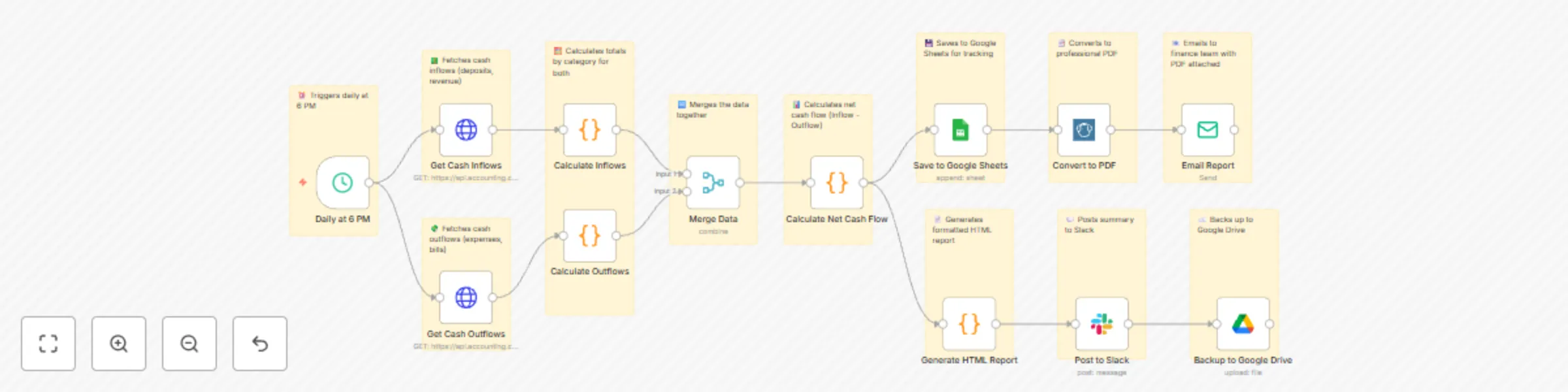
Daily cash flow reports with Google Sheets, Slack & Email for finance teams

Workflow preview

Workflow preview
100%
Daily cash flow reports with Google Sheets, Slack & Email for finance teams preview
Open on n8n.io

Important notice

This workflow is provided as-is. Please review and test before using in production.

1. Workflow Overview

Simplify financial oversight with this automated n8n workflow. Triggered daily, it fetches cash flow and expense data from a Google Sheet, analyzes inflows and outflows, validates records, and gene...

Best for

  • Document Extraction automation workflows
  • advanced n8n builders looking for reusable templates

Tools used

n8n-nodes-base.scheduletrigger, n8n-nodes-base.httprequest, n8n-nodes-base.code, n8n-nodes-base.merge, n8n-nodes-base.googlesheets, n8n-nodes-base.emailsend, n8n-nodes-base.googledrive, n8n-nodes-base.slack

Source and attribution

This workflow is cataloged by N8N Workflows and links back to its original n8n.io source page by Oneclick AI Squad.

Original n8n.io source

1.1 Workflow description

Title
Daily cash flow reports with Google Sheets, Slack & Email for finance teams
Workflow name
Daily cash flow reports with Google Sheets, Slack & Email for finance teams

Simplify financial oversight with this automated n8n workflow. Triggered daily, it fetches cash flow and expense data from a Google Sheet, analyzes inflows and outflows, validates records, and generates a comprehensive daily report. The workflow sends multi-channel notifications via email and Slack, ensuring finance professionals stay updated with real-time financial insights. 💸📧

Key Features

  • Daily automation keeps cash flow tracking current.
  • Analyzes inflows and outflows for actionable insights.
  • Multi-channel alerts enhance team visibility.
  • Logs maintain a detailed record in Google Sheets.

Workflow Process

  • The Every Day node triggers a daily check at a set time.
  • Get Cash Flow Data retrieves financial data from a Google Sheet.
  • Analyze Inflows & Outflows processes the data to identify trends and totals.
  • Validate Records ensures all entries are complete and accurate.
  • If records are valid, it branches to:
    • Sends Email Daily Report to finance team members.
    • Send Slack Alert to notify the team instantly.
  • Logs to Sheet appends the summary data to a Google Sheet for tracking.

Setup Instructions

  • Import the workflow into n8n and configure Google Sheets OAuth2 for data access.
  • Set the daily trigger time (e.g., 9:00 AM IST) in the "Every Day" node.
  • Test the workflow by adding sample cash flow data and verifying reports.
  • Adjust analysis parameters as needed for specific financial metrics.

Prerequisites

  • Google Sheets OAuth2 credentials
  • Gmail API Key for email reports
  • Slack Bot Token (with chat:write permissions)
  • Structured financial data in a Google Sheet

Google Sheet Structure:

  1. Create a sheet with columns:
    • Date
    • Cash Inflow
    • Cash Outflow
    • Category
    • Notes
    • Updated At

Modification Options

  • Customize the "Analyze Inflows & Outflows" node to include custom financial ratios.
  • Adjust the "Validate Records" filter to flag anomalies or missing data.
  • Modify email and Slack templates with branded formatting.
  • Integrate with accounting tools (e.g., Xero) for live data feeds.
  • Set different trigger times to align with your financial review schedule.

Discover more workflows – Get in touch with us

1.2 Logical Blocks

This catalog entry is organized from the workflow JSON. The node-level section below shows the executable blocks available for review before importing the template.

2. Block-by-Block Analysis

Block 1 - Daily at 6 PM

Type / Role
n8n-nodes-base.scheduleTrigger - scheduleTrigger
Config choices
Version 1

Block 2 - Get Cash Inflows

Type / Role
n8n-nodes-base.httpRequest - httpRequest
Config choices
Version 4.1

Block 3 - Get Cash Outflows

Type / Role
n8n-nodes-base.httpRequest - httpRequest
Config choices
Version 4.1

Block 4 - Calculate Inflows

Type / Role
n8n-nodes-base.code - code
Config choices
Version 2

Block 5 - Calculate Outflows

Type / Role
n8n-nodes-base.code - code
Config choices
Version 2

Block 6 - Merge Data

Type / Role
n8n-nodes-base.merge - merge
Config choices
Version 2.1

Block 7 - Calculate Net Cash Flow

Type / Role
n8n-nodes-base.code - code
Config choices
Version 2

Block 8 - Save to Google Sheets

Type / Role
n8n-nodes-base.googleSheets - googleSheets
Config choices
Version 4

Block 9 - Generate HTML Report

Type / Role
n8n-nodes-base.code - code
Config choices
Version 2

Block 10 - Email Report

Type / Role
n8n-nodes-base.emailSend - emailSend
Config choices
Version 2

Block 11 - Backup to Google Drive

Type / Role
n8n-nodes-base.googleDrive - googleDrive
Config choices
Version 3

Block 12 - Post to Slack

Type / Role
n8n-nodes-base.slack - slack
Config choices
Version 2.1

Block 13 - Convert to PDF

Type / Role
n8n-nodes-pdfmonkey.pdfMonkey - pdfMonkey
Config choices
Version 1

Block 14 - Sticky Note1

Type / Role
n8n-nodes-base.stickyNote - stickyNote
Config choices
Version 1

Block 15 - Sticky Note2

Type / Role
n8n-nodes-base.stickyNote - stickyNote
Config choices
Version 1

Block 16 - Sticky Note3

Type / Role
n8n-nodes-base.stickyNote - stickyNote
Config choices
Version 1

Block 17 - Sticky Note4

Type / Role
n8n-nodes-base.stickyNote - stickyNote
Config choices
Version 1

Block 18 - Sticky Note5

Type / Role
n8n-nodes-base.stickyNote - stickyNote
Config choices
Version 1

Block 19 - Sticky Note6

Type / Role
n8n-nodes-base.stickyNote - stickyNote
Config choices
Version 1

Block 20 - Sticky Note7

Type / Role
n8n-nodes-base.stickyNote - stickyNote
Config choices
Version 1

Block 21 - Sticky Note8

Type / Role
n8n-nodes-base.stickyNote - stickyNote
Config choices
Version 1

Block 22 - Sticky Note9

Type / Role
n8n-nodes-base.stickyNote - stickyNote
Config choices
Version 1

Block 23 - Sticky Note10

Type / Role
n8n-nodes-base.stickyNote - stickyNote
Config choices
Version 1

Block 24 - Sticky Note11

Type / Role
n8n-nodes-base.stickyNote - stickyNote
Config choices
Version 1

Showing the first 24 of 25 workflow blocks. Download the JSON for the full node graph.

3. Summary Table

Workflow Daily cash flow reports with Google Sheets, Slack & Email for finance teams
Complexity advanced
Nodes 25
Categories Document Extraction
Author Oneclick AI Squad
Published 24 Oct 2025

4. Reproducing the Workflow from Scratch

  1. 1. Download the workflow JSON

    Use the JSON export at /data/workflows/10109/10109.json as the source template for this automation.

  2. 2. Import the template into n8n

    Open n8n, import the downloaded JSON, and review each node before activating the workflow.

  3. 3. Configure credentials and variables

    Replace placeholder credentials, API keys, webhook URLs, account IDs, and environment-specific values with your own settings.

  4. 4. Test with sample data

    Run the workflow manually or in a staging workspace, inspect node output, and confirm downstream systems receive the expected data.

  5. 5. Activate and monitor

    Enable the workflow only after testing, then monitor executions, errors, and rate limits during the first production runs.

5. General Notes & Resources

Review imported nodes carefully before activation. This catalog entry is intended to help you inspect the workflow structure, understand required services, and find related templates faster.

Node names, credentials, schedules, webhook paths, and external service limits may need adjustment for your workspace.

Frequently asked questions

What does Daily cash flow reports with Google Sheets, Slack & Email for finance teams do?

Simplify financial oversight with this automated n8n workflow. Triggered daily, it fetches cash flow and expense data from a Google Sheet, analyzes inflows and outflows, validates records, and gene...

What do I need before importing this workflow?

Review the workflow JSON, configure any required credentials in n8n, and test the automation in a safe workspace before using it in production.

Can I customize this workflow?

Yes. Use the block-by-block analysis and the downloadable JSON to inspect each node, then adjust credentials, prompts, schedules, filters, or destinations for your Document Extraction use case.