Block 1 - Create Image Card
- Type / Role
- n8n-nodes-base.editImage - editImage
- Config choices
- Version 1


 Early Deal
This workflow is provided as-is. Please review and test before using in production.
Description Start your day with the perfect outfit suggestion tailored to the local weather. This workflow runs automatically every morning, fetches the current weather forecast for your city, and ...
n8n-nodes-base.editimage, n8n-nodes-base.set, @n8n/n8n-nodes-langchain.agent, n8n-nodes-base.openweathermap, n8n-nodes-base.scheduletrigger, @n8n/n8n-nodes-langchain.lmchatopenrouter, n8n-nodes-base.slack, n8n-nodes-base.stickynote
This workflow is cataloged by N8N Workflows and links back to its original n8n.io source page by koichi nagino.
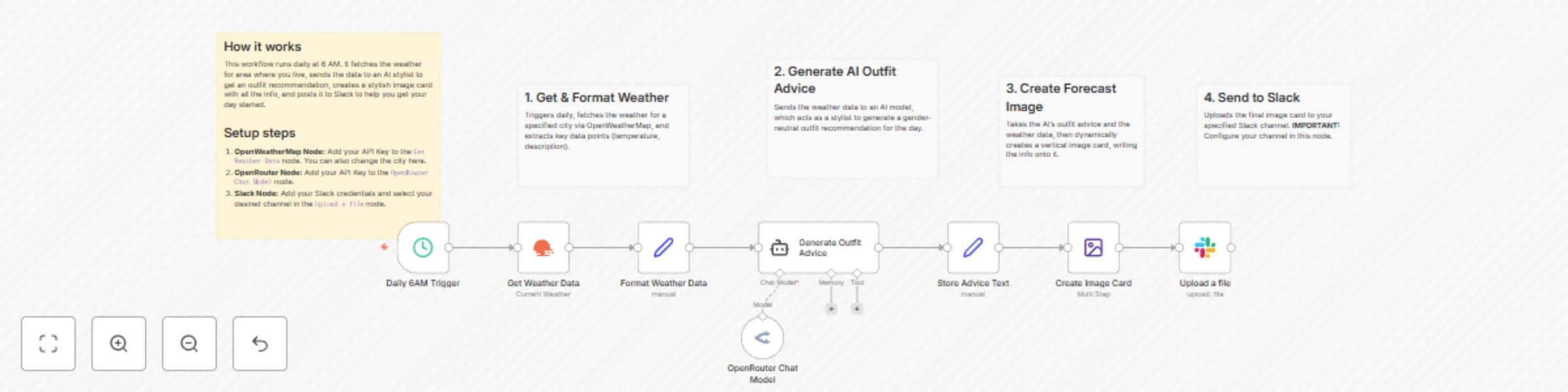
Original n8n.io sourceDescription Start your day with the perfect outfit suggestion tailored to the local weather. This workflow runs automatically every morning, fetches the current weather forecast for your city, and uses an AI stylist to generate a practical, gender-neutral outfit recommendation. It then designs a clean, vertical image card with all the details—date, temperature, weather conditions, and the complete outfit advice—and posts it directly to your Slack channel. It’s like having a personal stylist and weather reporter deliver a daily briefing right where your team communicates. Who’s it for Teams working in a shared office location who want a fun, daily update. Individuals looking to automate their morning routine and take the guesswork out of getting dressed. Community managers wanting to add engaging, automated content to their Slack workspace. Anyone interested in a practical example of combining weather data, AI, and dynamic image generation. How it works / What it does Triggers Daily: The workflow automatically runs every day at 6 AM. Fetches Weather: It gets the current weather forecast for a specified city (default is Tokyo) using the OpenWeatherMap node. Consults AI Stylist: The weather data is sent to an AI model, which acts as a stylist and returns a practical, gender-neutral outfit suggestion. Designs an Image Card: It dynamically creates a vertical image and writes the date, detailed weather info, and the AI's full recommendation onto it. Posts to Slack: Finally, it uploads the completed image card to your designated Slack channel with a friendly morning greeting. Requirements An n8n instance. An OpenWeatherMap API Key. An OpenRouter API Key (or credentials for another compatible AI model). A Slack workspace and the necessary permissions to connect an app. How to set up Set Weather Location: In the Get Weather Data node, add your OpenWeatherMap API Key and change the city name if you wish. Configure AI Model: In the OpenRouter Chat Model node, add your API Key. Configure Slack: In the Upload a file node, add your Slack credentials and, most importantly, select the channel where you want the forecast to be posted. Adjust Schedule (Optional): You can change the trigger time in the Daily 6AM Trigger node. How to customize the workflow Change the AI's Personality: Edit the system message in the Generate Outfit Advice node. You could ask the AI to be a pirate, a 90s fashion icon, or a formal stylist. Customize the Image: In the Create Image Card node, you can change the background color, font sizes, colors, and the layout of the text. Use a Different Platform: Swap the Slack node for a Discord, Telegram, or Email node to send the forecast to your preferred platform.
This catalog entry is organized from the workflow JSON. The node-level section below shows the executable blocks available for review before importing the template.
| Workflow | Daily AI outfit recommendations based on weather forecast to Slack |
|---|---|
| Complexity | intermediate |
| Nodes | 13 |
| Categories | Personal Productivity, Multimodal AI |
| Author | koichi nagino |
| Published | 19 Nov 2025 |
Use the JSON export at /data/workflows/11004/11004.json as the source template for this automation.
Open n8n, import the downloaded JSON, and review each node before activating the workflow.
Replace placeholder credentials, API keys, webhook URLs, account IDs, and environment-specific values with your own settings.
Run the workflow manually or in a staging workspace, inspect node output, and confirm downstream systems receive the expected data.
Enable the workflow only after testing, then monitor executions, errors, and rate limits during the first production runs.
Review imported nodes carefully before activation. This catalog entry is intended to help you inspect the workflow structure, understand required services, and find related templates faster.
Node names, credentials, schedules, webhook paths, and external service limits may need adjustment for your workspace.
Description Start your day with the perfect outfit suggestion tailored to the local weather. This workflow runs automatically every morning, fetches the current weather forecast for your city, and ...
Review the workflow JSON, configure any required credentials in n8n, and test the automation in a safe workspace before using it in production.
Yes. Use the block-by-block analysis and the downloadable JSON to inspect each node, then adjust credentials, prompts, schedules, filters, or destinations for your Personal Productivity, Multimodal AI use case.